Accessories & more
Pen Camera Learn more
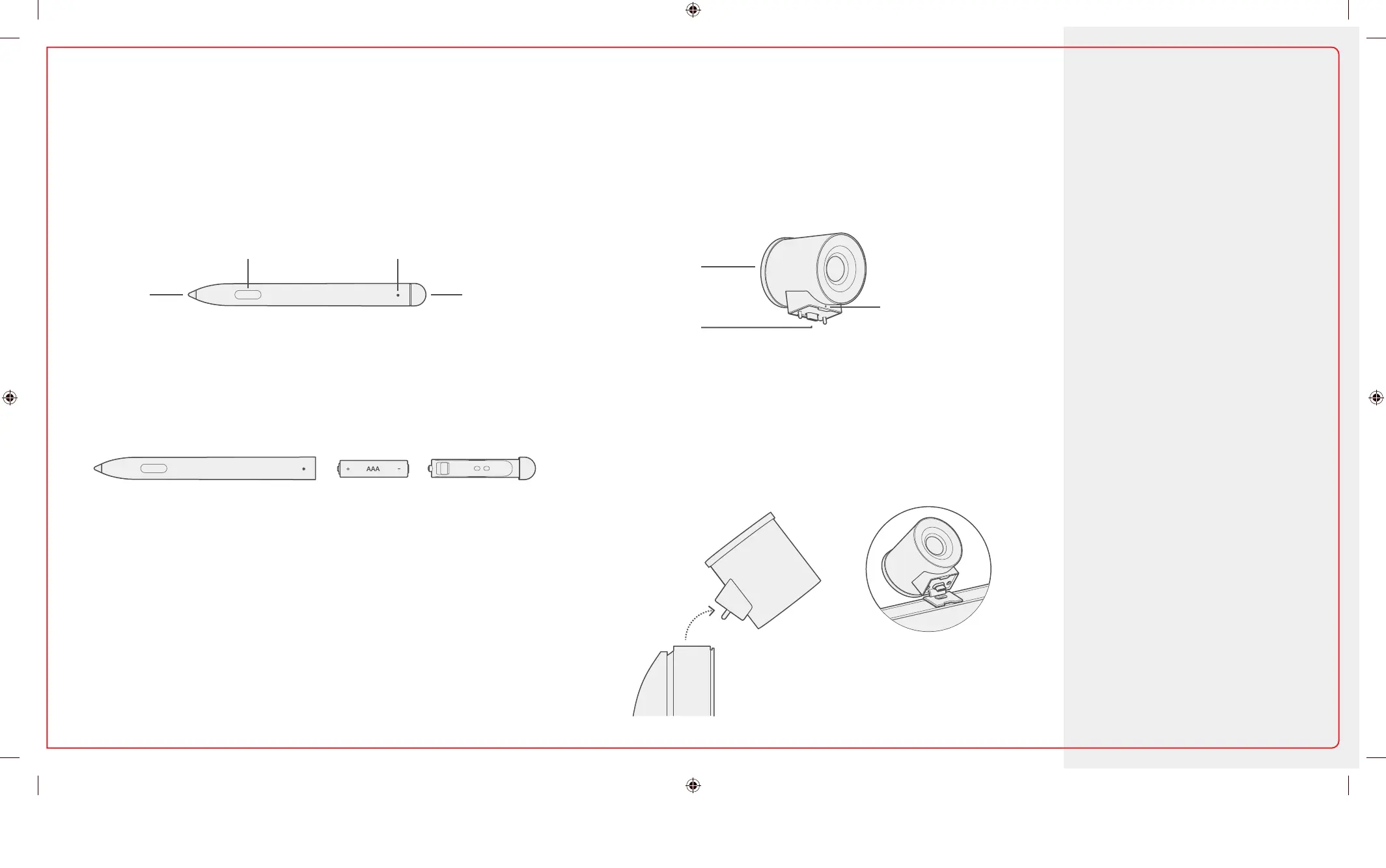
Your pen comes ready to use. Attach the camera to the USB-C port in the middle of the top of
the screen.
To replace the AAA battery, pull off the top button and insert battery
as shown. The indicator light will turn red when the battery is low.
The indicator will light when the camera is in use.
Move the lens cap to the front to protect the lens when the camera
is not in use.
To remove the camera, pull up and forward. There is a magnetic
tether that prevents the camera from being knocked off or pulled
off backwards.
Unboxing and setup
Using Microsoft Whiteboard
Connect and share
Sign-in and access content
And more...
aka.ms/Hub2SResources
For important safety
information, see the Safety &
Regulatory Guide.
Replaceable
pen tip
Eraser and
top button
Lens cover
USB-C plug
Indicator LED
Magnetic tether
Right-click and select button Indicator LED
1-139217.indd 5 06.03.19 04:02


 To Next Page