USING YOUR HEADSET
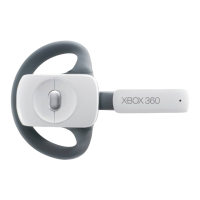
To temporarily turn off voice
transmission, press the mute button
on the headset control. To adjust the
listening volume of the headset, rotate
the volume control knob.
Hearing Loss
Extended exposure to high
volumes when using a headset
may result in temporary or
permanent hearing loss.
ImpoRtANt
Prevent damage to your headset by
not sitting or stepping on the headset,
its cable, or the cable connector.
For more information about using your
Xbox 360 Headset with a particular
game, see your game manual.
TROUBLESHOOTING
If you encounter problems, try the
possible solutions provided below.
Earpiece Emits No Sound
Make sure the headset connector is
p
lugged in securely. Try adjusting
the volume using the volume control
knob on the headset control.
Others Can’t Hear You
Make sure the headset connector is
plugged in securely and that your
headset isn’t muted. Make sure that
voice isn’t muted in the Xbox Guide.
Check your game manual to
determine whether you need to push
a button while speaking.
C
hat Doesn’t Work
Make sure the headset connector is
plugged in securely. Check the mute
button on the headset control to
make sure the microphone is on.



 To Next Page