TROUBLESHOOTING
If you encounter problems, try the
possible solutions provided below.
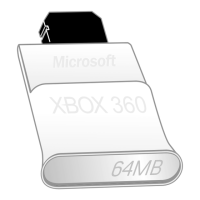
Memory Unit Not a Listed Storage
Device
Make sure the memory unit is fully
inserted into the memory unit slot on the
front of the console. Try the other
memory unit slot to make sure that is not
the problem. If you have a second
memory unit, try it out as well to
determine whether the original memory
unit is faulty.
NOTE
Damaged memory units will not appear
in the Xbox Dashboard and could harm
your Xbox 360 console. Memory units
that have been crushed, immersed in
liquids, or exposed to intense heat may
be damaged beyond use and will not
appear in your list of storage devices.
IF YOU NEED MORE HELP
Please go to www.xbox.com/support or
call Xbox Customer Support:
United States and Canada:
1-800-4MY-XBOX (1-800-469-9269)
TTY users: 1-866-740-XBOX
(1-866-740-9269)
Mexico: 001-866-745-83-12
TTY users: 001-866-251-26-21
Colombia: 01-800-912-1830
Do not take your Xbox 360 console or its
peripherals to your retailer for repair or
service unless instructed to do so by an
Xbox Customer Support representative.
Do Not Attempt Repairs
Do not attempt to take apart, service,
or modify the Xbox 360 console,
power supply, or its peripherals in
any way. Doing so could present the
risk of serious injury or death from
electric shock or fire, and it will void
your warranty.


 To Next Page