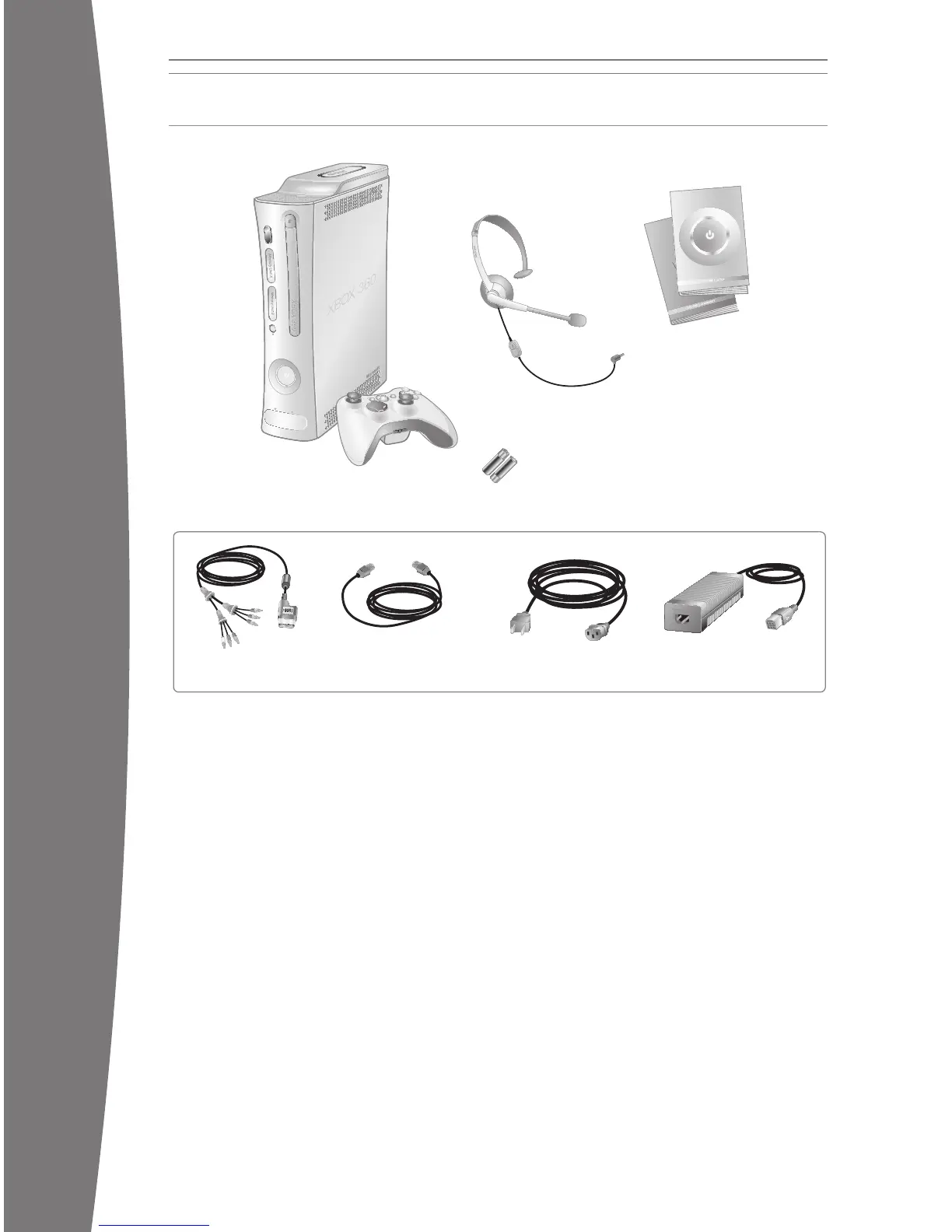
Power Cord Power Supply
Xbox 360 Console
and Wireless Controller
Ethernet Cable
AA Batteries
Component
HD AV Cable
Instruction
Manual (2)
Headset
Removable
Hard Drive
If the Xbox 360 console falls and hits
someone, especially a small child, it could
cause serious injury. To reduce the risk of
such injuries and damage to the Xbox 360
console, set up the Xbox 360 console
according to these instructions. Place the
console on a surface that:
• Is at and level.
• Is stable and not likely to tip over.
• Allows all four feet of the console to
be in contact with the surface.
• Is not likely to allow the console to slip
or slide off.
• Is clean and free of dust and debris.
If the surface or console feet become dirty or
dusty, clean them with a dry cloth. If the
console is positioned vertically, put it on a
surface where it is not likely to fall if it tips
over.
Arran
ge all cables and cords so that people
and pets are not likely to trip over or
accidentally pull on them as they move
around or walk through the area. When the
console is not in use, you may need to
disconnect all cables and cords from the
front and rear of the console to keep them
out of the reach of children and pets. Do not
allow children to play with cables and cords.
Prevent the Console from Overheating
Do not block any ventilation openings on the
console or power supply. Do not place the
console or power supply on a bed, sofa, or
other soft surface that may block ventilation
openings. Do not place the console or power
supply in a conned space, such as a
bookc
ase, rack, or stereo cabinet, unless the
space is well ventilated.
Do not place the console or power supply
near any heat sources, such as radiators, heat
registers, stoves, or ampliers.
Avoid Smoke and Dust
Do not use the console in smoky or dusty
locations. Smoke and dust can damage the
console, particularly the DVD drive.
SELECT A LOCATION FOR YOUR CONSOLE
Prevent the Console from Falling
Thanks for purchasing your Xbox 360™ video
game and entertainment system from
Microsoft. You’re now at the center of a
customizable experience that brings your
games, your friends, and your digital
entertainment together in one powerful
package.
• Th
e Xbox 360 video game and
entertainment system lets you play Xbox
360 games, DVD movies, and audio CDs.
• With high-speed Internet service, connect
to millions of gamers on Xbox LIVE
®
.
Instantly be a part of a community where
you can play together, talk to your friends,
and download new content.
• Stream pictures, music, and more to your
Xbox 360 console by connecting to your
Microsoft
®
Windows
®
-based PC or other
devices such as digital cameras and
portable music players.
• Enjoy music and other content pre-installed
with your Xbox 360 Hard Drive. For more
information about the Xbox 360 Hard Drive,
go to www.xbox.com.
YOUR XBOX 360 VIDEO GAME AND ENTERTAINMENT SYSTEM
X130405002MNL.indb 2 8/10/2007 6:28:09 PM














 To Next Page