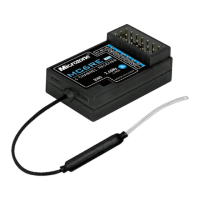
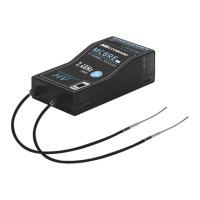
The Microzone MC7RB-V2 is a 2.4GHz FHSS digital proportional R/C system receiver designed for various remote-controlled models. It offers a combination of PWM and SBUS signal outputs, built-in antenna, and several safety features to ensure reliable operation.
Function Description:
The MC7RB-V2 serves as a receiver for Microzone's 2.4GHz FHSS remote control systems. It receives signals from a compatible remote control and translates them into control signals for various components of a model, such as servos and electronic speed controllers. The receiver supports both PWM (Pulse Width Modulation) and SBUS (Serial Bus) output types, providing flexibility for different model setups. It features a built-in antenna for convenience and a touch button for frequency pairing.
Important Technical Specifications:
- Model: MC7RB-V2
- Color: Teal transparent
- Applications: Fixed-wing, Car, Boat, Multi-axis models
- Channel Output: 7 PWM signals, 1 SBUS signal
- Frequency Range: 2401MHz-2478MHz
- Control Range: >800m
- Receiver Supply Voltage: DC: 4.5-6V
- SBUS Signal: Supported
- Frequency Pairing Mode: Contact to frequency (via touch button)
- Recovery Performance: Fast signal recovery
- Runaway Protection Settings: Supported
- Remote Control Support: 6C-MINI, C7-MINI, 8B-MINI, Classic-10
- Antenna Type: Built-in antenna
- Antenna Length: / (integrated)
- Size: 423013 mm
- Weight: 7g
PWM Signal Details:
- High level: 3.3V
- Cycle: 14ms
- Output pulse width (not mixing): 1000-2000us
- Output pulse width (mixing or trimming bias): 880-2120us
SBUS Signal Details:
- High level: 3.3V
- Baud Rate: 100k
- Data Bits: 8 (or 9 bits to be selected in stm32)
- Parity: Even (EVEN)
- Stop Bits: 2
- Frame Start: 0x0F
- Frame End: 0x00
- Total Bytes per Frame: 25
- Frame Data Structure: [0x0F] [data0] [data1] [data2] [data3] ... [data10] [flag] [0x00]
- Channel Data (data1-data22): Corresponding to 16 channels (ch1-ch16), each channel is 11-bit.
- Channel Data Value Range: 200-1800
- SBUS Signal Inversion: Requires hardware level inversion; software inversion is invalid. An inversion circuit diagram is provided in the manual.
Usage Features:
- Power On: Connect positive and negative terminals to the power supply.
- Indicator Description:
- Slow blinking: No signal.
- Always on: Signal reception is normal.
- Fast blinking: Frequency pairing in progress.
- Frequency Pairing:
- Ensure the remote control is turned off.
- Power on the receiver.
- Press the touch button on the receiver. The indicator light will flash quickly, indicating the receiver has entered frequency control mode.
- Turn on the remote control.
- The receiver indicator light will turn on, signifying successful signal reception.
- Fail-safe (Runaway Protection):
- Default Behavior: If the receiver loses signal, it automatically switches to a runaway state. In this state, the receiver outputs 1500us on channels 1, 2, and 4, 900us on channel 3, and other channels remain unchanged.
- Customized Runaway Protection Switching:
- The factory default runaway protection value for channel 3 is 900us, and 1500us for other channels.
- To switch to user-defined runaway protection, long-press the frequency pair button on the receiver for more than 15 seconds. The receiver indicator light will flash, confirming the switch.
- Failsafe Switching (for products after 2023): This feature allows changing the runaway protection value of channel 3 to 1500us.
- How to Operate:
- Turn off the receiver.
- Short-circuit channels 5 and 6 with a wire.
- Power on the receiver.
- After three seconds, remove the wire.
- Restart the receiver.
Maintenance Features:
The manual emphasizes several precautions for safe and reliable operation, which can be considered aspects of maintenance and care:
- Environmental Conditions: Avoid using in harsh weather (evenings, thunderstorms, snow), low energy levels, or snowy/watery places to prevent damage and short-circuits.
- Signal Interference: Be aware of potential signal interference near mobile phone towers, high-voltage power lines, communication antennas, military radar, complex wireless environments, and navigation domains.
- User Condition: Do not operate when tired, uncomfortable, drunk, or under the influence of drugs to prevent injury.
- Line of Sight: Always keep the model product within your line of sight when using the 2.4G system, as obstacles can block the signal.
- Installation and Direction: Ensure correct installation of the remote control and model, and verify that all steering gear actions and controls are in the same direction to prevent damage.
- Control Distance and Battery Voltage: Shorten the control distance appropriately if it becomes too far. Replace the remote control battery as soon as the "POWER" indicator flashes and an alarm sounds, as insufficient voltage can cause signal loss.
- Power-Off Sequence: Always cut off the receiver's power supply before turning off the remote control. Turning off the remote control first may leave the receiver powered on, potentially leading to loss of control or the engine continuing to run.
- Product Compatibility: The remote control and receiver are designed to work in pairs within Microzone's 2.4G wireless transmission system. They are not compatible with products from other companies.
- Safety Guidelines: Always read and follow the instructions carefully to ensure the safety of the operator, others, and equipment.
The MC7RB-V2 is not a toy and is not suitable for children under 12 years of age. Adults should keep the product out of reach of children and exercise caution during operation.

 Need help?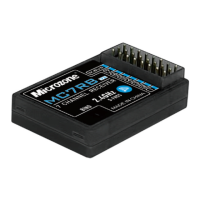

 To Next Page
 General