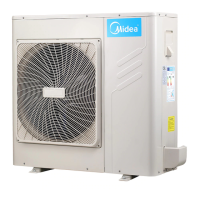
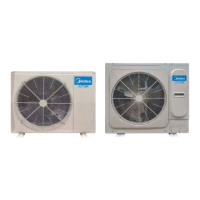
This document is an Owner's Manual for Midea Mini VRF C Series air conditioners, covering models MDV-V80W/DN1(C), MDV-V100W/DN1(C), MDV-V120W/DN1(C), MDV-V140W/DN1(C), and MDV-V160W/DN1(C). It provides essential information for safe operation, maintenance, and troubleshooting.
Function Description
The Midea Mini VRF C Series air conditioner is designed for cooling and heating purposes, utilizing a heat-pump process where heat is absorbed from outdoor air and released indoors during heating. The system consists of an indoor unit (IDU), an outdoor unit (ODU), connecting pipes, and a remote controller. It is intended for use by expert or trained users in shops, light industry, farms, or for commercial use by lay persons.
The outdoor unit features an air inlet, an air outlet, and a refrigerant pipe connector. The main control board of the ODU includes a forced cooling button (SW1 for 8kW models, long-pressed for over 5s; SW1 for 10/12/14/16kW models, pressed once) and a spot check function button (S1 for 8kW, SW2 for 10/12/14/16kW). The forced cooling function sends a signal to all IDUs to initiate cooling, with the outdoor compressor running at a fixed frequency (44 Hz for both 8kW single phase and 10/12/14/16kW single phase models) and the IDU fan operating at high speed. Pressing the button again exits forced cooling.
The spot check function allows the digital tubes on the main control board to display various parameters of the air conditioner, including current frequency, operating mode, fan speed, IDU capacity requirement, ODU capacity requirement, T3 tube temperature, T4 ambient temperature, T5 discharge temperature, TF module temperature, TL refrigerant cooling tube temperature, EXV position, last error/protection code, program version, priority mode, ODU address, model, number of running IDUs, total number of IDUs, T2/T2B average temperature, DC bus voltage, actual voltage value, inverter compressor current, and actual current value.
The system incorporates a three-minute protection feature, preventing immediate restart after operation to protect the air conditioner. During heating operation, the outdoor unit may automatically defrost (2-10 minutes) to increase efficiency, draining water from the unit. Both outdoor and indoor unit fan motors stop during defrosting.
Important Technical Specifications
The manual specifies operation ranges for safe and effective performance:
- Cooling Mode:
- Room temperature: 17°C to 32°C
- Outdoor temperature: -5°C to 55°C
- Heating Mode:
- Room temperature: 0°C to 30°C
- Outdoor temperature: -15°C to 27°C
- Dehumidification Mode:
- Room temperature: 12°C to 32°C
- Outdoor temperature: -5°C to 55°C
The sound pressure level of the unit is below 56 dB(A). The units 8-16kW are partial unit air conditioners, complying with partial unit requirements of IEC 61000-3-12.
The forced cooling frequency for all listed models (8kW single phase and 10/12/14/16kW single phase) is 44 Hz.
Usage Features
- Power-on Preheating: After turning on the power switch, 12 hours of preheating are imperative. The power should not be shut down if the unit is expected to run for 24 hours or less, to warm the crankcase heat box and prevent compulsive condenser startup.
- Airflow Management: Users should ensure that the air inlet and outlet are not blocked, as this can decrease efficiency or trigger the protector.
- Remote Controller: The remote controller allows users to set temperature, fan speed, and operating mode. It is advised to use an insulated stick or gloves when operating switches and push buttons to avoid touching live parts.
- Cooling and Heating Operation: The indoor units in the same system cannot run cooling and heating simultaneously. If conflicting modes are selected, the cooling mode IDUs will stop and display "Standby" or "No Priority," while heating mode IDUs will continue. If the administrator sets a running mode, the air conditioner cannot operate in other modes.
- Heating Warm-up: At the beginning of heating operation, warm air will not be blown out immediately (3-5 minutes, depending on indoor and outdoor temperatures) until the indoor heat exchanger becomes hot.
- Power Cut Handling: In case of a power cut during operation, the unit stops immediately. Upon power restoration, the indoor unit's display panel lamp flashes, and the unit auto-restarts. For mishandling due to lighting or mobile wireless interference, users should shut off the manual power switch, turn it on again, and then press the ON/OFF button.
- Heating Capacity Considerations: Heating capacity decreases as outdoor temperature drops. Supplementary heating equipment is recommended in very cold climates.
- Dehumidification: In humid environments (relative humidity > 80%) during cooling, condensation may form and drip from the IDU. To mitigate this, set the air guide to the maximum air outlet position and fan speed to "High."
Maintenance Features
- Professional Installation and Service: Installation, improvement, repair, and maintenance should only be performed by a qualified dealer or service person to prevent water leakage, electric shock, or fire.
- Regular Cleaning: Before cleaning, stop operation, turn off the breaker, or pull out the supply cord to prevent electric shock and injury.
- Outdoor Unit Window-Shades: Periodic cleaning of the outdoor unit window-shades is necessary to prevent jamming, which can lead to overheating of components and shorten their service life.
- Refrigerant Leakage: In case of refrigerant leakage, contact the dealer immediately. If refrigerant leaks in a small room, ensure its concentration remains below the limit to prevent oxygen depletion. If refrigerant comes into contact with fire from a burner, heater, or cooker, it can produce harmful gases. Turn off combustible heating devices, ventilate the room, and do not use the air conditioner until the leak is repaired.
- Grounding: Ensure the air conditioner is properly grounded to prevent electric shock. The earth wire must not be connected to gas or water pipes, lightning conductors, or telephone earth wires.
- Fuse Replacement: Never replace a fuse with one of the wrong rated current or other wires, as this can cause unit breakdown or fire.
- Internal Parts: Do not touch internal parts of the controller or remove the front panel, as some parts are dangerous to touch and can cause machine trouble.
- Heat Exchanger Fins: Avoid touching the heat exchanger fins, as they are sharp and can cause injuries.
- Air Filter and Heat Exchanger Cleaning: If the indoor or outdoor unit heat exchanger or air filter is dirty, clean them.
- Troubleshooting: The manual provides a comprehensive troubleshooting guide (Tables 7-1 and 7-2) for common issues such as the unit not starting, poor cooling/heating, frequent starts/stops, and remote controller malfunctions. It lists symptoms, probable causes, and solutions. For persistent problems or specific fault codes (e.g., E2, E4, E5, E6, E9, Eb, EF, EH, EP, F1, H0, HF, H4, H7, L0, L1, L2, L4, L5, L7, L8, L9, PL, P1, P2, P3, P4, P5, P8, PE), users are advised to contact the distributor or Midea's customer service center with product model and fault details.
- Display Function Instruction: The LED display shows the number of online indoor units in standby mode, compressor frequency during operation, and "dF" during defrost.



 To Next Page
 General