EasyManua.ls Logo

Midea MES30S2AST - User Manual

Midea MES30S2AST
54 pages
Print Icon
To Next Page IconTo Next Page
Loading...
WiFi Connectivity with Smart
Device App
5-Element Glass Ceramic
Cooktop
6.3 Cubic Feet Total Oven
Capacity
Glass Touch Controls
"Built In" Appearance
version A - 3 - 2020
MODEL NUMBERS
MES30S2AST
MES30S4AST
www.midea.com
en
Note:
Before using this product, please
read this manual carefully and
keep it for future reference.
Contact Midea Customer Service
at 1-866-646-4332 or visit
assistance.
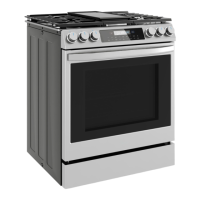
(Pictures are for reference only and may not
accurately represent all models covered by this manual.)
USER’S MANUAL
30" Slide-In Electric Range
midea.com/us/support for

Other manuals for Midea MES30S2AST

Questions and Answers

  • J
    Jason GuerraSep 23, 2025
    What to do if Midea MES30S2AST cooktop is pitted?
    • E
      Ethan ThompsonSep 23, 2025
      If a sugary spill has occurred on the hot glass of your Midea Ranges cooktop and it is pitted, this cannot be repaired. Service must be called to replace the cooktop glass.
  • S
    Sean ThomasAug 23, 2025
    What to do if my Midea MES30S2AST Ranges food is overcooked?
    • A
      Amy ScottAug 23, 2025
      To reduce overcooking in your Midea Ranges oven, adjust the oven calibration downwards.
  • J
    Jennifer RichardsonAug 25, 2025
    Why is my Midea Ranges oven door locked?
    • J
      jonesmatthewAug 26, 2025
      If the self-clean cycle on your Midea Ranges oven recently finished, this is normal. You should wait for the oven to cool fully, and it will unlock automatically.
  • U
    ugonzalezAug 27, 2025
    What to do if my Midea Ranges cooktop will not operate?
    • R
      Regina CaldwellAug 27, 2025
      Check that the circuit breaker or fuse for your Midea Ranges cooktop has not tripped and that the cord is properly plugged in.
  • C
    castroscottAug 27, 2025
    How to fix Midea MES30S2AST Ranges cooktop glass scratched?
    • J
      Julia SandersAug 27, 2025
      Scratches on the Midea Ranges cooktop glass cannot be removed. To prevent further scratching: * Avoid incorrect cleaning methods. * Ensure cookware is flat-bottomed, smooth and clean. * Avoid sliding cookware across the cooktop.
  • B
    Bradley SmithSep 18, 2025
    Why does my Midea MES30S2AST Ranges cooktop heating element not glow when power level is reduced?
    • M
      Melvin EnglishSep 18, 2025
      It is normal for the Midea Ranges cooktop heating element to begin cycling again once the heating element has cooled slightly.
  • M
    Michael BarreraSep 15, 2025
    How to fix Midea Ranges cooktop is discolored?
    • M
      mcphersonjeffreySep 15, 2025
      If your Midea Ranges cooktop is discolored, see the section in this manual on care and cleaning of the cooktop.
  • M
    Mathew AndersonSep 16, 2025
    Why does my Midea Ranges cooktop heating element not glow steadily?
    • D
      Daniel TaylorSep 16, 2025
      It is normal for the Midea Ranges cooktop heating element to cycle off and on to maintain the power level selected at the knob.
  • C
    Chad SmithSep 6, 2025
    Why is my Midea MES30S2AST Ranges control dark and will not respond?
    • M
      Matthew MartinezSep 6, 2025
      If the control panel display on your Midea Ranges shows only ']' or '] [', the control is in Sabbath Mode.
  • C
    Christopher HicksSep 3, 2025
    Why is my Midea Ranges oven not starting self-clean?
    • P
      Peggy DavisSep 4, 2025
      If your Midea Ranges oven was in use recently, this is normal. The self-clean cycle can only be started when the oven has cooled sufficiently.

Summary

Safety Instructions

Safety Definitions and Symbols

Explains hazard symbols (Warning, Caution, Notice, Note) and general safety guidelines for appliance use.

Tip Over Hazard Prevention

Details the risk of range tipping and the importance of installing and engaging the anti-tip device correctly.

Installation and General Usage Safety

Covers safe installation practices and general usage precautions to prevent accidents and damage.

Cooktop and Oven Hazards

Highlights specific dangers related to cooktop fires, burns, electric shock, and oven operation.

Self-Clean Hazards and FCC Notice

Addresses risks associated with self-cleaning cycles and provides FCC compliance information.

Preparing for First Use

Range Overview and Controls

Identifies all components of the range and provides an overview of the user interface and control panel.

WiFi Connection Setup

Step-by-step guide to connect the oven to the MSmartLife app for smart device control.

Setting the Clock and Initial Prep

Instructions for setting the oven's clock and preparing the range for its first use.

Cooktop Operation

Cooktop Safety Precautions

Essential warnings regarding fire, burns, electric shock, and preventing damage to the cooktop.

Understanding Cooking Elements

Describes the different elements, their placement, and the importance of matching pan size to element size.

Using Cooktop Controls and Indicators

Explains how to operate cooking elements, interpret indicators, and control warming elements.

Oven Operation

Oven Safety and Rack Placement

Key safety warnings for oven use and guidance on selecting appropriate rack positions for cooking.

Baking and Roasting Modes

Detailed instructions for using Bake, Convection Bake, Convection Roast, and Pizza cooking modes.

Special Oven Functions

Guidance on using Broil, Keep Warm, Proof, Delay Start, Cook Time, and Food Probe features.

Advanced Modes and Cleaning

Information on Sabbath Mode, Steam Clean, and Self Clean operations for specialized use and maintenance.

Connectivity and Utilities

Instructions for WiFi remote operation, using the timer, and controlling the oven light.

Control Settings

Navigating Settings and Calibration

How to access the settings menu, adjust oven calibration, and set the clock.

Customizing Display and Modes

Adjusting display brightness, volume, units, Hold After Cook, Sabbath, and Demo modes.

Cleaning and Maintenance

Glass Cooktop Cleaning Procedures

Safe and effective methods for cleaning the glass cooktop based on soiling type.

Control Panel and Oven Interior Care

Guidelines for cleaning the control panel and interior surfaces, including caution for electrical hazards.

Door, Drawer, and Light Maintenance

Instructions for cleaning the oven door, drawer, and replacing oven lights.

Troubleshooting

Cooktop Issue Resolution

Addresses common cooktop problems like connectivity, heating issues, and glass damage.

Oven Performance and Control Issues

Solutions for oven operation problems, cooking inconsistencies, and control responsiveness.

Self-Clean and Error Code Guidance

Troubleshooting for self-clean cycle malfunctions, unusual noises, and interpreting error codes.

Warranty Information

Service and Support Contact

How to contact Midea customer service and what information to have ready for warranty claims.

Warranty Coverage and Exclusions

Details on what is covered by the limited warranty and what items or conditions are excluded.

Warranty Limitations and Disclaimers

Explains limitations on implied warranties and exclusion of incidental or consequential damages.

Midea MES30S2AST Specifications

General IconGeneral
TypeFreestanding
Cooktop SurfaceStainless Steel
Number of Burners5
Self-CleaningYes
ColorStainless Steel
Range TypeElectric
ConvectionYes
Burner TypesRadiant
Oven TypeElectric
Oven WindowYes
Oven LightYes
Power SourceElectric
Voltage240 V
Width29.88 inches
Oven CleaningSelf Clean

Related product manuals