Need help?
Do you have a question about the Midea MK-17S30B2-E5 and is the answer not in the manual?
This document describes the Midea Electric Kettle, model MK-17S30B2-E5, providing instructions for its operation, function, and maintenance.
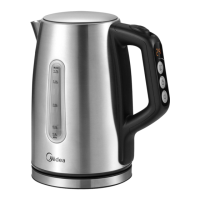
The Midea Electric Kettle is designed for convenience and enjoyment in your daily life. It offers rapid boiling, saving time and energy. A removable filter helps keep the water clean. The kettle features Strix control, which automatically switches off the appliance after boiling, and includes boil-dry protection to prevent damage if operated without water. Its 360-degree rotational power base allows for easy placement and lifting. An easy-to-read water gauge helps monitor water levels, and a high-quality thermostat ensures reliable performance.
The kettle's operation begins when it is placed on its base. The display screen illuminates for 1 second, accompanied by a long beep, then shows the current water temperature, entering standby mode.
One-button boiling: From standby or when displaying the actual water temperature (without a specific temperature set), pressing the "Start" button initiates boiling to 100°C, after which the kettle returns to standby. During boiling, the digital display shows the real-time water temperature, indicator light 1 is on, and the power lamp remains illuminated.
Fixed temperature boiling water: To set a specific boiling temperature, use the "Setting" key to cycle through options (70-80-90-100-40-60°C). Once a temperature is selected, indicator light 1 turns on. From standby or the temperature setting state (displaying the set temperature), pressing "Start" will boil the water to the chosen temperature, then the kettle enters standby. The digital display shows real-time water temperature, light 1 is on, and the power lamp is always on during this process.
Heat preservation mode 1: This mode allows the kettle to maintain a set temperature after boiling. To activate, set the desired temperature (70-80-90-100-40-60°C in sequence). If heat preservation is set first, the mode is maintained while setting the temperature, and dots above the digital display indicate this. Press the "Keep Warm" button once to select this mode (the 100°C heat preservation option is invalid in this mode), and indicator lights 1 and 2 will illuminate. From standby or the temperature setting state (displaying the set temperature), press "Start" to boil water. Once the target temperature is reached, the kettle enters heat preservation mode, and the buzzer sounds three times. During heat preservation, the set temperature is maintained within a specific range (1.0L-1.7L, +3/-3°C; 1.0L-0.5L excluding 1.0, +5/-5°C). After 60 +2/-2 minutes, the kettle will shut down. Temperature control and thermal insulation keys can be operated in any sequence.
Heat preservation mode 2: Similar to mode 1, this mode also allows temperature setting (70-80-90-100-40-60°C in sequence). If heat preservation is set first, the mode is maintained while setting the temperature, with dots displayed above the digital tube. Press the "Keep Warm" button twice to select this mode (the 100°C heat preservation option is invalid), and indicator lights 1, 2, and 3 will illuminate. After boiling water to 100°C, the kettle waits for the water to cool to the set temperature before entering heat preservation.
For first-time use or after a long period of inactivity, it is recommended to fill the kettle to the maximum level with fresh tap water, boil it, and empty it at least twice to clear any tiny particles. This water should not be consumed.
To prolong the kettle's life, regularly clean mineral deposits. Always unplug the kettle and allow it to cool before cleaning. Do not use chemical, steel wool, or abrasive cleaners on the exterior, as these can scratch the surface and fade the color.
The appliance should not be disposed of with regular household waste. At the end of its service life, it must be delivered to a collection point for the recycling of electrical and electronic equipment. This contributes to the conservation of natural resources and environmentally sound disposal.
 General
| Model | MK-17S30B2-E5 |
|---|---|
| Power | 1850-2200W |
| Capacity | 1.7L |
| Material | Stainless Steel |
| Heating Element | Concealed |
| Safety Features | Boil-dry Protection, Auto Shut-off |
| Voltage | 220-240V |
| Frequency | 50/60Hz |
| Auto Shut-off | Yes |
| Boil-dry Protection | Yes |

 To Next Page