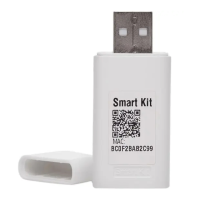
This document is a user manual for a WLAN Kit designed for Smart Split AC units, branded Midea Wi-Fi CMI. It provides instructions for installation, user registration, app operation, and various smart features.
Function Description
The WLAN Kit enables smart control of Midea Split AC units via a mobile application. Users can register their AC units, configure network settings, and operate the air conditioner remotely through their smartphone. The app offers a comprehensive control interface, including basic functions like ON/OFF, mode selection (AUTO, COLD, DRY, FAN), fan speed adjustment (Auto, High, Med, Low), and temperature setting (17~30 °C).
Beyond basic control, the system includes advanced features such as:
- Timer ON/OFF Set: Allows scheduling the AC to turn on or off at specific times, with intervals from 0.5 to 24 hours.
- Special Functions: Includes controls for vertical louvers swing, horizontal louvers swing, display light (LIGHT), HEALTH Mode (ionizer function), and SLEEP mode. A Turbo mode is also available for cool running. Note that some of these functions may be model-specific.
- Energy Consumption Monitoring: Provides a "Bar Graph" option to monitor daily, monthly, and yearly energy consumption, displaying electrical quantity in KW.h.
- Profile Settings: Users can manage their profile, including changing profile photos, nicknames, and time zones.
- Account and Security: Offers options to create gesture unlock patterns, delete accounts, and change login passwords.
- Device Sharing: Allows users to share control of their AC unit with other registered users of the app.
- Feedback and Support: Includes an FAQ section and a mechanism to report issues or provide feedback.
- Complaint Registration: In case of an error with the AC unit, the app displays an error code and provides contact information (toll-free number and email) for registering a complaint.
- Scenes Creation (Automation): Users can create custom "Tap-to-Run" scenes to automate tasks based on conditions like weather changes, schedules, or device status changes. These scenes can trigger specific AC functions.
- Voice Assistant Integration: The system supports integration with popular voice assistants:
- Alexa Skills: Users can link their Midea-Wi-Fi-CMI account to Alexa to control their AC units using voice commands.
- Google Assistant Skills: Similar to Alexa, the app can be linked to Google Assistant for voice control.
- Siri Skills: For iOS users, created scenes can be added to Siri, allowing activation of these scenes via Siri voice commands.
Important Technical Specifications
- Module: WBR1
- Standard: IEEE 802.11 b/g/n 20
- Antenna Type: PCB antenna
- Frequency: Only supports WLAN 2.4 GHz
- Maximum Transmitted Power: 20 dBm
- Operation Temperature: -20°C to +85°C
- Operation Humidity: 10% ~ 85%
- Applicable System: iOS (8.0 or later recommended), Android (4.4 or later recommended). Compatibility may vary, and users are advised to check the service website for applicable devices.
- WLAN Home Router: Must remain powered on and have internet connectivity for remote app operation.
- SMART KIT Wireless Safety Strategy: Supports WPA-PSK/WPA2-PSK encryption and none encryption. WPA-PSK/WPA2-PSK encryption is recommended for security.
- Smart Phone Camera: A camera with 5 million pixels or above is recommended for scanning QR codes effectively.
- Bluetooth Range (for initial setup/hotspot unavailable): Up to 10 meters for optimum operation.
Usage Features
- User-Friendly APP Interface: The Midea-Wi-Fi-CMI app provides an intuitive interface for managing and controlling AC units.
- Remote Control: Operate the air conditioner from anywhere with an internet connection.
- Network Configuration: Clear steps are provided for connecting the smart kit to the WLAN router and adding the device to the user's account. The process involves setting the AC to "SA Mode" (WLAN network setting mode) by pressing the 'Sleep' button on the remote 4 times continuously within 6 seconds or holding the 'Wi-Fi opt' button for 5 seconds.
- Multi-Device Management: Users can see a list of their smart devices on the Home page and access individual control pages.
- Personalization: Customize profile information and security settings.
- Automation: Create custom scenes for automated operation based on various triggers.
- Voice Control: Seamless integration with Alexa, Google Assistant, and Siri for hands-free operation.
- Troubleshooting Guidance: The manual addresses potential network issues, such as request time-outs and "offline" device status, providing advice like refreshing the device list or restarting the AC.
Maintenance Features
- Self-Diagnosis (Error Codes): The app displays error icons (e.g., "F2" for outdoor heat exchanger temperature sensor issues) and provides feasible solutions, along with contact details for support.
- Firmware Upgrades: The FAQ section addresses what to do if a firmware upgrade fails.
- Network Diagnosis: A feature within the app to diagnose network connectivity issues.
- Clear Cache: An option to clear the app's cache, which can help resolve performance issues.
- Regular Updates: The manual notes that the APP user interface may update without notice, implying ongoing improvements and maintenance.
- Support Contact: Users are advised to contact the original provider for further help with issues related to internet, WLAN Home Router, or smart mobile problems, as Midea is not liable for these.

 Need help?
 General

 To Next Page