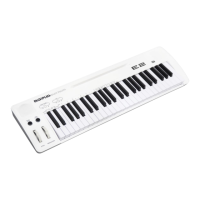
The MIDIPLUS EASY PIANO E2 is a MIDI keyboard controller designed for musicians and enthusiasts seeking a versatile and portable instrument with integrated sound capabilities. This owner's manual provides a comprehensive overview of its features, functions, and basic operation, ensuring users can quickly get started and maximize their creative potential.
Function Description
At its core, the EASY PIANO E2 functions as a 49-key velocity-sensitive piano-style keyboard, offering a responsive playing experience. It boasts a built-in sound engine with 128 General MIDI (GM) Level 1 standard instruments, allowing users to play a wide array of sounds directly from the keyboard without needing external software or modules. The instrument supports 16 multi-timbre reception, making it suitable for complex MIDI arrangements.
Beyond its internal sound capabilities, the EASY PIANO E2 also serves as a MIDI controller. It features MIDI IN and MIDI OUT jacks, enabling seamless integration with other MIDI devices such as sound modules, synthesizers, and drum machines. A USB port further enhances its connectivity, allowing the keyboard to connect directly to a computer for both power and MIDI message transmission to a sound card or Digital Audio Workstation (DAW).
The keyboard includes essential performance controls such as a Pitch Bend wheel and a Modulation wheel. The Pitch Bend wheel is used to raise or lower the pitch of a voice during performance, with the range of pitch values depending on the connected sound generator. The Modulation wheel is commonly used to change the intensity of effects like vibrato (pitch change), tremolo (volume change), and modulation (tone change), producing expressive vibrato effects that are particularly effective for voices like saxophone strings and oboe.
For added expressiveness, the EASY PIANO E2 features a SUSTAIN SWITCH jack, allowing users to connect an optional sustain footswitch. This enables the sustain effect, mimicking the sustain pedal on an acoustic piano, which is crucial for many piano and keyboard performances.
Usage Features
The EASY PIANO E2 is designed for ease of use, featuring intuitive controls on both its front and rear panels.
Front Panel Controls:
- OCTAVE & PROGRAM Touch Buttons (Up & Down): These touch-sensitive buttons serve a dual purpose. When the SELECT/ENTER function is off (red light off), they control the octave range of the keyboard, allowing users to shift the active keyboard range higher or lower by one octave at a time. Pressing both buttons simultaneously resets the octave value to "0." When the SELECT/ENTER function is on (red light on), these buttons function as PROGRAM controls, enabling users to change the built-in sounds of the EASY PIANO E2. Pressing both buttons simultaneously resets the sound to "1" (Grand Piano).
- VOLUME & DEMO Touch Buttons (Up & Down): Similar to the OCTAVE & PROGRAM buttons, these also have dual functionality. With SELECT/ENTER off, they adjust the master volume of the instrument, with simultaneous presses resetting the volume to a preset value. With SELECT/ENTER on, they control the DEMO play function, allowing users to increment or decrement through the demo songs. Pressing both simultaneously resets the demo play to a preset.
- SELECT/ENTER Button: This crucial button toggles the selection function on and off. When pressed, its red light illuminates, indicating that the PROGRAM and DEMO buttons are active. Pressing it again turns the light off, activating the OCTAVE and VOLUME functions.
- DEMO PLAY/STOP Button: This button initiates and stops the playback of demo music. When demo music is playing, the red light on this button illuminates.
- Quickly Function: This feature allows for rapid adjustments to various parameters without needing to turn off the selection function. Once SELECT/ENTER is pressed (red light on), users can access:
- Quickly Sound: By pressing specific keys on the keyboard (e.g., ), users can quickly change the sound.
- Quickly Transpose: Specific keys (<Gb...~C~...Gb>) allow for quick transposition of notes.
- Quickly Velocity Curve: Keys like <LIGHT~HEAVY> enable adjustment of the keyboard's velocity curve, offering different response sensitivities.
- Quickly Reverb: Keys <OFF~ON> toggle the reverb effect on or off.
- Quickly Demo Mode: Keys <ALL~ONCE> change the demo play mode:
- ALL: Plays all demo songs sequentially and loops.
- RE-ONE: Repeats the current demo song after it finishes.
- ONCE: Plays the current demo song once and then stops.
- Quickly Save: This combination allows users to save their current settings, which will be recalled upon the next power-on.
- PITCH Wheel: Used for real-time pitch bending effects.
- MODULATION Wheel: Used for real-time modulation effects, such as vibrato.
Rear Panel Connections:
- PHONE Jack: A 1/4" TRS stereo headphone output, providing the same audio signal as the main outputs for private listening.
- AUX OUT Jack: Allows connection to external speakers or an amplifier.
- SUSTAIN SWITCH Jack: For connecting an optional sustain footswitch.
- MIDI IN Jack: Receives MIDI messages from external devices.
- MIDI OUT Jack: Sends MIDI messages to external devices.
- USB Port: Connects to a computer for power and MIDI communication.
- Power Switch (USB POWER /BATTERY or DC 9V): Controls the power to the unit, allowing selection between USB power, battery power, or an external DC 9V adapter.
- DC IN 9V Jack: For connecting an external 9V DC power adapter.
Power Options:
The EASY PIANO E2 offers flexible power options, making it suitable for various environments:
- External 9V DC Power (option): For continuous use with a dedicated power adapter.
- USB Power: Can be powered directly via a USB connection to a computer or a USB power adapter.
- 6 AA Type Batteries (not included): Provides portability for on-the-go performances or practice sessions.
Maintenance Features
The manual emphasizes the importance of proper care and handling to ensure the longevity and optimal performance of the EASY PIANO E2.
- Reset Function: If users wish to restore the keyboard to its factory default parameters, a "Reset" function is available. This is achieved by holding down both the SELECT/ENTER button and the DEMO PLAY/STOP button simultaneously before powering on the EASY PIANO E2. This feature is useful for troubleshooting or returning to a known good state.
- Power Supply Recommendations: For the DC 9V jack, it is crucial to "Use only a genuine external 9V DC adaptor with the same voltage rating as the power supply in your area to prevent damage to internal components." This highlights the importance of using compatible power sources to protect the device's internal circuitry.
- Sustain Pedal Connection Note: The manual advises, "Power switch is off then plug the pedal," when connecting the sustain footswitch. This is a standard safety and operational guideline to prevent potential issues or damage during connection.
- General Care: While not explicitly detailed as "maintenance features," the introductory "Preface" implicitly encourages good maintenance practices by stating, "Please read carefully before proceeding, keep this manual in a safe place for future reference." This suggests that understanding the device's operation and following guidelines will contribute to its overall upkeep. The non-sensitive touch buttons also imply a design that might be less prone to wear and tear compared to physical buttons with moving parts, potentially reducing maintenance needs for those controls.
In summary, the MIDIPLUS EASY PIANO E2 is a user-friendly and versatile MIDI keyboard controller with integrated sounds, designed for both beginners and experienced musicians. Its intuitive controls, flexible power options, and essential performance features make it a practical choice for practice, performance, and music production. Proper adherence to the provided usage and power guidelines will ensure its reliable operation and extended lifespan.

 Need help?
 General

 To Next Page