5. How to use the PianoBox Pro
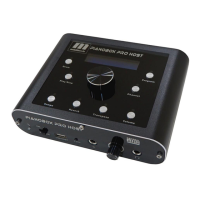
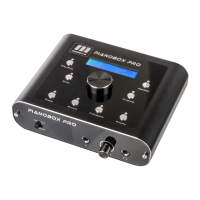
The basic buttons of the PianoBox Pro are the Drum , Program buttons
and Play/Stop button. The Drum, Program buttons switches between the
basic modes: Drum box and Program module. In Drum mode, the display
shows a “Drum”, in Program mode, a “Sound”. After this you can switch
between the program or drum patterns with the encoder turn right +1and
turn left -1.
The Play/Stop button plays the drum patterns of the PianoBox Pro . Press
button PLAY to start playing style, display ”PLAY”; press the same
button for STOP, display ”STOP”.
You can switch between the sound bank by the “GM/EMU” button. Press
the button , then the display shows “GM” for 8030 GM sound bank ,
“EMU-8030” for 8030 EMU sound bank.
To choose the value of the reverb, press “Reverb” button with the
encoder turn right +1and turn left -1 , display “Drum Rev” or “Sound
Rev” .
Possible values are between 0 and 127.
To choose the value of the drum patterns tempo, press “Tempo” button
with the encoder turn right +1and turn left -1 , display “Drum Tempo” .
Possible values are between 0 and 127.
To adjust the volume level of the PianoBox Pro , please press “Volume”
button with the encoder turn right +1and turn left -1, display “Main
Volume”.
The “Transpose” button to adjust midi notes of the keyboard from
PianoBox Pro's MIDI IN port. With the encoder turn right +1and turn left
-1, display “Transpose”. Possible values are between -12 and +12
Hidden functions:
“Save all state” – by pressing the Drum button 3 seconds
“Reset all state” – by pressing the Program button 3 seconds



 To Next Page