EasyManua.ls Logo

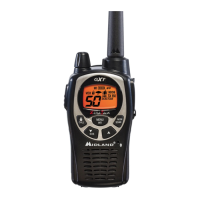
Midland GXT850 Series - User Manual

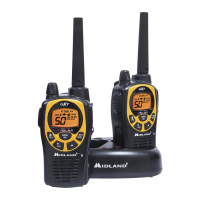
Midland GXT850 Series
28 pages
Print Icon
To Next Page IconTo Next Page
Loading...
GXT800/850 Series
GMRS/FRS Radio
X-TRA TALK
®
OWNER'S MANUAL
www.midlandradio.com

Questions and Answers

  • Y
    youngmorganJul 30, 2025
    What to do if my Midland GXT850 cannot receive messages?
    • C
      christopher59Jul 30, 2025
      If your Midland Two-Way Radio isn't receiving messages, ensure that all radios are set to the same channel and Privacy Code. Also, confirm that you are within the communication range of the other radios. Be aware that buildings and other structures can interfere with radio communication.
  • E
    Emily SullivanAug 12, 2025
    How to fix Midland GXT850 with no power?
    • C
      Cole JohnsonAug 12, 2025
      If your Midland Two-Way Radio has no power, check the battery installation or replace the batteries.

Summary

FCC License Requirements and RF Exposure

Important Notice: FCC License Required for GMRS Operation

Highlights the necessity of an FCC license for GMRS channels and potential penalties for unlicensed use.

Exposure To Radio Frequency Energy

Details national and international standards for radio frequency electromagnetic energy exposure compliance.

Battery and Belt Clip Installation

Battery Installation

Step-by-step guide for installing AA batteries or optional rechargeable battery packs.

Operating Your Radio

Transmitting and Receiving a Call

Guidance on how to transmit voice and receive calls using the PTT button and microphone.

Radio Functions: Monitor, Scan, and Call Alert

Advanced Radio Features

Using the Radio in Group Mode

Enables 'direct calls' within a group without alerting others; requires specific group mode settings.

Group Mode Settings

Direct Call and Ring Tone Configuration

Making a Direct Call

How to make private calls to specific individuals or the entire group.

Standard Mode and Privacy Codes

Transmit Power and VOX Settings

Transmit (TX) Power Level Selection

How to adjust transmit power (Hi/Mid/Lo) on GMRS channels; FRS channels are low power only.

Alerts and NOAA Weather Functions

NOAA Weather Radio

Enables reception of weather reports from designated NOAA stations on dedicated WX channels.

NOAA Weather Alert

Automatically receives weather alerts from NOAA stations, indicated by beeps and icons.

Troubleshooting and Maintenance

Troubleshooting Guide

Provides solutions for common problems such as no power, no reception, and display issues.

Specifications and Charts

Specifications

Details technical specifications including channel counts, operating frequencies, and power sources.

Limited Warranty Information

Limited Warranty

Information on the warranty coverage, duration, and service contact details for the transceiver and accessories.

Midland GXT850 Series Specifications

General IconGeneral
NOAA Weather AlertYes
SOS SirenYes
Vibrate AlertYes
Direct CallYes
Channel ScanYes
Backlit DisplayYes
Keypad LockYes
ScanningYes
Channels22
Power SourceBattery
Battery Type4 x AA Batteries
VOXYes
Privacy Codes142 Privacy Codes (38 CTCSS/104 DCS)
Weight7.2 oz (with battery)
Dimensions2.4 x 6.3 x 1.5 inches

Related product manuals