EasyManua.ls Logo

Midland X-Talker T295 - User Manual

Midland X-Talker T295
20 pages
Print Icon
To Next Page IconTo Next Page
Loading...
T290 SERIES midlandusa.com
TWO-WAY RADIOS

Questions and Answers

Summary

GMRS Operation and Licensing

FCC License Requirement for GMRS

Details the FCC license requirement for operating GMRS radios in the United States.

Radio Frequency Exposure Guidelines

RF Energy Exposure Standards

Outlines compliance with national and international standards for RF energy exposure.

Battery Management

Charging the Battery Pack

Procedure for charging the NiMH battery pack using the provided desktop charger.

Operating Your Radio

Powering On;Off and Volume Control

How to turn the radio on/off and adjust the volume level using the knob.

Transmitting and Receiving Calls

Instructions for communicating, including proper mic usage and signal reception.

Advanced Radio Operations

Radio Settings and Functions

GMRS Channel Selection

Procedure for selecting GMRS channels for communication with other users.

Setting Privacy Codes

Guide to setting CTCSS and DCS privacy codes for more secure communication.

Configuration Options

Transmit Power Level Selection

How to select high, medium, or low power settings for transmission.

VOX (Voice Activated Transmission)

Configuration of VOX sensitivity levels for hands-free voice-activated transmission.

Specialized Features

NOAA Weather Radio and Scan

Using the radio to receive NOAA weather broadcasts and scan for active weather channels.

NOAA Weather Functions

NOAA Weather Alert

Enabling NOAA Weather Alert to receive automatic alerts from designated stations.

Troubleshooting and Care

Troubleshooting Common Issues

Solutions for common problems like no power, no reception, and display issues.

Technical Specifications

Frequency and Code Charts

Overview

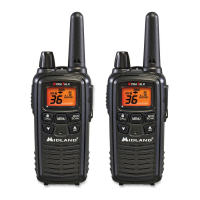
The Midland T290 Series X-Talker Two-Way Radios are designed for GMRS (General Mobile Radio Service) operation, offering reliable and trouble-free performance. These radios are built with solid-state circuitry and fine components, mounted on a rugged printed circuit board.

Function Description:

The T290 Series radios are primarily used for two-way voice communication over GMRS frequencies. They feature a range of functions to enhance communication and user experience, including:

  • Transmission and Reception: Users can transmit voice by pressing and holding the PTT button and receive calls by releasing it. The radio displays TX and RX icons to indicate transmission and reception status, respectively.
  • Channel Selection: The radios operate on 22 GMRS channels, allowing users to select a specific channel for communication.
  • Privacy Codes: To minimize interference and ensure private conversations, the radios support 121 Privacy Codes (38 CTCSS / 83 DCS). These codes can be set for channels 1-22.
  • Power Level Settings: Users can adjust the transmit power to High (H), Medium (M), or Low (L) on channels 1-7 and 15-36. Channels 8-14 are restricted to Low power as per FCC regulations.
  • VOX (Voice Operated eXchange): This feature allows for hands-free operation with 9 selectable sensitivity levels (oF/1-9).
  • Call Alert: The radios can transmit a call alert signal to other users. The T290 has 5 selectable call alerts, while the T295 model offers 10, including 5 animal sounds (Cougar, Duck, Crow, Wolf, and Turkey).
  • Roger Beep Tone: An audible tone confirms the end of a transmission, signaling to other users that the channel is clear.
  • Silent Operation: This mode disables all "beeps" and "tones" for discreet use.
  • Keypad Lock: Prevents accidental changes to radio settings while keeping PTT and CALL functions active.
  • Monitor Function: Allows users to listen to background noise to adjust volume or check for activity on the current channel before transmitting.
  • Scan Function: Scans all 36 channels for activity, stopping on an active channel for 6 seconds before resuming.
  • NOAA Weather Radio/Scan: Provides access to weather reports from designated NOAA stations. The Weather Scan function scans all 10 NOAA Weather Radio channels.
  • NOAA Weather Alert: Automatically receives weather alerts from NOAA stations. The WX Alert is automatically active during WX Scan mode.
  • Vibrate Alert (T295 only): Provides a silent vibration alert for incoming calls.

Important Technical Specifications:

  • Channels: 22 GMRS Channels, 14 Midland Preset Channels, 10 NOAA Weather (WX) Band Channels.
  • Privacy Codes: 121 (38 CTCSS / 83 DCS).
  • Operating Frequency: UHF 462.5500 ~ 467.7125 MHz.
  • Power Source: 6.0V Rechargeable NiMH battery pack (BATT5RX).
  • Battery Life: Indicated by a Battery Level Meter, with a "bt Lo" warning for low battery.
  • FCC Compliance: Complies with Part 15 of the FCC Rules and FCC RF exposure guidelines for body-worn operation (requires Midland-supplied or approved accessories). GMRS operation on channels 1-36 requires an FCC license.

Usage Features:

  • Power On/Off and Volume Control: Managed by a single POWER/VOLUME knob.
  • LCD Display: Shows various icons and information, including:
    • Transmit Power Level (H/M/L)
    • NOAA Weather (WX) Band Icon
    • Key Lock Icon
    • VOX Icon
    • Channel Number (1-36 GMRS, 1-10 WX)
    • Vibrate Alert Icon (T295 only)
    • Battery Meter
    • Receive (RX) Icon
    • Transmit (TX) Icon
    • Privacy Code Icon and selected code (oF~38/oF~83)
  • Buttons:
    • PTT Button: For transmitting voice.
    • CALL/LOCK Button: Sends a CALL ALERT signal; press and hold to turn KEY LOCK on/off.
    • MENU Button: Accesses menu mode for feature adjustments.
    • MONITOR/SCAN Button: Enters SCAN mode; press and hold for MONITOR mode.
    • UP ▲ / WX SCAN and DOWN ▼ Buttons: Adjust settings in MENU mode; press and hold UP for 5 seconds to activate NOAA Weather Scan.
  • External Speaker/Mic Jack: Allows connection of optional external speaker/microphone or headset accessories.
  • Range Optimization: Maximum range is achieved in open rural areas without obstructions and over water. Using fresh/fully charged batteries and setting the radio to Hi power (where applicable) also helps.

Maintenance Features:

  • Battery Installation and Charging:
    • Uses a rechargeable NiMH battery pack (BATT5RX).
    • Battery pack is installed by removing the belt clip and battery cover.
    • Charged using a desktop charger; the Battery Meter flashes during charging and stops when complete.
    • Recommended to charge with the radio OFF for full charge.
    • Only use Midland NiMH battery packs; avoid charging alkaline batteries or other non-specified packs.
    • For long-term storage, turn the radio OFF and remove batteries.
  • Cleaning:
    • Use a soft, damp, lint-free cloth.
    • Do not use alcohol or cleaning solutions.
    • Do not immerse the radio in water.
    • Dry immediately if wet.
  • Troubleshooting Guide: Provides solutions for common issues like no power, inability to receive messages, unresponsive buttons, dim display, and charger malfunction.
  • Restoring to Original Setting: Can be reset to default by turning on while pressing and holding the UP button.

The T290 Series radios are designed for ease of use and durability, making them suitable for various communication needs.

Midland X-Talker T295 Specifications

General IconGeneral
Channels22
NOAA Weather AlertYes
Call AlertsYes
Keypad LockYes
Battery MeterYes
Channel ScanYes
License RequiredNo
Battery LifeUp to 12 hours
Privacy Codes121
Power SourceBattery
Water ResistanceSplash Resistant
Frequency Range462.5500 - 467.7125 MHz
Battery TypeRechargeable NiMH

Related product manuals