Installation Procedures
Preva
45
Installing the Control Unit Front Cover and the Operator Panel
The Operator Panel can be installed on the Control Unit or remote from the
Control Unit. Installation of the Operator Panel on the Control Unit may require
the purchase and use of the coil-cord hand switch option 30-A2040.
Important Note
In order to comply with the regulations and proper X-ray practices, the Operator
Panel must be located where the operator can view both the patient and the
technique factors prior to the exposure.
On the Control
Unit
1. Connect the short cable at point J1 on the Power Supply Control Board 30-
08160.
2. Feed the cable through the front cover of the Control Unit.
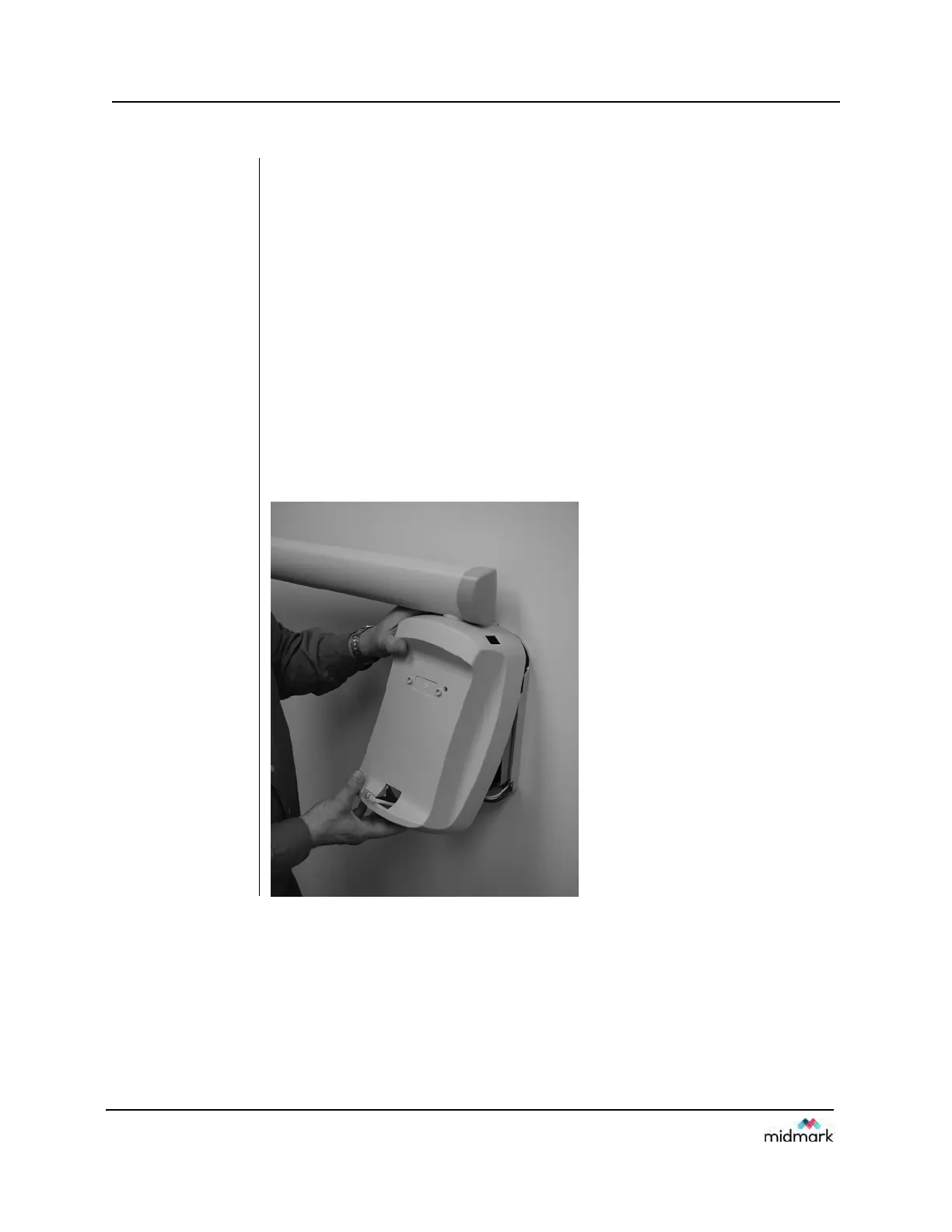
3. Place the top of the front cover on the Control Unit and pop the bottom of the
cover into place, as shown in Figure 36, being careful of the power switch
and cover alignment.
4. Replace the screw on the front cover of the Control Unit.
5. Plug the cable into the bottom of the Operator Panel.
6. Snap the Operator Panel into place on the front cover of the Control Unit, as
shown in Figure 37.
Figure 36
Placing the
Cover on the
Control Unit



 To Next Page