Before using for the first time
24
Installing the Con@ctivity 2.0 stick
See the relevant installation
instructions provided with the
Con@ctivity 2.0 stick.
Activating the wireless connection
The ventilation hood and the cooktop
must be installed and operational.
The wireless connection must be
activated on the ventilation hood and
the cooktop at the same time.
Activation on the ventilation hood is
described below.
Activation on the cooktop is described
in the relevant operating and installation
instructions. Please refer to the
operating instructions before starting.
Activate the ventilation hood first, then
the cooktop.
Activating the ventilation hood
The cooktop and ventilation hood
must be switched off.
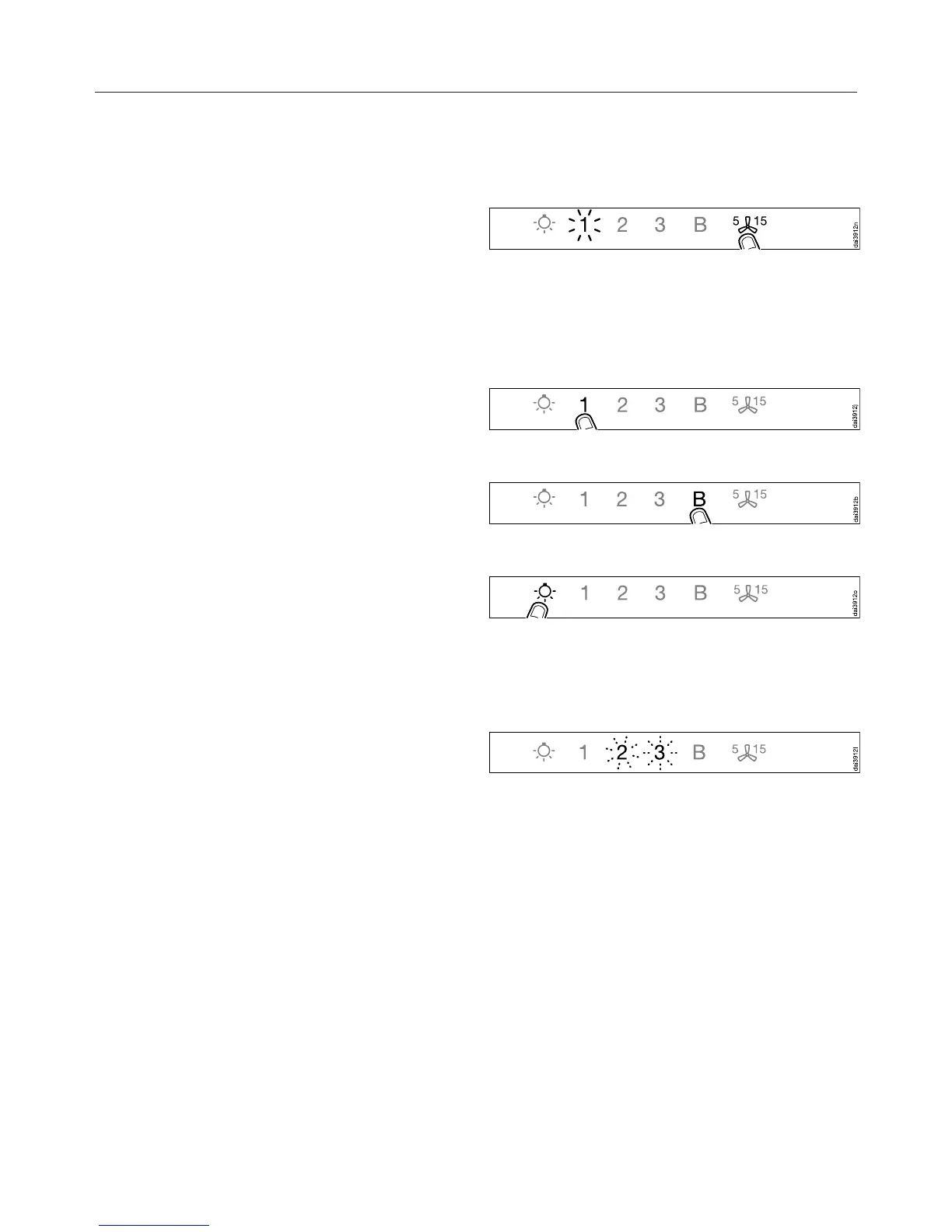
Touch the delayed shutdown
control for approx. 10seconds
until 1 lights up.
Then touch in turn:
– the 1 control,
– then the B control,
– then the lighting control.
The ventilation hood is now in signing
on/off mode.
If a wireless connection has not yet
been established, 2 and 3 will flash at
the same time.
If a wireless connection has already
been established, 2 and 3 will light up
constantly (Con@ctivity 2.0 is already
activated or a remote control is signed
on).


 To Next Page