EasyManua.ls Logo

Miele G 542 U - Page 5

Miele G 542 U
36 pages
Print Icon
To Next Page IconTo Next Page
To Previous Page IconTo Previous Page
Loading...
Description
of
the
appliance
The
fill-time
selector
switch
on
the
left
side
of
the
control
panel
is
used
to
increase
or
decrease
the
amount
of
water
entering
the
appliance.
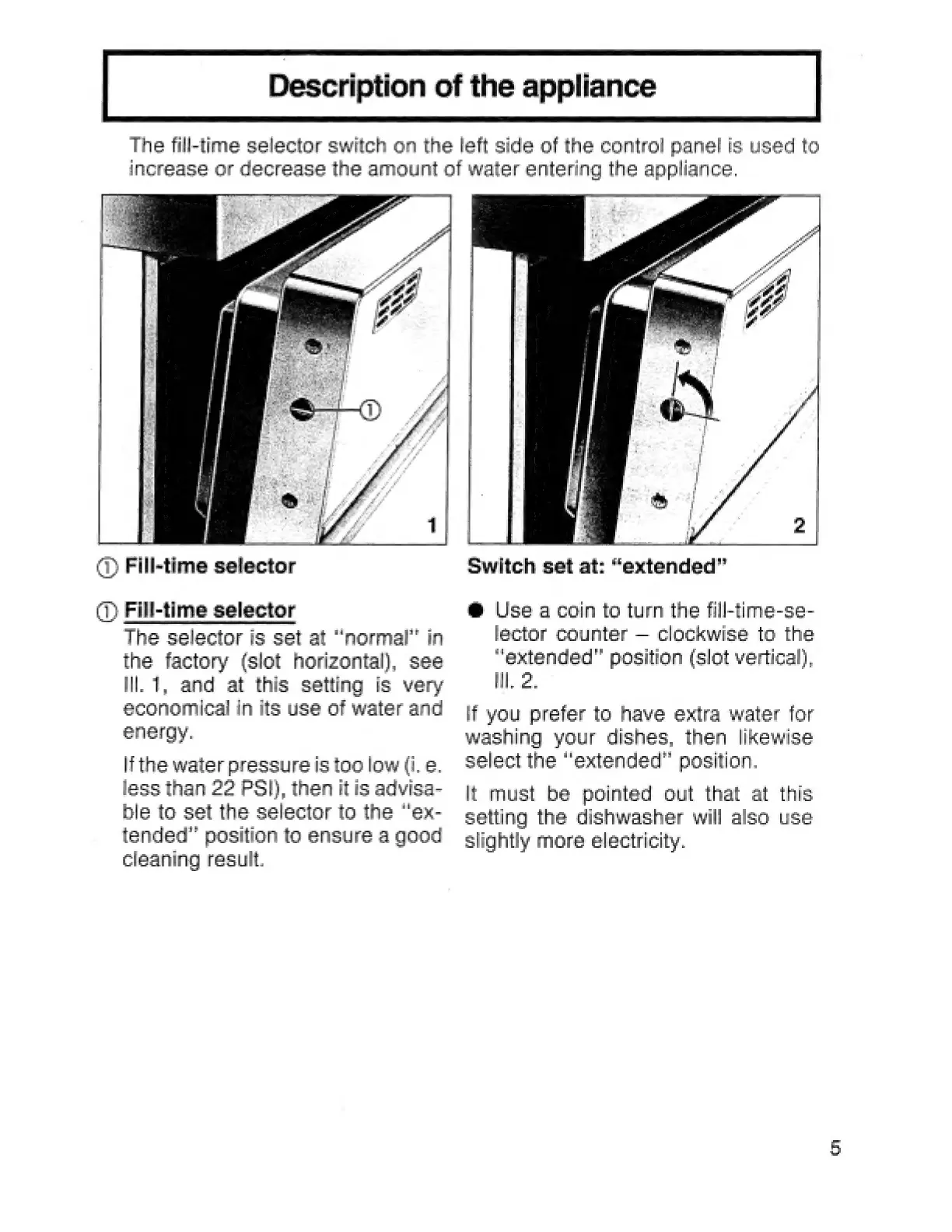
(1)
Fill-time
selector
(7)
Fill-time
selector
The
selector
is
set
at
“normal”
in
the
factory
(slot
horizontal),
see
lll.
1,
and
at
this
setting
is
very
economical
in
its
use
of
water
and
energy.
lf
the
water
pressure
is
too
low
(i.
e.
less
than
22
PSI),
then
it
is
advisa-
ble
to
set the
selector
to
the
“ex-
tended”
position
to
ensure
a
good
cleaning
result.
Switch
set
at:
“extended”
®
Use
a
coin
to
turn
the
fill-time-se-
lactor
counter
clockwise
to
the
“extended”
position
(slot
vertical),
iW.
2.
lf
you
prefer
to
have
extra
water
for
washing
your
dishes,
then
likewise
select
the
“extended”
position.
It
must
be
pointed
out
that
at
this
setting
the
dishwasher
will
also
use
slightly
more
electricity.