Switching on
^ Make sure the spray arms are not ob-
structed.
^ Close the door.
^ Open the stopcock, if it is closed.
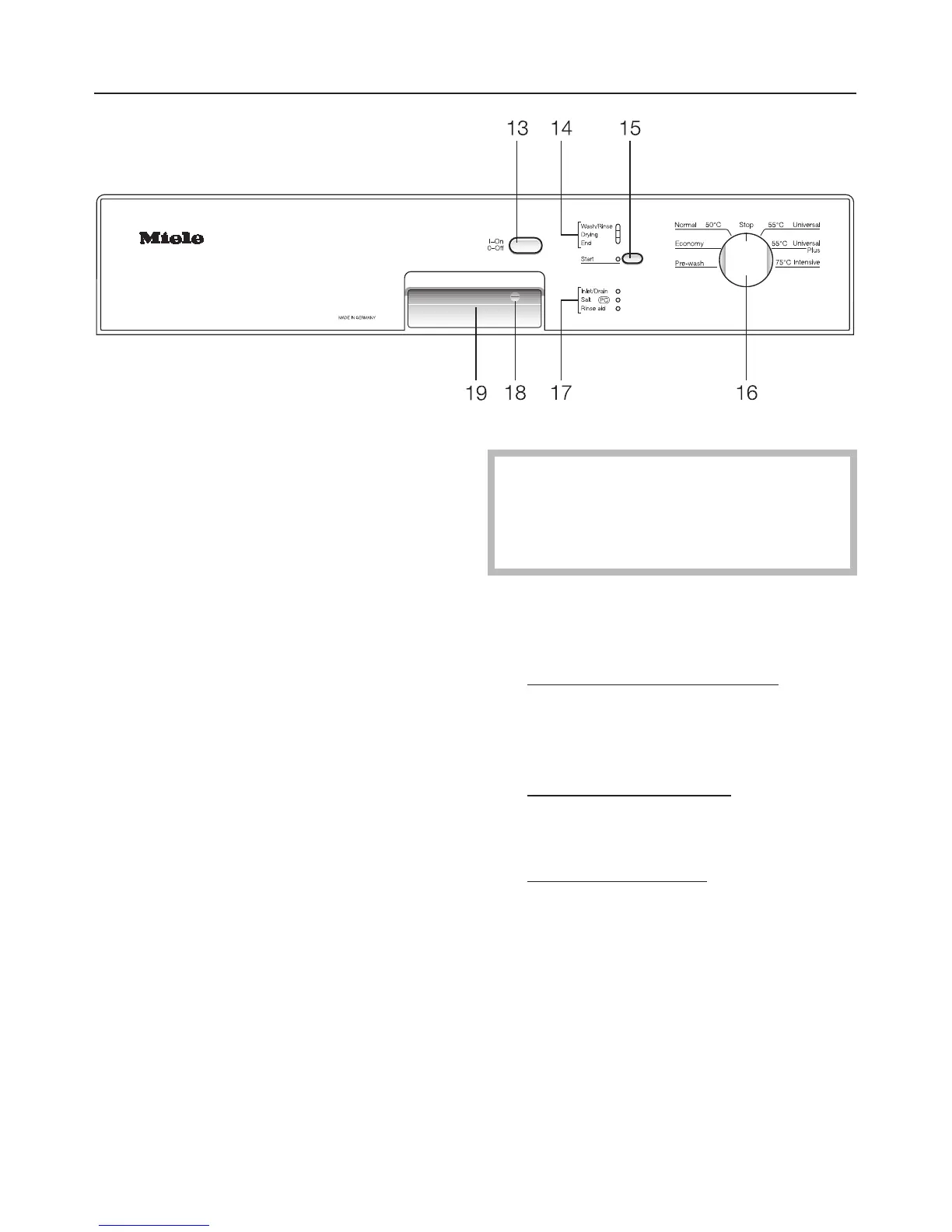
^ Press the "On/Off" button (13).
The "Start" indicator light (15) will flash.
Starting a programme
^
When selecting a programme, refer
to the programme chart at the end of
the operating instructions.
^
Turn the programme selector (16)
clockwise or anti-clockwise to the re
-
quired programme.
^
Press the "Start" button (15).
The programme cycle begins. The
"Start" (15) and "Wash/Rinse" (14) indi
-
cator lights come on.
Do not finish a programme prema-
turely. Important programme stages
(e. g. reactivating the water softener)
could be omitted.
Programme sequence
indicator lights (14)
The "Wash/Rinse" indicator light comes
on in the pre-wash, main wash, interim
rinse and final rinse stages of a
programme.
The "Drying" indicator light
comes on
during the drying stage of a
programme.
The "End" indicator light
comes on
when the programme has finished.
Operating the dishwasher
33



 To Next Page