Settings
35
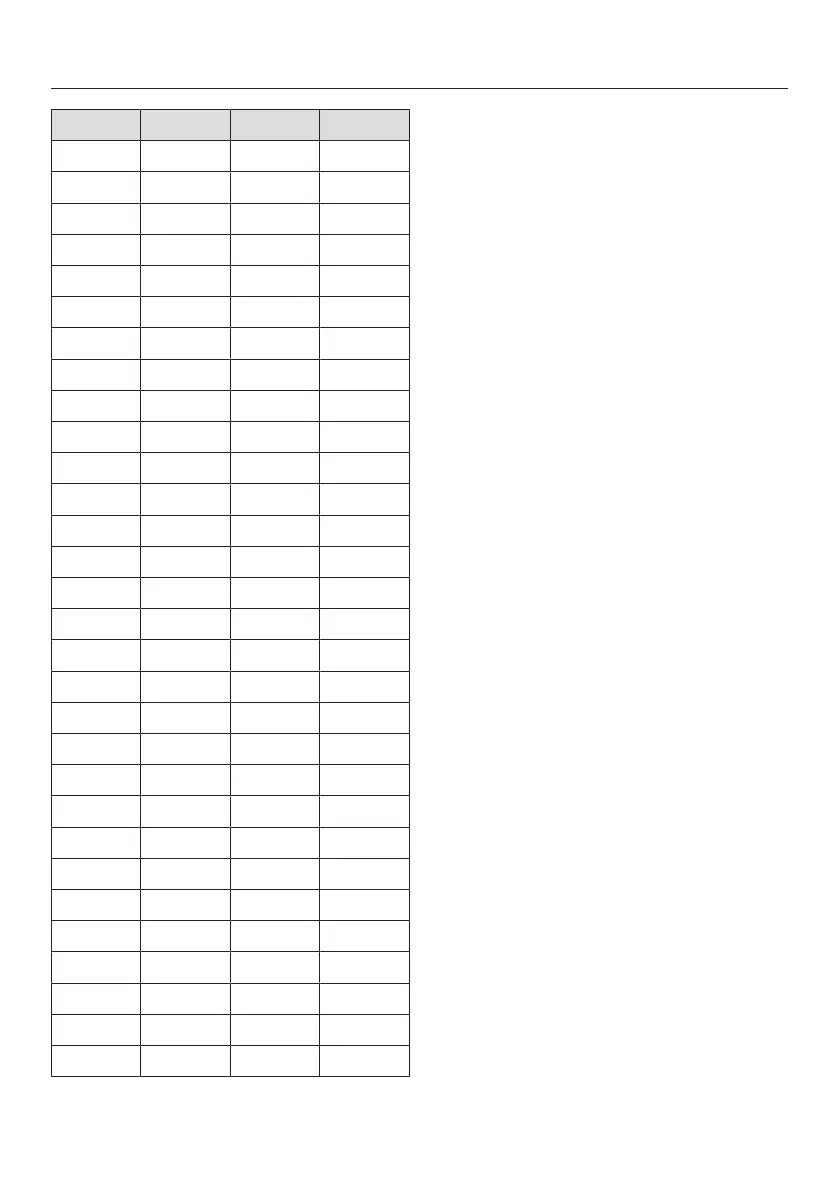
°d gr/gal °fH Display
11 11 20 11
12 13 22 12
13 14 23 13
14 15 25 14
15 16 27 15
16 17 29 16
17 18 31 17
18 19 32 18
19 20 34 19
20 21 36 20
21 22 38 21
22 23 40 22
23 24 41 23
24 25 43 24
25 26 45 25
26 27 47 26
27 28 49 27
28 29 50 28
29 30 52 29
30 31 54 30
31 32 56 31
32 33 58 32
33 34 59 33
34 35 61 34
35 36 63 35
36 38 65 36
37-45 39-47 66-80 37-45
46-59 48-62 82-105 46-59
60 63 107 60
61-70 64-73 109-125 61-70
Setting the water hardness
Select the water hardness level in
your area and confirm with OK.
AutoDos (automatic
dispensing)
Automatic dispensing automatically
adjusts the amount of detergent to the
selected program. In the Auto45–65°C
program, the quantity is adjusted
depending on the degree of soiling of
the dishware.
If you want to extend the service life of
the PowerDisk, you can reduce the
dispensing quantity. The program’s
cleaning performance may decrease as
a result.
If you want to improve the cleaning
performance, you can increase the
dispensing quantity. This reduces the
service life of the PowerDisk.
Setting the Dosage amount
For best results, you can adjust the
dispensing quantity of the PowerDisk.
Select the Dosage amount menu
option and confirm with OK.
Select the setting you want and
confirm with OK.



 To Next Page