Delay start (d)
The starting time of a programme can
be delayed, e.g. to benefit from econ
-
omy rates of electricity. A delay start
time of between 1 and 9 hours can be
selected.
The delay start time is set in one hour
stages.
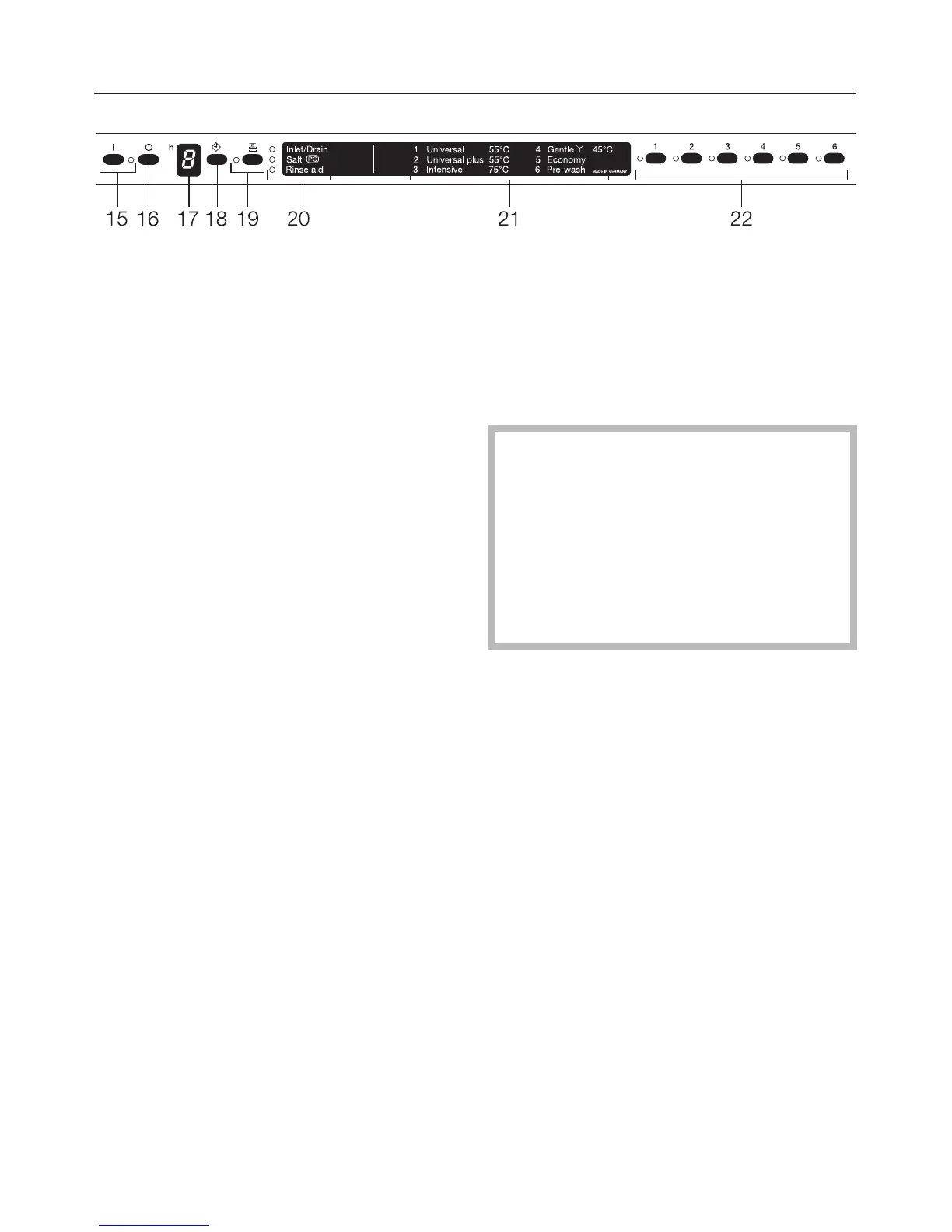
^ Press the "On" (15) button.
The "On" indicator light (15) comes on.
^ Press the button for the programme
you wish to run.
The indicator light next to the selected
programme button comes on.
^ Press the d (18) button.
A 1 appears in the delay start display
(17). A delay of one hour has been set.
^
Press button d (18) repeatedly until
the required delay start period shows
up in the display (17).
The delay start time counts up to 9 in
one hour stages. Pressing the "Delay
start" button d (18) again switches the
option off.
If the "Delay start" button is held in the
display counts up automatically.
The "Top Solo" function can now be se
-
lected (see previous page).
^
Close the door.
At the end of the delay period the se
-
lected programme begins automati
-
cally.
,
When using the "Delay Start"
function, make sure that the com
-
partment is dry before adding deter-
gent. Wipe dry with a cloth if neces-
sary. Do not use liquid detergent
when selecting "Delay Start". It may
run out of the dispenser before the
programme starts.
Operating the dishwasher
36



 To Next Page