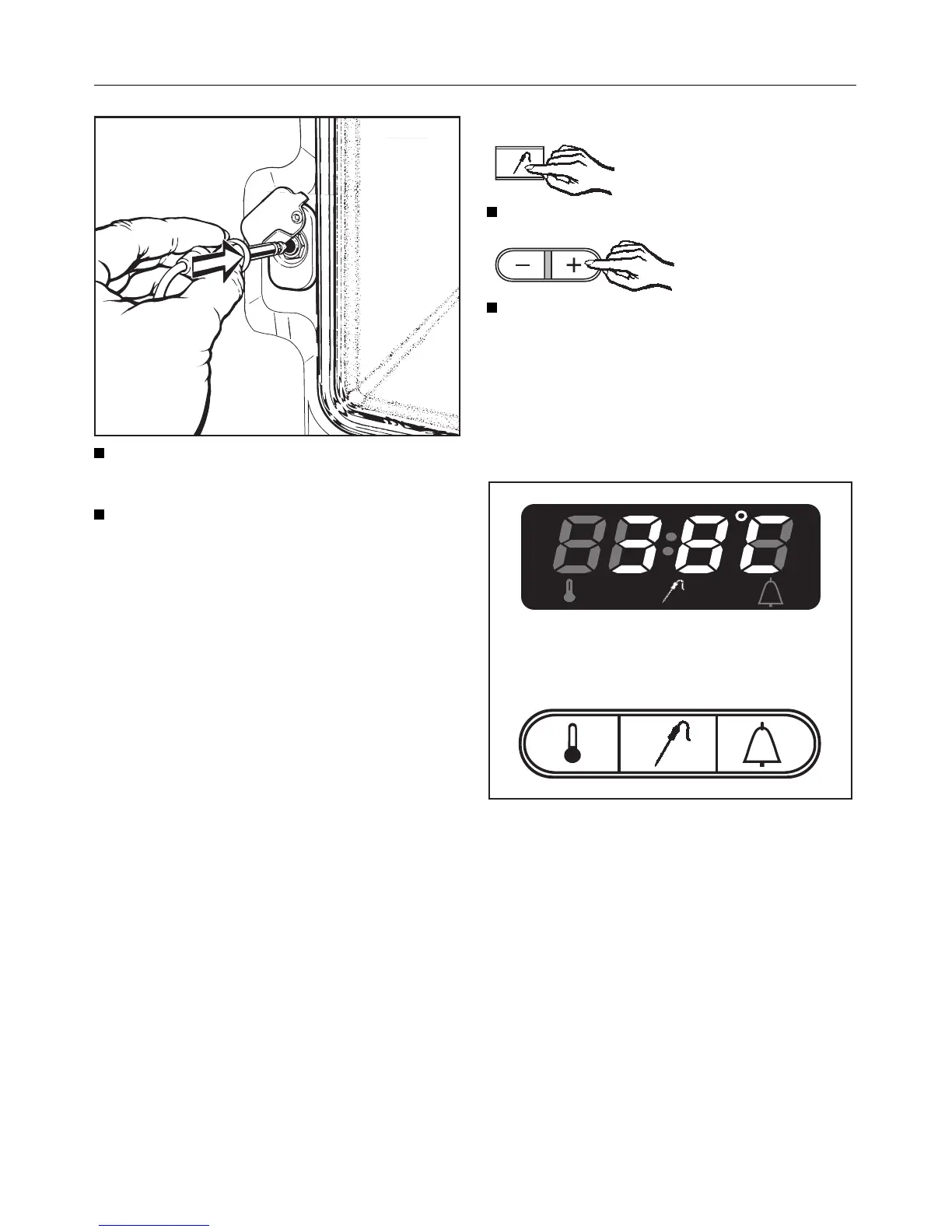
Insert the plug of the roast probe into
the socket until you feel it engage.
Turn the function selector to the re-
quired oven function.
The following light up:
– the recommended oven tempera-
ture in the oven display,
– the indicator light for the "+/–" button.
The recommended oven temperature
can be altered if required with the
"+/–" button.
Next, a food core temperature of
60°C appears in the oven display, and
the indicator light for the "+/–" button is
on.
If necessary this food core tempera-
ture can be altered with the "+/–" but-
ton according to the type of food being
cooked, (see "Oven roasting chart" for
suitable choice of temperatures) and
can be altered within a range of 20°C
to 99°C.
In order to do this:
Press the "e" button.
Enter the desired temperature using
the "+" or "–" buttons.
When the light in the "+/–" button goes out
– the oven heating switches on.
– the actual core temperature ap-
pears in the oven display. N.B. The
lowest temperature that can be dis-
played is 20°C, so this will also be
shown until the roast probe registers
20°C.
Roasting with the Roast Probe
47


 To Next Page