Powered by TCPDF (www.tcpdf.org)
MUW216743-2 7
Guide to the machine
12
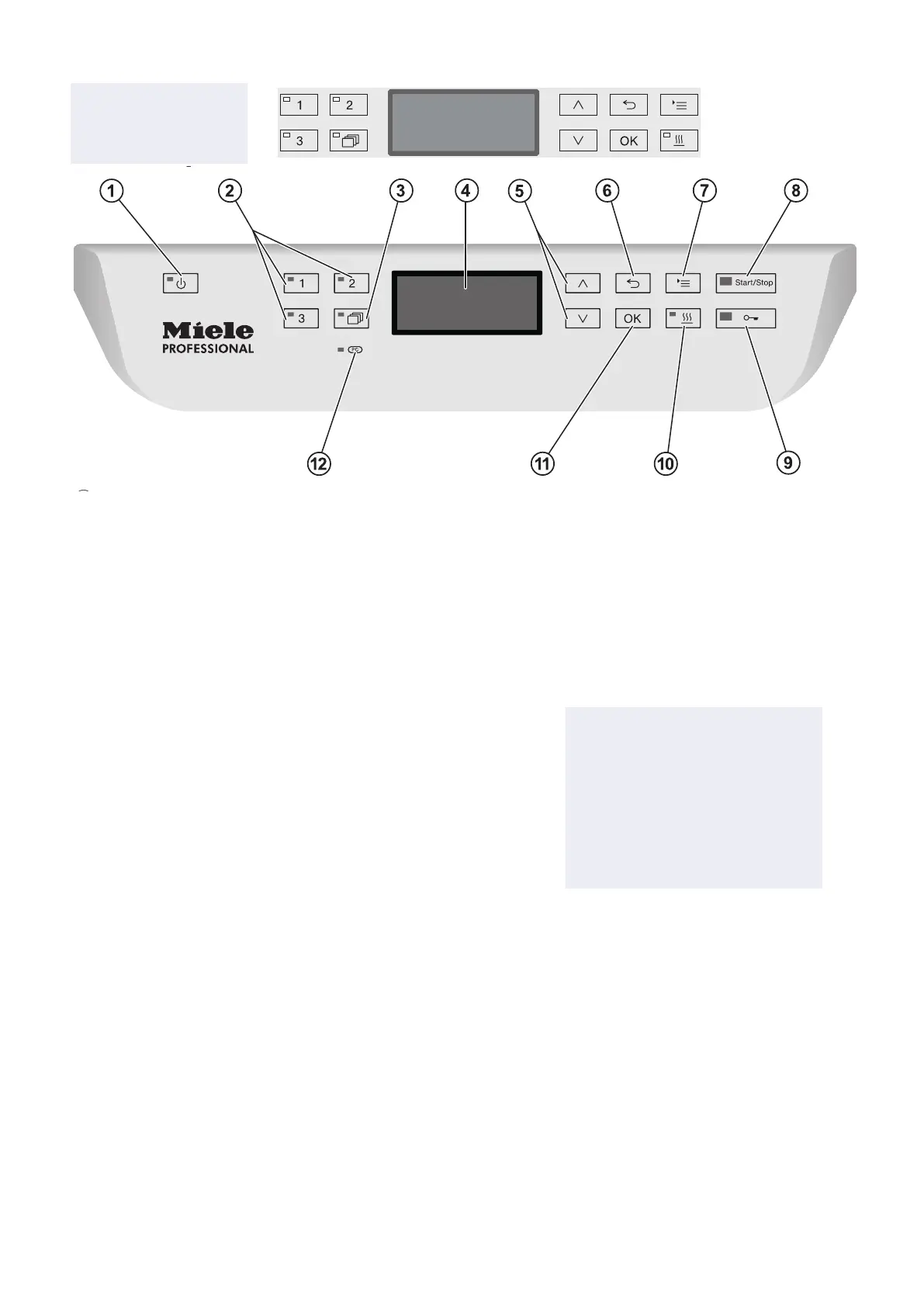
Control panel
a
On/Off button
For switching the washer-disinfector on and off.
b
, and buttons
Programme selection buttons.
Can be configured.
c
Programme list button
For accessing the list of all programmes.
d
Display
User interface and programme sequence display
e
and arrow buttons
For navigating within the display
f
Cancel button
For cancelling a process
(not for cancelling programmes)
g
Settings button
For accessing the system settings menu.
h
Start/Stop button
For starting or cancelling a programme
i
Door release button
For opening the door before or after a programme
j
button (drying assistance)
For switching Drying assistance on and off
k
OK button
For selecting or confirming entries in the user interface.
l
PC / Optical interface
This is used by Miele service technicians to run diagnostic checks
and can also be used to update programming data in the future.
Guide to the machine
12
Control panel
a
On/Off button
For switching the washer-disinfector on and off.
b
, and buttons
Programme selection buttons.
Can be configured.
c
Programme list button
For accessing the list of all programmes.
d
Display
User interface and programme sequence display
e
and arrow buttons
For navigating within the display
f
Cancel button
For cancelling a process
(not for cancelling programmes)
g
Settings button
For accessing the system settings menu.
h
Start/Stop button
For starting or cancelling a programme
i
Door release button
For opening the door before or after a programme
j
button (drying assistance)
For switching Drying assistance on and off
k
OK button
For selecting or confirming entries in the user interface.
l
PC / Optical interface
This is used by Miele service technicians to run diagnostic checks
and can also be used to update programming data in the future.
Using the machine
21
Control panel
The machine is operated exclusively by the buttons located on the
stainless steel surfaces either side of the display. The display is not a
touch screen.
A light touch on the relevant button is sufficient to operate the
functions. The buttons can also be pressed and held for approx.
20 seconds.
Display illustrations
All display illustrations shown in these operating instructions are
examples which can be different from the actual display screens
shown.
Vario TD Dental
Temperature
Duration
Min50
55 °C
The control buttons are shown next to the display. The , and
Start/Stop buttons are not shown.
Eschmann W T D
Temperature 55˚C
Duration 50Min
Control panel
The machine is operated exclusively
by the buttons located on the
stainless steel surfaces either side of
the display. The display is not a touch
screen.
A light touch on the relevant button
is sucient to operate the functions.
Available Cycles
Either Eschmann Dental
or Eschmann W T D will be
available for use.


 To Next Page