Operating panel
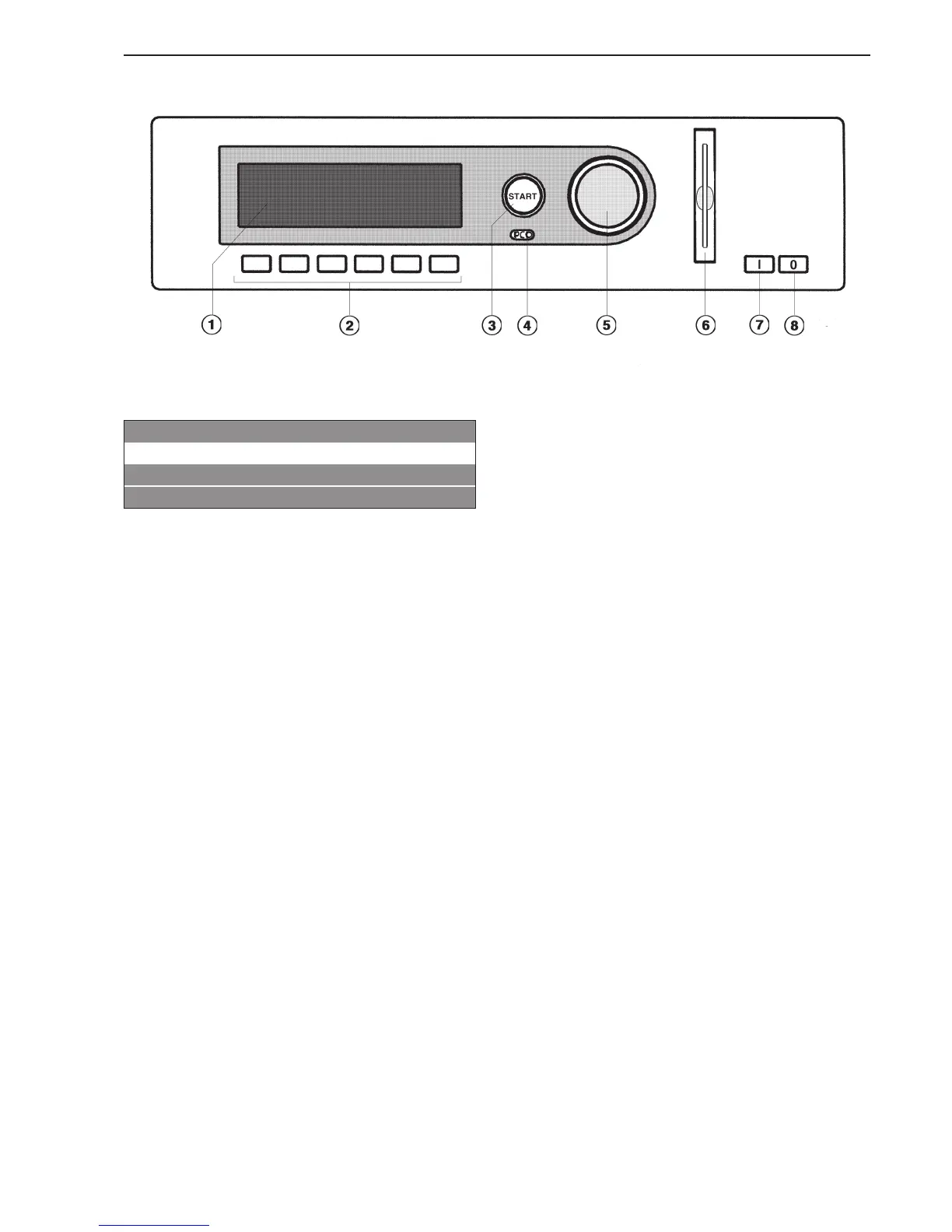
a Display*
1 White Cottons 0%
2 Cottons 0%
3 Cottons Hot Wash 0%
FC A
After turning on, the "Welcome" display will appear for
a short time followed by the program list. The most
recently used program is highlighted.
b Function keys
The keys have different functions depending on the
appliance status. The functions are shown in the
display above the buttons.
c Start button
The light ring flashes if a selected program can be
started or a selection can be made.
Once a program has started the Start button can be
pressed to show the original display.
* Contents in the display will vary with program
offering.
d Optical PC interface
For data transfer between the machine’s controls and
a PC.
e Jog shuttle
Turn the jog shuttle for display selections and input
fields.
Press the jog shuttle to confirm display selections or
changes.
f Card reader
If the machine has been programmed for card
operation, you can only use those programs stored
on the card to dry laundry.
g I On button
h 0 Off button
Description of the appliance
7



 To Next Page