26
Cleaning the front wheel
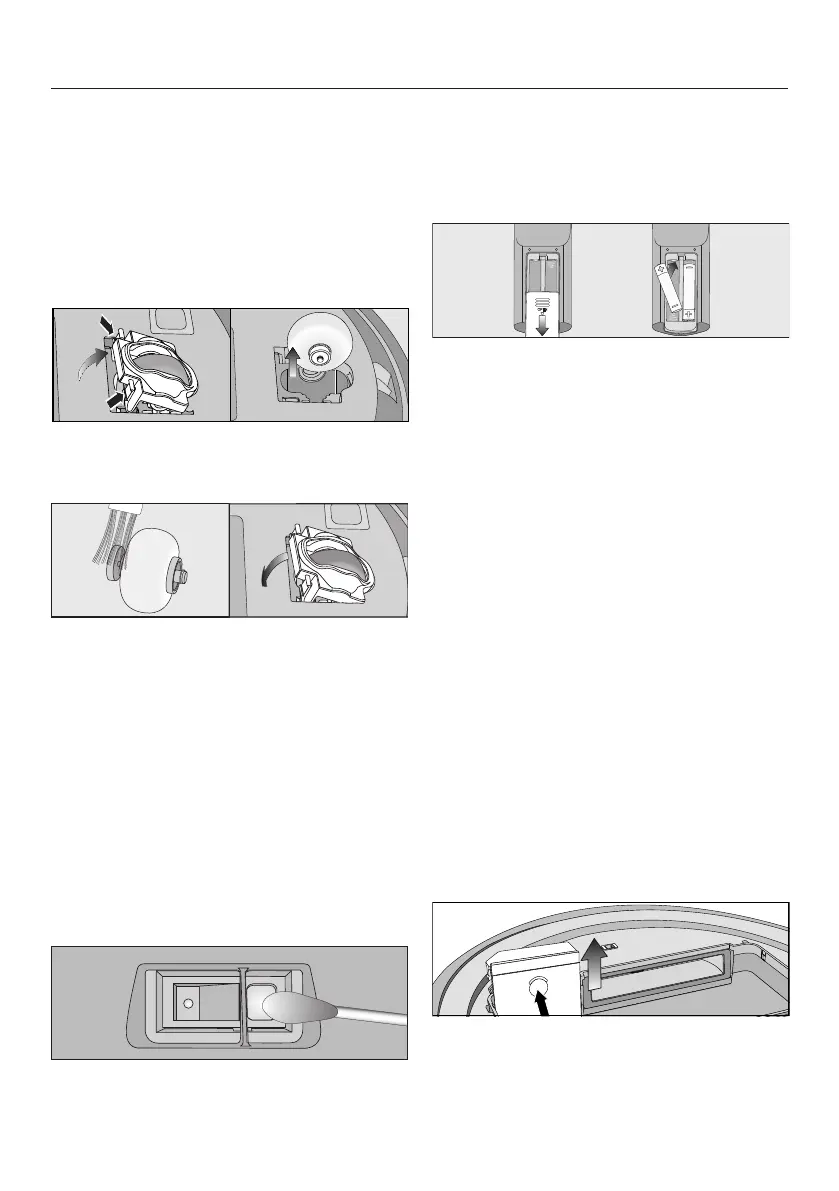
Clean the front wheel as required. For
this you will require the cleaning tool
which is located at the top of the dust
box lid.
Place the robot vacuum cleaner up-
side down on a level, clean surface.
Unclip the cover.
Remove the front wheel.
Remove any threads and hair and
clean the front wheel, the cover and
the slot depression using the cleaning
tool.
Refit the front wheel and close the
cover making sure it clicks into posi-
tion.
Cleaning the sensors
Clean the sensors as required.
Place the robot vacuum cleaner up-
side down on a level, clean surface.
Clean the sensors carefully using a
dry cotton wool bud.
Changing the batteries in the remote
control
The remote control requires two 1.5V
(AAA) batteries.
Remove the battery compartment
cover.
Exchange the batteries. Take care
with the polarity.
Close the battery compartment cover.
Observe the special instructions re-
garding the handling and disposal of
batteries found in the sections "Warn-
ing and Safety" and "Caring for the
environment" at the beginning of
these operating instructions.
Replacing the rechargeable battery
You will require an original Miele lithium-
ion rechargeable battery:
– YCR-M05 for Scout RX2
The rechargeable battery compartment
is located in the robot vacuum cleaner's
storage compartment.
Remove the dust box.
Open the rechargeable battery com-
partment by unlatching the cover up-
wards.



 To Next Page