27
Scout RX2 (YCR-M05)
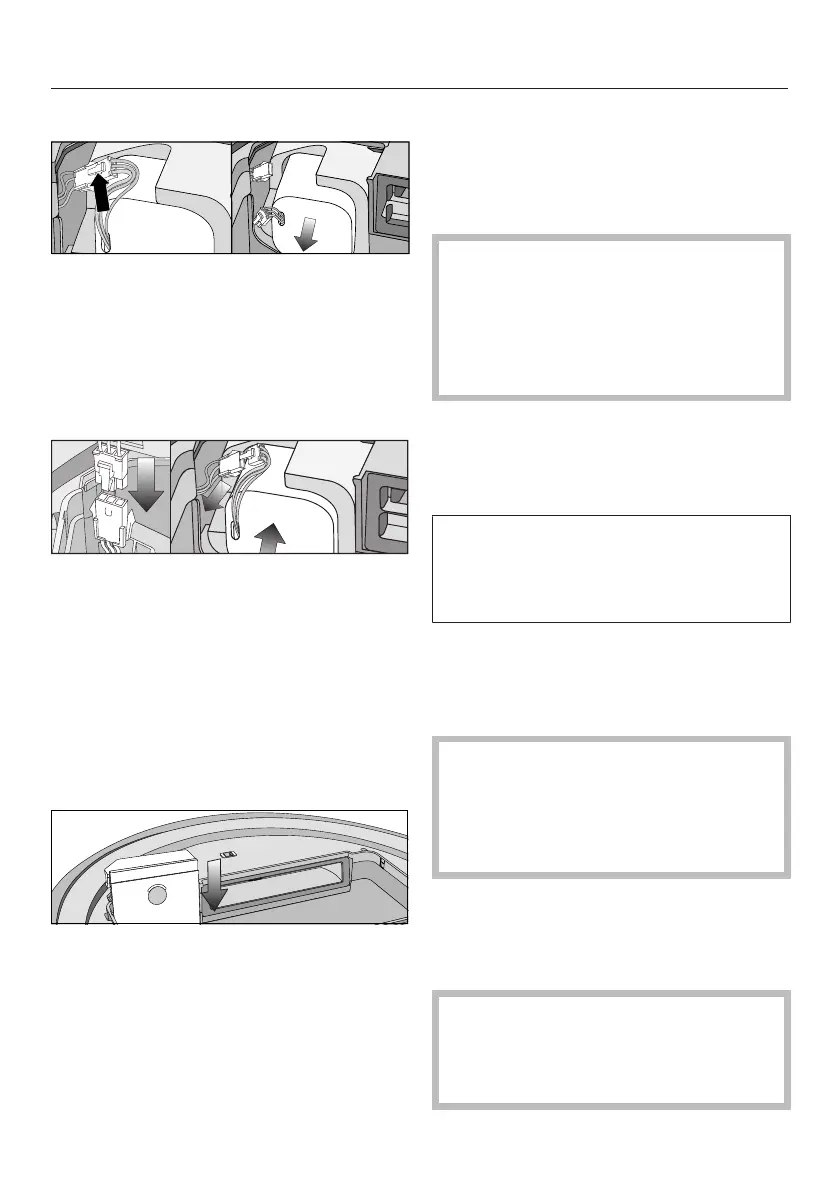
Carefully pull the cables so that the
plug connection is pulled out of the
slot.
Press the latch on the plug connec-
tion in order to release the plug.
Remove the rechargeable battery.
Insert the plug of the new re-
chargeable battery into the counter-
part, making sure it clicks into place.
Insert the rechargeable battery care-
fully, making sure it is properly posi-
tioned (see right-hand side of pic-
ture).
Store the plug connection in the slot
at the side.
Carefully refit the cover of the re-
chargeable battery compartment and
close it, making sure it clicks into
place.
Observe the special instructions re-
garding the handling and disposal of
the old rechargeable battery found in
the sections "Warning and Safety"
and "Caring for the environment" at
the beginning of these operating in-
structions.
Storage
Switch the robot vacuum cleaner
off if it is not going to be used for a
long period of time. To switch it off,
slide the I/0 switch on the side of the
robot vacuum cleaner to the 0 posi-
tion.
If the robot vacuum cleaner is not going
to be used for a long period of time,
make sure it is stored in a well ventil-
ated, cool place.
For optimum care, store the robot va-
cuum cleaner at half charge capacity
(rechargeable battery status indicator
in the display is orange).
Cleaning and care
Maintaining the robot vacuum
cleaner and accessories
Switch the robot vacuum cleaner
off before doing any maintenance
work. To switch it off, slide the I/0
switch on the side of the robot va-
cuum cleaner to the 0 position.
The robot vacuum cleaner and all
plastic accessories can be cleaned with
a dry or a slightly damp cloth, or with a
proprietary cleaner suitable for plastic.
Do not use abrasive cleaning
agents, glass cleaning agents, all-
purpose cleaners or oil-based condi-
tioning agents!



 To Next Page