Control panel
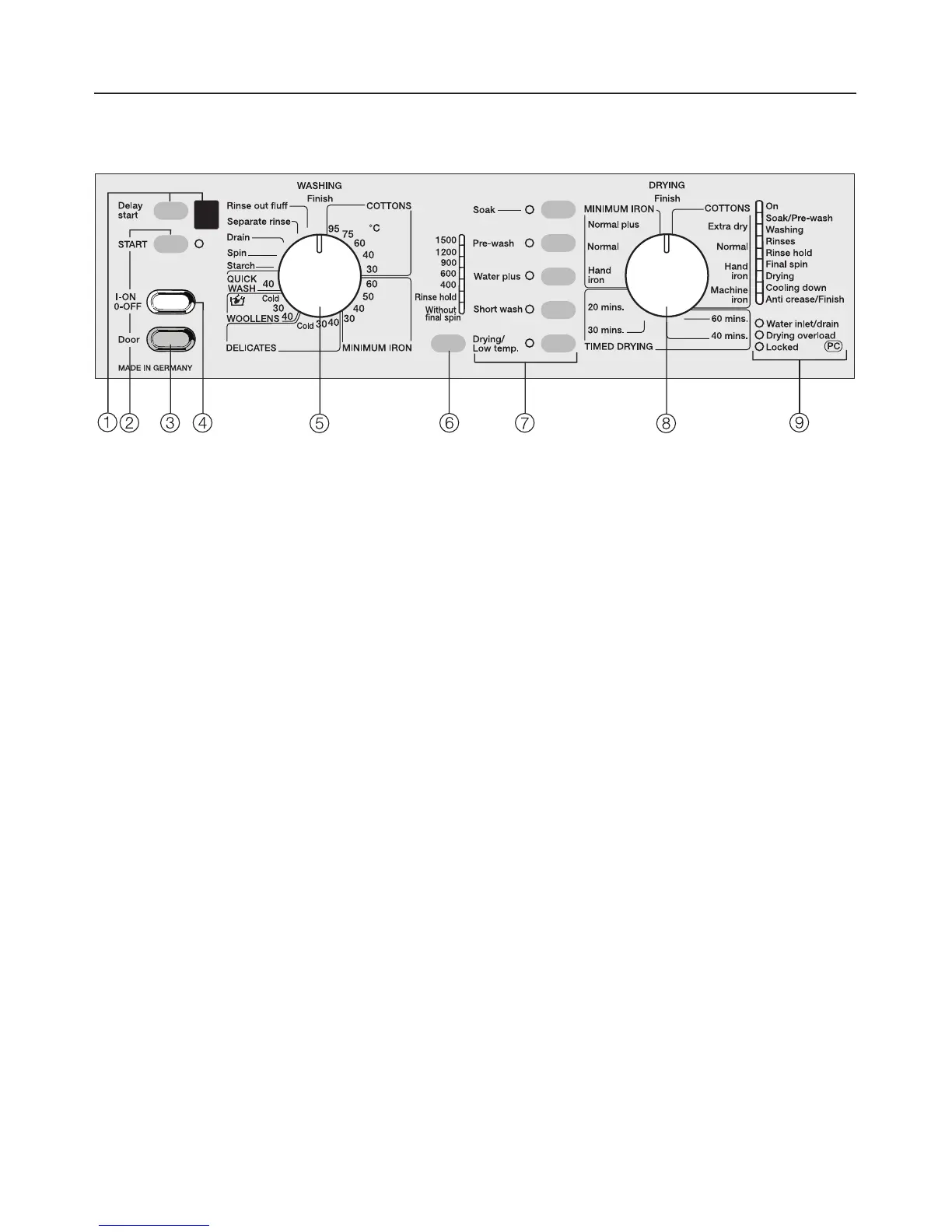
a Delay start button and display
This is used to delay the start of a
programme.
The delay time will appear in the
display.
b "START" button
Press the Start button to start a
programme.
The Start indicator lamp will flash as
soon as a programme can be
started.
c Door button
Opens the drum door.
d I-ON / 0-OFF button
to switch the machine on and off and
to interrupt a programme that is
currently running.
e WASHING programme selector
for selecting a basic wash
programme and temperature.
The programme selector can be
turned clockwise or anti-clockwise.
f "Spin" button
for changing a spin speed or
selecting
– Rinse hold or
– Without final spin.
g Additional option buttons
for selecting additional functions.
When an additional option is selected
the relevant indicator lamp will come
on.
h DRYING programme selector
for selecting the drying programme
and the drying level required. The
programme selector can be turned
clockwise or anti-clockwise.
i Programme sequence
Programme sequence indicator
lamps show which section of the
programme has been reached
and fault / check indicator lamps.
Description of the appliance
10



 To Next Page