10 FAQ
English
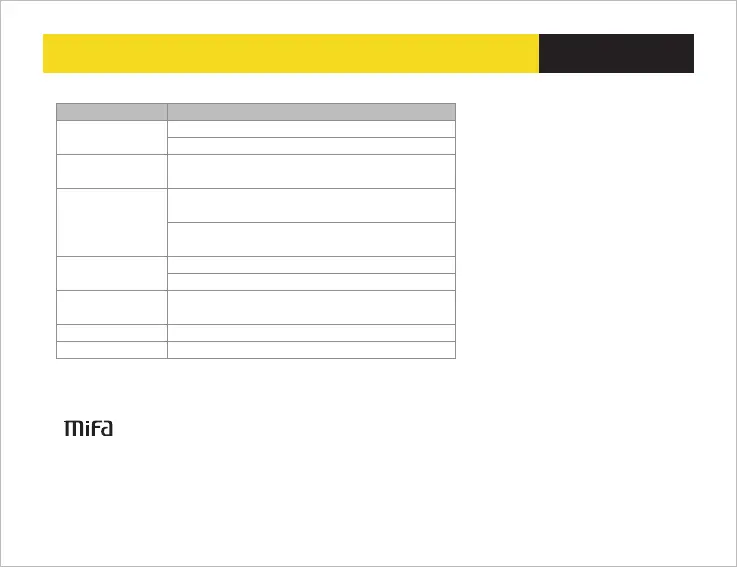
Paired Bluetooth
device will not connect
Problems
What to do
1.Restar t the speak er
2.If need password , please input “0000”
File format fault
1. Check if the TF card format is right (the speaker just can
support FAT 32 format TF card )
Music play hang up
Please check the Bluetooth connection valid distance or if
something cut off the signal
Speaker indicates a
connection ,but is not
playing music
1.Check the volume of speaker
2.Check if the speaker is in mute or pause
Poor sound quality
From the AUX source
Check if the audio cable connect right
Speaker will not turn on
Check if the battery is low
System halted
Reset the speak er
2.Check if the music file format store in TF card is right ,the
speaker just can support APE/FLAC/WAV/WMA/MP3 format
files
©2013 MIFA all rights reserved .The product and the packaging trademarks or registered trademarks of
MIFA INNOVATIONS LLC in the united states or other countries .All rights reserved . Other trademarks and
trade names are registered mark of their respective owners . MIFA INNOVATIONS LLC for any errors that may
occur in this manual does not undertake any responsibility. The information contained in this manual are
subject to change no prior notice.
MIFA INNOVATIONS LLC Hotline :4007-881-899 www.mifalife.net Made in China


 To Previous Page