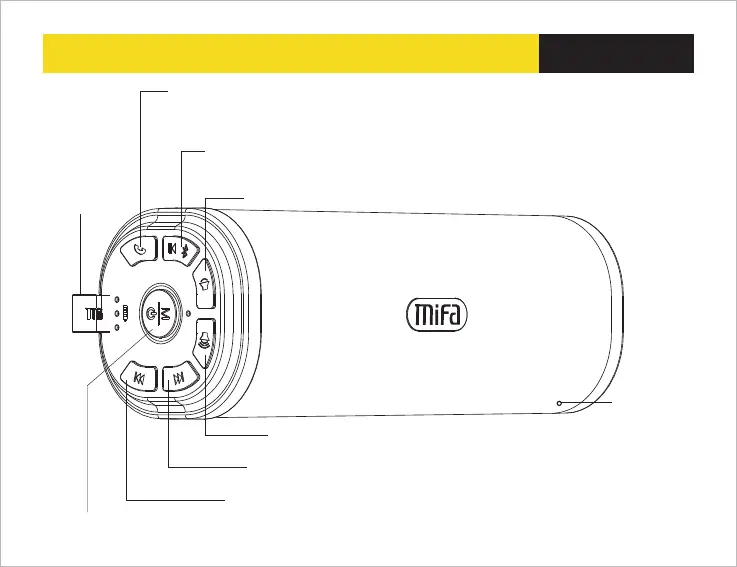
04 Keys Function
English
Next : Press to next song, Press and hold to fast forward under Micro SD card mode
Previous: Press to previous song , Press and hold to fast reverse under Micro SD
card mode
Plus(+) Increase volume : MODE LED white light fast flashing when Max.
volume is reached
Power : Press and hold 2 seconds to power on/off
Mode : Press this key to exchange the functions among Bluetooth mode/ Micro SD mode/ Auxiliary input
Hanging Ring
Built-in Mic
Answer the call button : when call coming ,shot press to answer the phone or
hang up the phone, Press and hold to reject the phone
Normal status : Press and hold this key to open or close locking key function ,
white flashing one time to indicate
Play/Pause : press to play or pause
Press and hold to set the speaker to discoverable mode and allow pairing with
another Bluetooth device
Minus (-) decrease volume


 To Next Page