Need help?
Do you have a question about the Mighty Mule MMKPD and is the answer not in the manual?
Describes keypad illumination, beeps, status light, and idle/lock-down modes.
Covers programming up to 25 entry codes, temporary codes, memory storage, and reset.
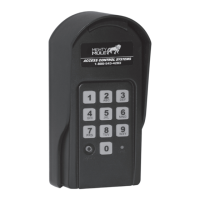
Details the PROGRAM button and STATUS light on the front of the keypad.
Describes the RESET button and battery holder located inside the keypad.
Steps to set or change the master code for keypad programming.
Procedure to add a new 4-digit entry code to the keypad.
Instructions for removing a specific entry code from the keypad.
Method to add an entry code that expires after a set number of days.
Process to erase all programmed entry codes from the keypad.
 General
| Type | Wireless Keypad |
|---|---|
| Compatibility | Mighty Mule Gate Openers |
| Power Source | Battery |
| Keypad Backlight | Yes |
| Weather Resistant | Yes |
| Range | Up to 50 feet |
| Color | Black |
| Weather Resistance | Weather resistant |
| Mounting | Surface |
| Battery Type | 9V |
| Number of User Codes | Up to 25 codes |

 To Next Page