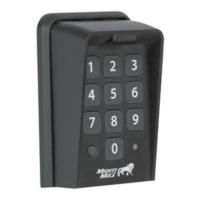
Need help?
Do you have a question about the Mighty Mule FM137 and is the answer not in the manual?
Details the keypad's illumination, beeps, status light, and idle/lock-down modes.
Covers programming up to 25 Entry Codes, temporary codes, and default master code.
Instructions for installing 3 AA batteries for keypad power and backup.
Step-by-step guide to pair the FM137 keypad with compatible Mighty Mule gate openers.
Procedure for pairing the FM137 with MM271/MM272 openers, including dip-switch note.
Step-by-step guide to change the master code for keypad programming.
Instructions for adding a new 4-digit entry code to the keypad.
Guide to program temporary entry codes with an expiration period.
Steps to remove a specific entry code from the keypad's memory.
Instructions to erase all programmed entry codes from the keypad.
 General
| Model | FM137 |
|---|---|
| Type | Wireless Keypad |
| Power Source | Battery |
| Operating Frequency | 318 MHz |
| Number of Codes | Up to 25 |
| Mounting Type | Surface Mount |
| Compatibility | Mighty Mule gate openers |
| Battery Type | 9V |
| Weather Resistance | Weatherproof |

 To Next Page