12
Programming the Keypad
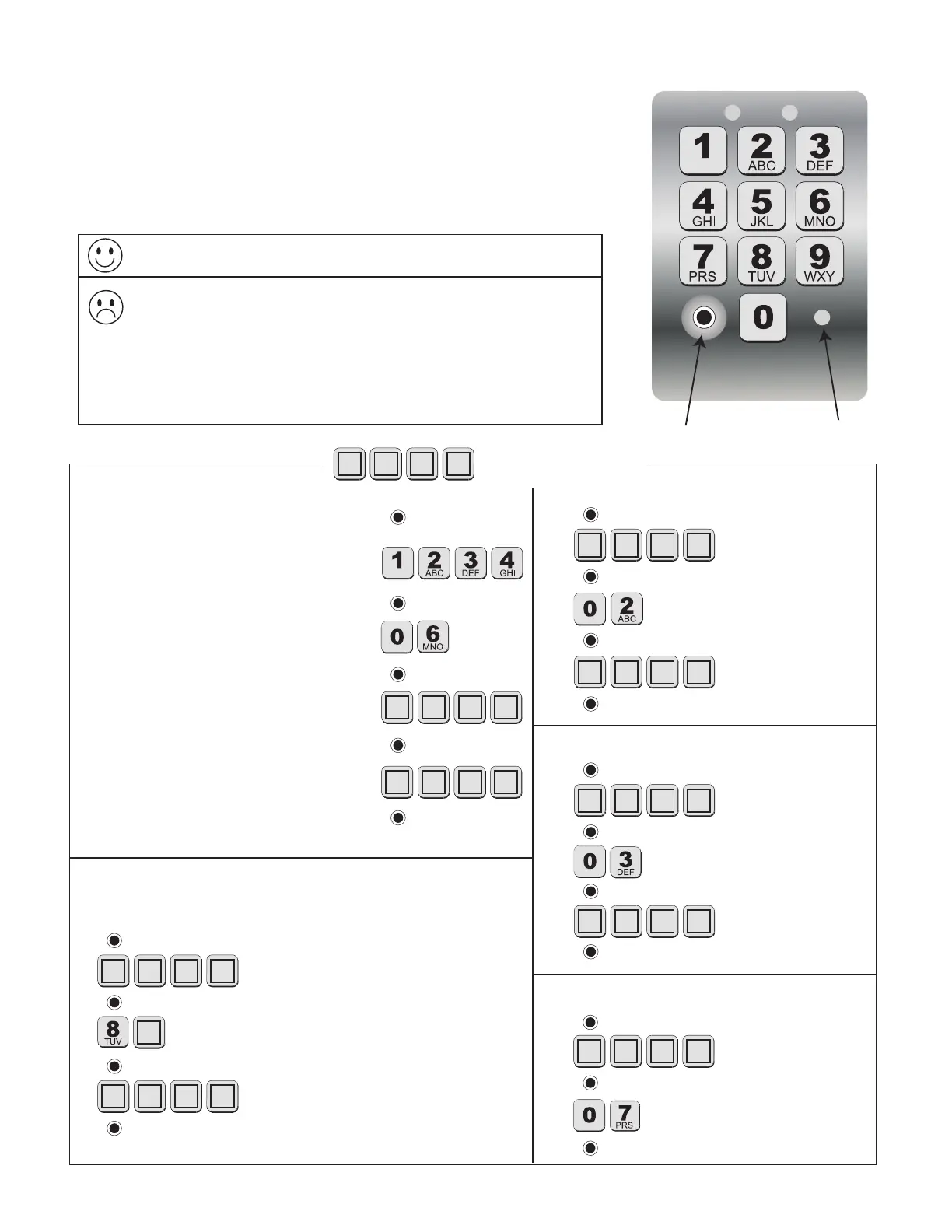
Program New Master Code
1. Press and Release Program Button:
2. Enter current Master Code:
(example: the factory default Master Code)
3. Press and Release Program Button:
4. Enter the Function Code:
5. Press and Release Program Button:
6. Enter the new Master Code:
7. Press and Release Program Button:
8. Enter the new Master Code again:
9. Press and Release Program Button:
Program Button
Status Light
= Your 4-digit code.
• A Master Code is needed to add, remove, or program Entry Codes.
• Factory default Master Code is “1234.”
• Keypad can only enter “program” mode from “idle” mode.
• Keypad will beep three times before going into “idle” mode (more
than 10 seconds between key presses).
Add New Entry Code
1.
2. Master Code
3.
4. Function Code
5.
6. New Entry Code
7.
Delete Entry Code
1.
2. Master Code
3.
4. Function Code
5.
6. Code to be deleted
7.
Delete All Entry Codes
1.
2. Master Code
3.
4. Function Code
5.
Add Temporary Entry Code
*In step 4, you will need to enter a number from 1 through 7
to indicate the number of days until the Entry Code expires.
1.
2. Master Code
3.
4.
Function Code & # of days Code will be active*
5.
6. Temporary Entry Code
7.
Programming Conrmed: Keypad will beep 3 times.
Error Message: Status light will ash rapidly, error tone will sound for
1 second and keypad will return to “idle” mode (changes not saved).
• Entry Code is not 4 digits.
• New Master Codes don’t match “Program New Master Code”.
• Memory is full (already 25 codes).
• No matching code is found “Delete Entry Code”.


 To Next Page