9
Wired Installation of the Keypad
IMPORTANT: Remove the batteries from the keypad. The keypad will not work properly if batteries are not rst removed.
Step 1: Turn the gate opener’s power switch OFF. Run wire
through PVC pipe between the opener control board to protect the
wire.
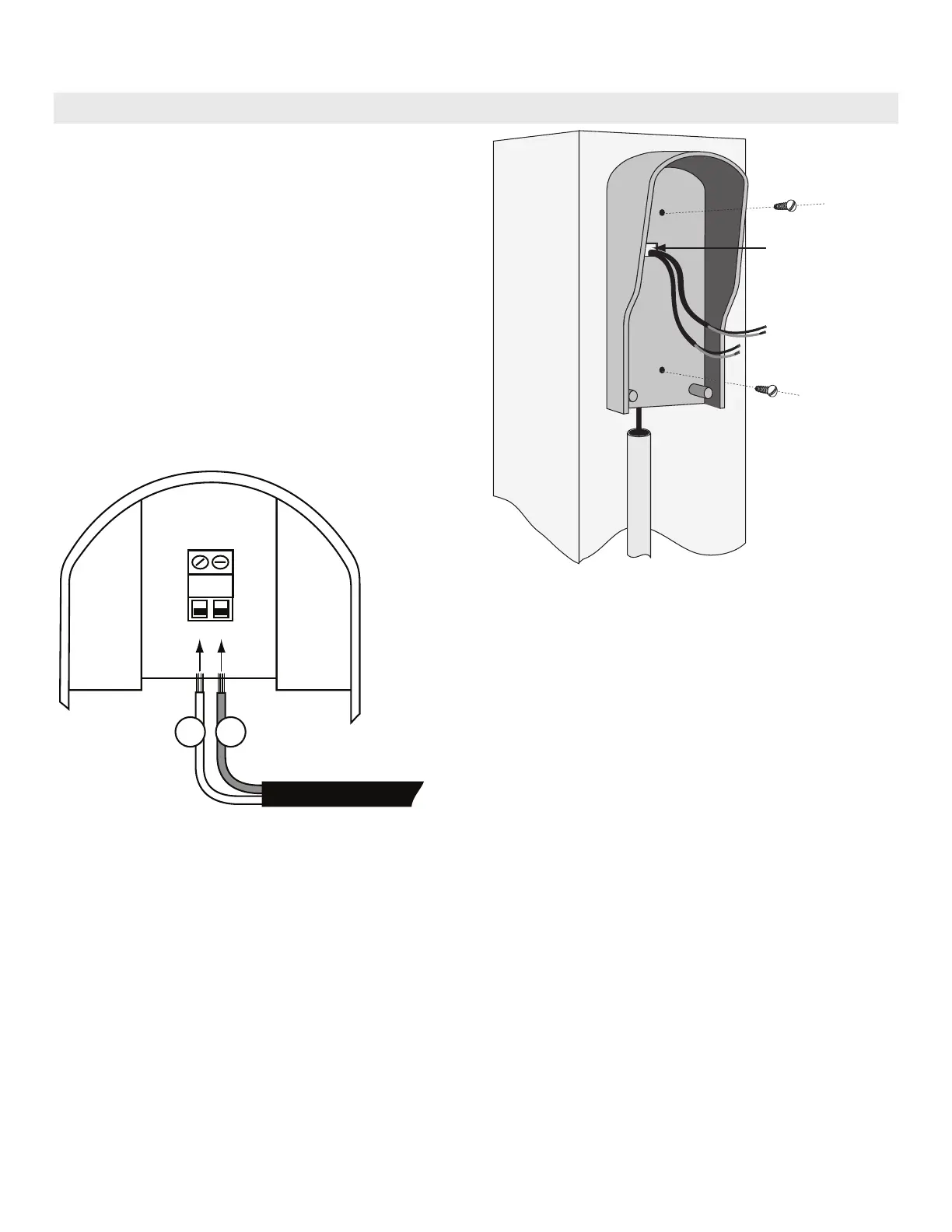
Remove the small rectangular knock-out on the back of the
keypad cover and pull the wire into the cover. Then mount the
cover to the post using the screws provided. (Figure 6)
Step 2: Strip the wires back 3/16” and attach the wires to the
terminal block marked OUT COM on the keypad control board as
shown in (Figure 7) making sure to keep track of polarity. Connect
the other end to the opener’s control board as shown in Control
Board Connections section below.
NOTE: For a hard-wired application the 318 MHz RF transmitter
is automatically disabled.
OUT COM
Hard-wire from Gate Opener
#
1
#
2
Step 3: With the power to the opener turned OFF. Remove opener control board cover and feed enough of the low voltage keypad
wire through a strain relief to reach the gate opener control board terminals.
Figure 6
Figure 7


 To Next Page