11
Adjusting Slitter Blades
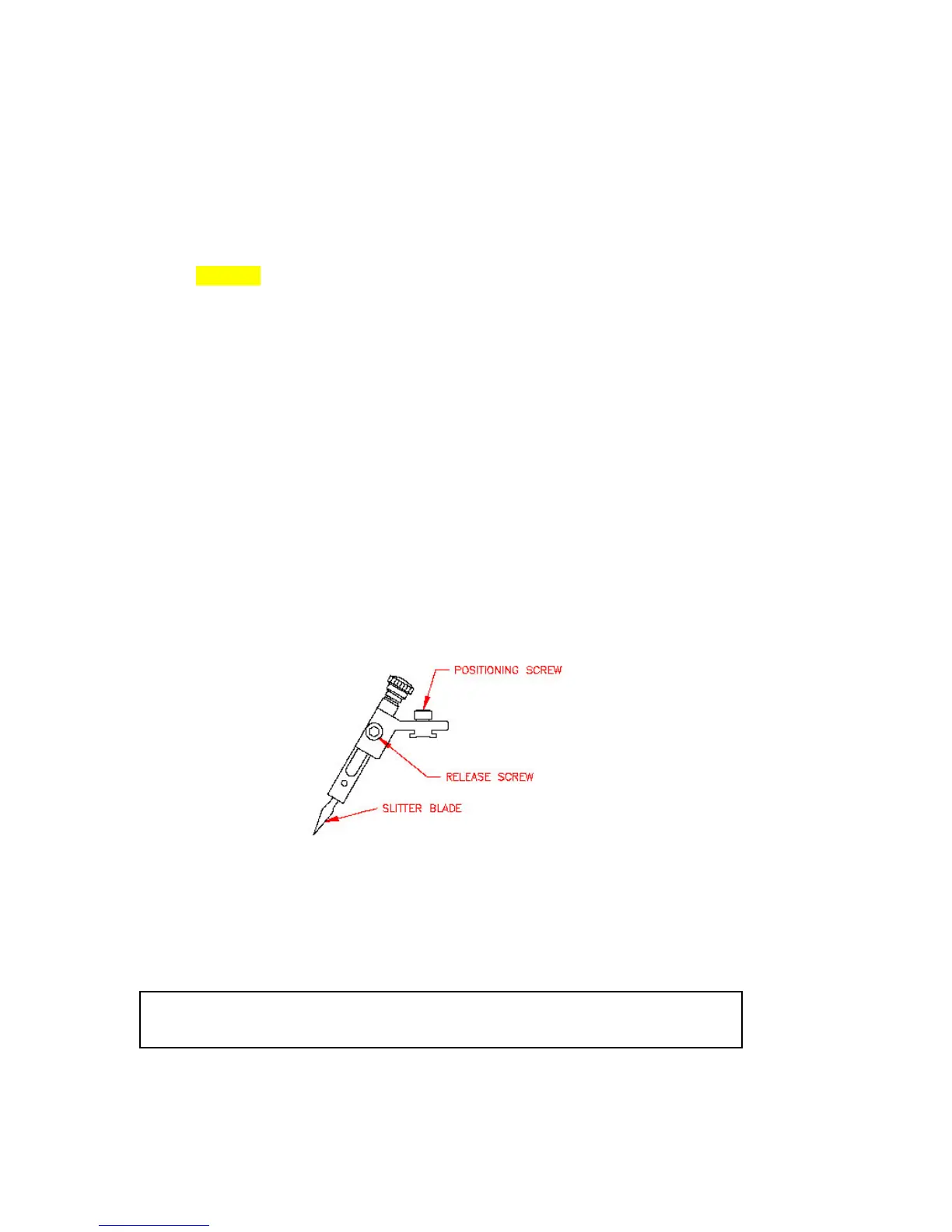
The slitter (figure 8) may be set to trim the web to the desired width as it exits the laminator. If an additional slitter
blade is installed (optional), two pages (side-by-side) may be laminated and trimmed in a single operation. (As the web
exits the unit, these pages may then be separated with the additional slitter blade).
Caution! If the blade release knobs are turned too far, the slitter blade may fall
out of its guide and come in contact with the rubber rollers. If this happens, the
rollers could be damaged. Never turn the blade release knobs more than one turn
to position the blades.
To Adjust the Slitter Blades:
1. Be sure the slitter blades are positioned above the laminating web. If they are lowered, loosen the release screws and
lift the blades away from the web. Tighten the screws to lock the blades in place.
2. Loosen the positioning screws (counter clockwise) and slide the slitter blades left or right to the desired width of the
edge seal. Lock the blades left or right to desired position by turning the positioning screws (clockwise).
3. Carefully, loosen each release screw and lower the blade in contact with the web. Tighten the release screw.
4. To prevent accidental damage to rollers, remove slitter blades when not in use.
Figure 8
Laminating…
1. Be sure the heaters have been turned on and are at the proper temperature. The fans should be turned on for
laminating 3mil and heavier.
Caution! Do not allow the temperature to exceed 350°F as this could cause the
laminating film to melt on the heat shoes.


 To Next Page