EN
Removing the belt systems
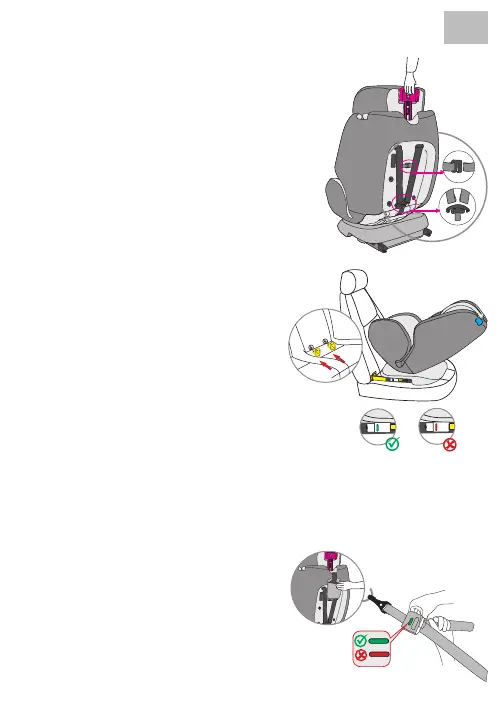
• Loosen the belt.
• Unlock the harness and shoulder pads on the back
and then remove the belt system.
Installation with Isox
• Push the yellow insertion aids through the slot in
the upholstery between backrest and seat and into
the Isox brackets.
• Make sure the at side is facing down. This is not
necessary if the vehicle already has xed insertion
aids.
• Press both side Isox connector buttons to extend
the Isox connectors in length.
• Insert the Isox connectors into the insertion aids
and press until you hear them click into place.
• The display on both sides only turns green when
the connections are made. Press the child car seat
against the backrest until it is secure.
Installation with Top-Tether
• Take the top tether out of the pocket.
• To release the top tether, press the grey adjustment
button with one hand and pull the side of the belt
anchor to the required length with the other hand.
• To attach the Top-Tether, attach the anchor to
the attachment point on the car seat and pull it
as tightly as possible. The indicator does not turn
green until the belt is locked.



 To Next Page