EasyManua.ls Logo

Mile Marker 7076 - User Manual

Mile Marker 7076
4 pages
Print Icon
To Next Page IconTo Next Page
Loading...
PLUG N PLAY
WIRELESS WINCH REMOTE
Model Number: 7076
2121 Blount Road Pompano Beach, FL 33069 MileMarker.com 1.800.886.8647PAGE 1
IMPORTANT
If your control box has any other pin
configuration other than the standard IP67
waterproof 4 pin, use the pig tail provided
(Item 3)
ITEMS IN THE BOX
1. USB cable
2. Mounting hardware
3. Pig tail (plug)
4. Remote control holder
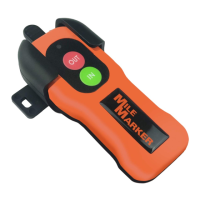
5. Remote control
6. Control box
IP67 waterproof
2
3
5
6
1
4
Question and Answer IconNeed help?

Do you have a question about the Mile Marker 7076 and is the answer not in the manual?

Summary

Installation: Plug N Play

Pairing Wireless Remote to Control Box

Detailed steps for pairing the wireless remote with the control box using button sequences on both units.

Installation: Using Pigtail

Pigtail Wiring and Placement

Instructions for wiring the pigtail plug and options for its physical placement on the solenoid box.

Charging Your Wireless Remote Control

For Best Performance

Warranty Information

Mile Marker 7076 Specifications

General IconGeneral
BrandMile Marker
Model7076
CategoryRemote Control
LanguageEnglish