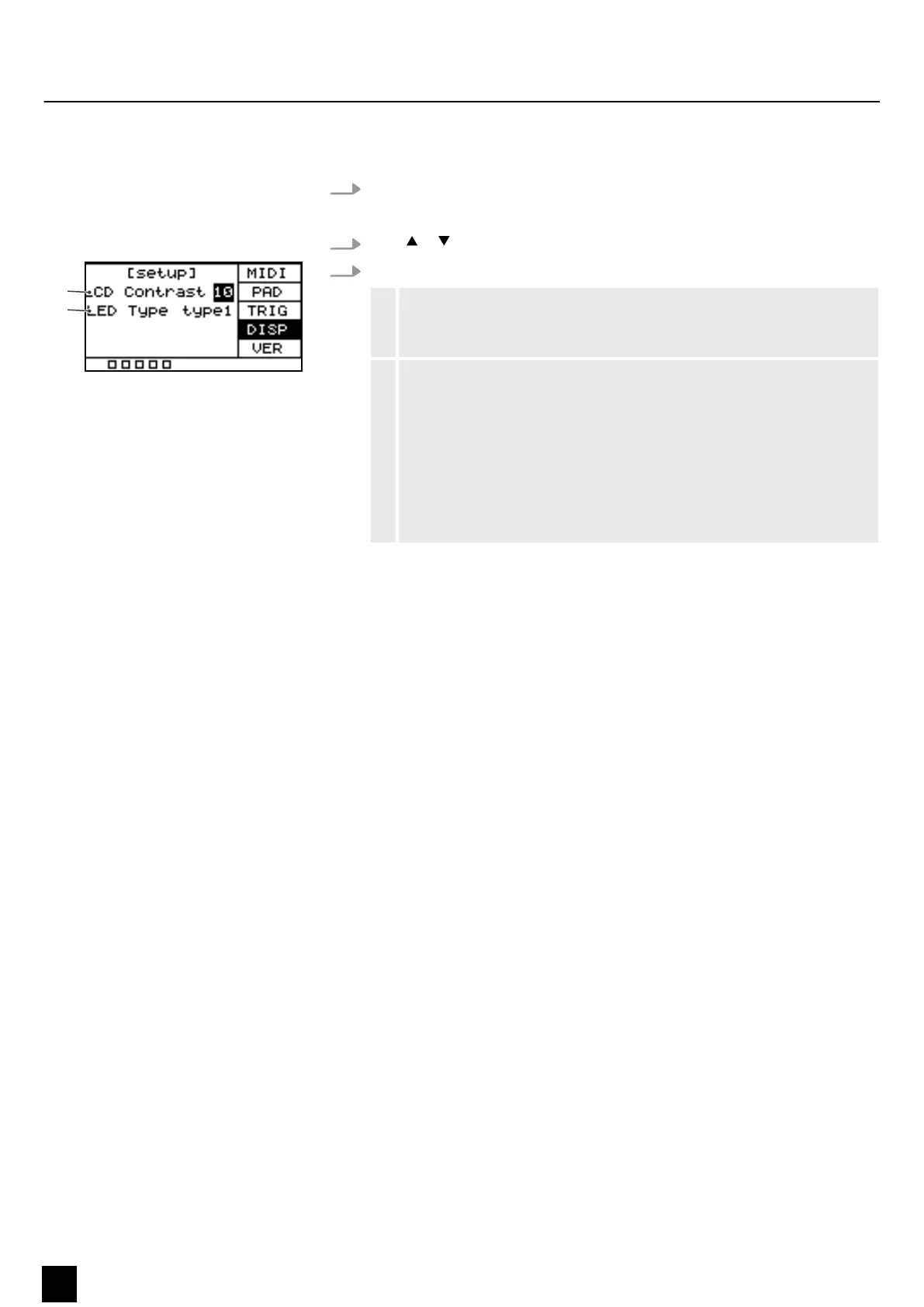
5.10.4 Display settings
1. Press [SETUP] to enter the settings menu.
ð
The display shows the respective submenus.
2.
Press or to select the menu item ‘DISP’ .
3. Press [SELECT] repeatedly to switch between submenus.
1 Shows the display's contrast.
Use the rotary control or press [–/+] to set the display contrast between
‘0’ and ‘20’ . Conrm the selection with [OK].
2 Shows the behaviour of the LEDs below the pads.
Use the rotary control or press [–/+] to set the LEDs' behaviour.
‘o’ : The LEDs below the pads do not light up when the pads are played.
Conrm the selection with [OK].
‘type1’ : The LEDs below the pads light up for 0.5 seconds when the pads
are played. Conrm the selection with [OK].
‘type2’ : The LEDs below the pads light up immediately when the pads
are played. Conrm the selection with [OK].
ð
The display shows ‘Save successfully!’ .
5.11 Using a USB Flash drive (USB stick)
The Percussion Pad detects USB ash drives (USB stick) that are in the exFAT, FAT32
or FAT format and are not partitioned. We recommend formatting the USB ash drive
(USB stick) before using it with the percussion pad.
Operating
26
NonaPad
Sampling Percussion Pad


 To Next Page