EasyManua.ls Logo

Miller Subarc DC 1250 - User Manual

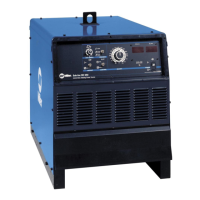
Miller Subarc DC 1250
56 pages
Print Icon
To Next Page IconTo Next Page
Loading...
Processes
Description
Arc Welding Power Source
OM-265 363B 2014−05
Subarc DC 650/800, 1000/1250
Visit our website at
www.MillerWelds.com
File: Submerged (SAW)
Submerged Arc (SAW) Welding
Digital Power Sources
CE

Table of Contents

Questions and Answers

  • H
    Heather EllisAug 12, 2025
    What to do if my Miller Subarc DC 1250 has no weld output and the power switch light is off?
    • J
      James WilliamsAug 12, 2025
      First, ensure the line disconnect device is in the On position. Next, check for any open line fuses and replace them if necessary. Verify that the input power connections are properly connected and the jumper link is in the correct position. Finally, inspect fuse F1 and replace it if it's blown.
  • M
    Melissa SimonAug 16, 2025
    What to do if my Miller Power Supply has no weld output but the power switch light is on?
    • A
      Abigail HardyAug 16, 2025
      If the unit has overheated, allow it to cool down with the fan on. If you are using a remote control, ensure the Output (Contactor) switch is in the Remote position and the remote control is properly connected. If not using a remote, put the switch in the On position. If the issue persists, check, repair, or replace the remote device.
  • J
    Jeffrey PenningtonAug 19, 2025
    Why is my Miller Subarc DC 1250 Power Supply fan not operating?
    • D
      David FosterAug 20, 2025
      Check for any obstructions that might be blocking the fan's movement and remove them. If there are no obstructions, have a Factory Authorized Service Agent check the fan motor.
  • A
    Adrian MurphyAug 25, 2025
    What to do if my Miller Subarc DC 1250 Power Supply has no weld output, the power switch light is on, and the fan is off?
    • M
      michael25Aug 25, 2025
      First, check that the input power connections are properly connected. Next, check for any open line fuses and replace them, or reset the circuit breaker if it has tripped. If the problem continues, turn the power switch off and then back on. If there is still no output, have a Factory Authorized Service agent inspect the SCR’s.
  • J
    Joshua OlsonAug 27, 2025
    Why does my Miller Subarc DC 1250 Power Supply have limited weld output and low open-circuit voltage?
    • A
      Alexandria AdamsAug 27, 2025
      Check the position of the Remote Amperage/Voltage Control switch. Also, check for any open line fuses and replace them if necessary. Ensure that the input power connections are properly connected and that the jumper link is in the correct position. Finally, clean and tighten all weld output connections.
  • J
    John DelacruzAug 31, 2025
    Why does my Miller Subarc DC 1250 provide only maximum or minimum weld output?
    • J
      Justin PierceAug 31, 2025
      Check the position of the Remote Amperage/Voltage Control switch. If the issue persists, have a Factory Authorized Service Agent check the control board PC1 and hall device HD1.
  • A
    Aaron SanchezSep 4, 2025
    What causes erratic or improper weld output on my Miller Subarc DC 1250?
    • K
      kristen75Sep 4, 2025
      Ensure you are using the correct size and type of weld cable. Clean and tighten all weld connections. Also, check the wire drive installation according to the Owner’s Manual. If the issue remains, have a Factory Authorized Service Agent check the control board PC1 and hall device HD1.
  • C
    Christopher DurhamSep 7, 2025
    What to do if there is no 24 volts AC output at Remote receptacle RC1 on my Miller Subarc DC 1250 Power Supply?
    • D
      Dawn SalasSep 8, 2025
      Reset the supplementary protector CB2.

Summary

SECTION 1 - SAFETY PRECAUTIONS - READ BEFORE USING

1-2. Arc Welding Hazards

Details potential dangers and safety measures related to arc welding.

SECTION 4 - INSTALLATION

4-3. Specifications For SubArc DC Digital Power Sources

Lists detailed technical specifications for the power source models.

4-5. Duty Cycle And Overheating

Explains duty cycle ratings and precautions against overheating.

4-11. Electrical Service Guide

Provides guidance for electrical service and input power requirements.

4-12. Placing Jumper Links

Details how to adjust jumper links for different input voltages.

SECTION 5 - SYSTEM CONNECTIONS

SECTION 6 - MAKING WELD OUTPUT CONNECTIONS

6-1. Weld Output Terminals And Selecting Cable Sizes*

Guides on selecting appropriate weld cable sizes based on amperage and length.

6-3. Basic Sub Arc (SAW) Welding

Outlines the basic setup and connections for Sub Arc welding.

SECTION 7 - POWER SOURCE OPERATION

7-1. Controls

Describes the functions of the power source controls and indicators.

SECTION 8 - PLC OPERATION

SECTION 9 - MAINTENANCE AND TROUBLESHOOTING

9-1. SubArc System Help Codes

Lists and explains system help codes for troubleshooting issues.

9-4. Troubleshooting Table For Power Source

Provides a table of common problems and their remedies for the power source.

SECTION 10 - ELECTRICAL DIAGRAM

Miller Subarc DC 1250 Specifications

General IconGeneral
Duty Cycle100%
Efficiency85%
Protection ClassIP23
Cooling MethodForced air
Rated Output1250 A at 44 VDC, 100% duty cycle
PolarityDC
Output Current Range150-1250 A
Weight985 lb (447 kg)

Related product manuals