Notes
● Automatic re-lock feature is a separate feature of [automatic/manual] lock ability, so it is
automatically locked again if the door is not opened within 7 seconds of opening the product.
● Even when [automatic/manual] lock feature is set to [manual lock], the re-lock feature oper-
ates the same.
● If the product is set to [dual lock] setting status, the door cannot be opened via passcode.
● In the [dual lock] setting status, opening or closing the number plate cover or pressing the
[lock button] will notify the [dual lock] setting status through red lamp and sound.
● Even in the [dual lock] setting status, turning the manual switchgear device with hands can
open the door.
Notes
● When the product is opened via [manual switchgear], [automatic re-lock] does not operate.
● What is [automatic lock]? It is a feature that automatically locks the product when the door is
closed.
● When it is set to [automatic], pressing hand to door detection sensor will lock the product as
well.
● When it is set to [manual lock], the product is not locked even when the door is closed.
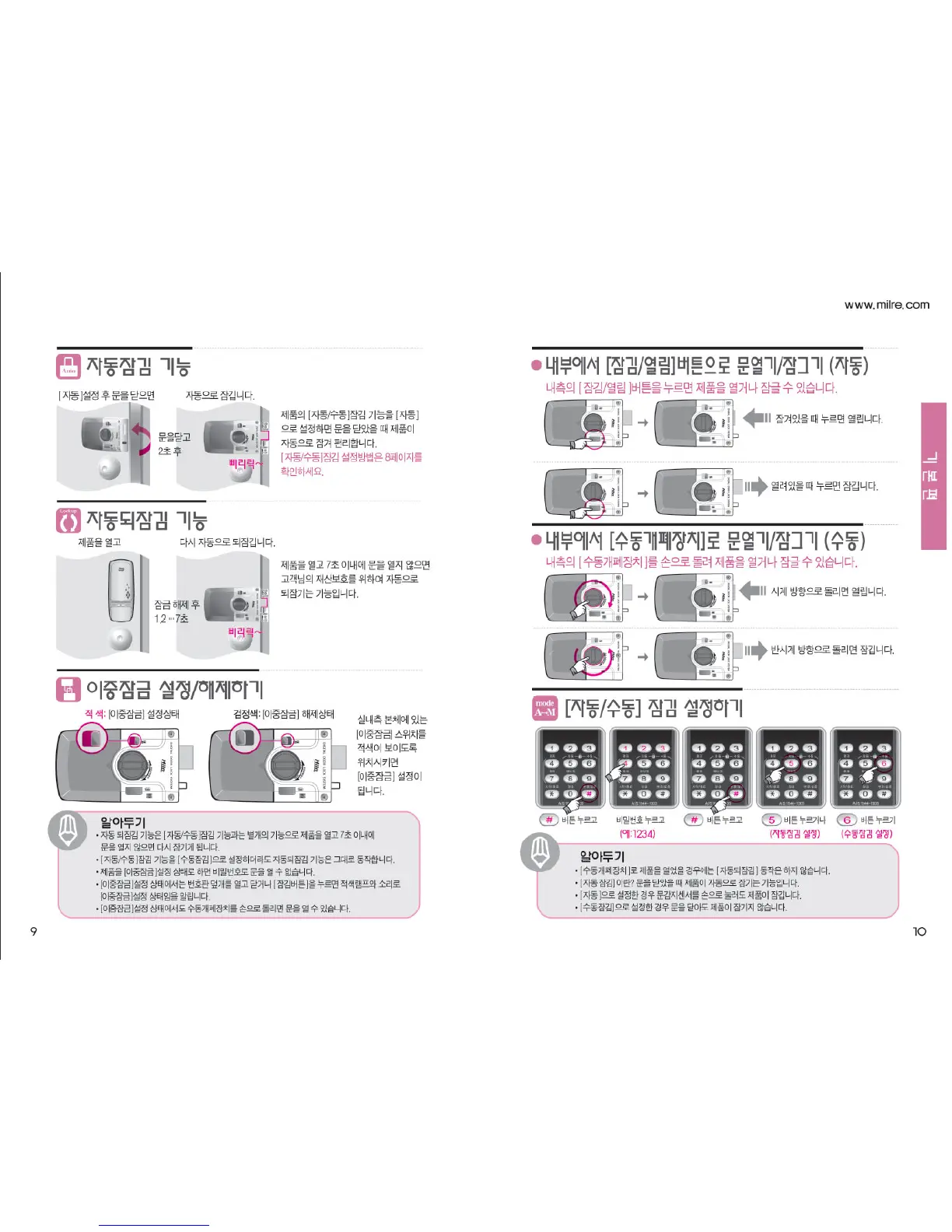
Automatic lock feature
Opening the door from the inside with
[lock/open] button & [manual switchgear]
/locking (automatic & manual)
Setting [automatic/manual] lock
When the door is closed
after [automatic] setting
It is locked automatically
Because the product is auto-
matically locked by closing the
door while setting the [auto-
matic/manual] lock feature of
the product to [automatic], it is
convenient.
When it is pressed while it is
locked, it becomes opened.
Press
passcode
Press
button
When it is turned in clockwise
direction, it is opened.
When it is turned in counter-
clockwise direction, it is locked.
When it is pressed while it is
open, it becomes locked.
2 seconds
after closing
the door
Automatic re-lock feature
The product is opened
It is automatically
locked again
Dual lock setting/disabling
Red : [dual lock] setting status Black : [dual lock] disabling status
If the door does not open
within 7 seconds after opening
the product, this feature auto-
matically locks it again for the
protection of your property.
When the [dual lock]
switch on the inside
main unit is posi-
tioned to show red
color, [dual lock] is
set.
7 seconds
after disabling
the lock
When the [lock/open] button & [manual switchgear] on the inside is pressed,
the product can be opened or locked.
Basics
Press button
(automatic lock setting)
Press
button
Press button
(manual lock setting)


 To Next Page