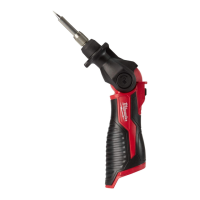
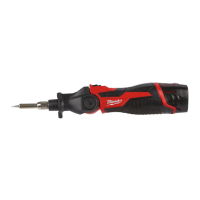
This document provides original instructions for the Milwaukee M12 SI soldering iron, a heavy-duty tool designed for professional use. The device is part of the Milwaukee M12 system, indicating compatibility with M12 battery packs and chargers.
The M12 SI soldering iron is engineered for soldering and tinning electrical components, cables, and conductors, specifically for applications away from a mains supply. It is not intended for any other use beyond its specified purpose.
Function Description:
The soldering iron operates by heating a tip to a specific temperature, allowing for the melting of solder to create electrical connections. The device features an indicator light that communicates its status:
- Blinking Green: Indicates the tool is currently heating up.
- Continuous Green: Signifies that the solder melt temperature (between 200-400°C) has been reached and the tool is ready for use.
- Continuous Red: Indicates that the tool is in a cooling state.
The tool is battery-powered, ensuring portability and flexibility for various work environments. It incorporates a mechanism for easy battery pack insertion and removal, as well as a power button for activation and deactivation. An integrated LED light illuminates the work area, enhancing visibility during soldering tasks.
Usage Features:
Before any work on the machine, it is crucial to remove the battery pack to prevent accidental activation and ensure safety.
Battery Insertion and Removal:
- To insert the battery pack, align it with the tool's battery slot and slide it in until it clicks into place, indicating a secure connection.
- To remove the battery pack, press the release button (usually located on the battery pack itself or the tool's handle) and slide the battery out.
Powering On/Off:
- To turn the soldering iron ON, press and hold the power button until the tool activates. The indicator light will begin blinking green as it heats up.
- To turn the soldering iron OFF, press and hold the power button until the tool deactivates. The indicator light will turn continuous red as it cools down.
Tip Temperature Indication:
The indicator light provides real-time feedback on the tip's temperature status, guiding the user on when the tool is ready for soldering and when it is safe to handle after use.
Work Area Illumination:
The integrated LED light can be activated to illuminate the soldering area, which is particularly useful in dimly lit environments or for intricate work.
Tip Replacement:
The soldering iron features a mechanism for replacing the soldering tip. This involves:
- Ensuring the tool is off and the tip is cool before attempting replacement. The tip temperature indicator should be off.
- Unscrewing or releasing the retaining mechanism that holds the tip in place.
- Carefully removing the old tip.
- Inserting the new tip and securing it with the retaining mechanism.
Safety Precautions during Use:
- Always work in well-ventilated areas as soldering produces fumes and smoke.
- Wear personal protective equipment, including safety goggles or glasses with side shields, especially when using chemicals like flux and solder paste.
- Keep hands and fingers behind the finger guard to avoid contact with the hot tip, which can cause serious burns.
- Never stand or store the tool upright on the battery pack, as it could tip over and cause contact between the hot tip and flammable materials, leading to a fire hazard. Always set or store the tool on its side when not in use.
Maintenance Features:
Regular maintenance ensures the longevity and safe operation of the Milwaukee M12 SI soldering iron.
Battery Care:
- Battery packs that have not been used for some time should be recharged before use.
- Avoid exposing battery packs to temperatures exceeding 50°C (122°F) to prevent reduced performance and overheating.
- Keep the contacts of chargers and battery packs clean.
- For optimal battery life, fully charge battery packs after use.
- Remove the battery pack from the charger once it is fully charged to achieve the longest possible battery life.
- For storage longer than 30 days, store battery packs below 27°C and away from moisture, maintaining a 30%-50% charged condition. Recharge the pack every six months during storage.
- Ensure the tool is off and the tip is cool before cleaning.
- Clean the soldering tip regularly to remove solder residue and oxidation, which can affect performance.
- Keep the tool's body clean and free from debris.
General Maintenance:
- Use only Milwaukee accessories and spare parts.
- If components require replacement that are not described in the manual, contact a Milwaukee service agent.
- Do not immerse the tool, battery pack, or charger in fluid, and prevent fluid from flowing inside them, as corrosive or conductive fluids can cause a short circuit, leading to fire, personal injury, or product damage.
Disposal:
- Do not dispose of used battery packs in household refuse or by burning them. Milwaukee Distributors offer retrieval of old batteries for environmentally compatible recycling.
- Do not store battery packs with metal objects to avoid short-circuit risk.
- Electric tools and batteries that have reached the end of their life must be collected separately and returned to an environmentally compatible recycling facility. Check with local authorities or retailers for recycling advice.
Transporting Lithium Batteries:
- Lithium-ion batteries are subject to Dangerous Goods Legislation. Transport must comply with local, national, and international provisions.
- Users can transport batteries by road without further requirements.
- Commercial transport by third parties is subject to Dangerous Goods regulations and must be carried out by appropriately trained persons.
- When transporting, ensure battery contact terminals are protected and insulated to prevent short circuits.
- Secure the battery pack against movement within packaging.
- Do not transport cracked or leaking batteries. Consult the forwarding company for further advice.

 Need help?
 General

 To Next Page
