7
GETTING STARTED
FIRST SETUP
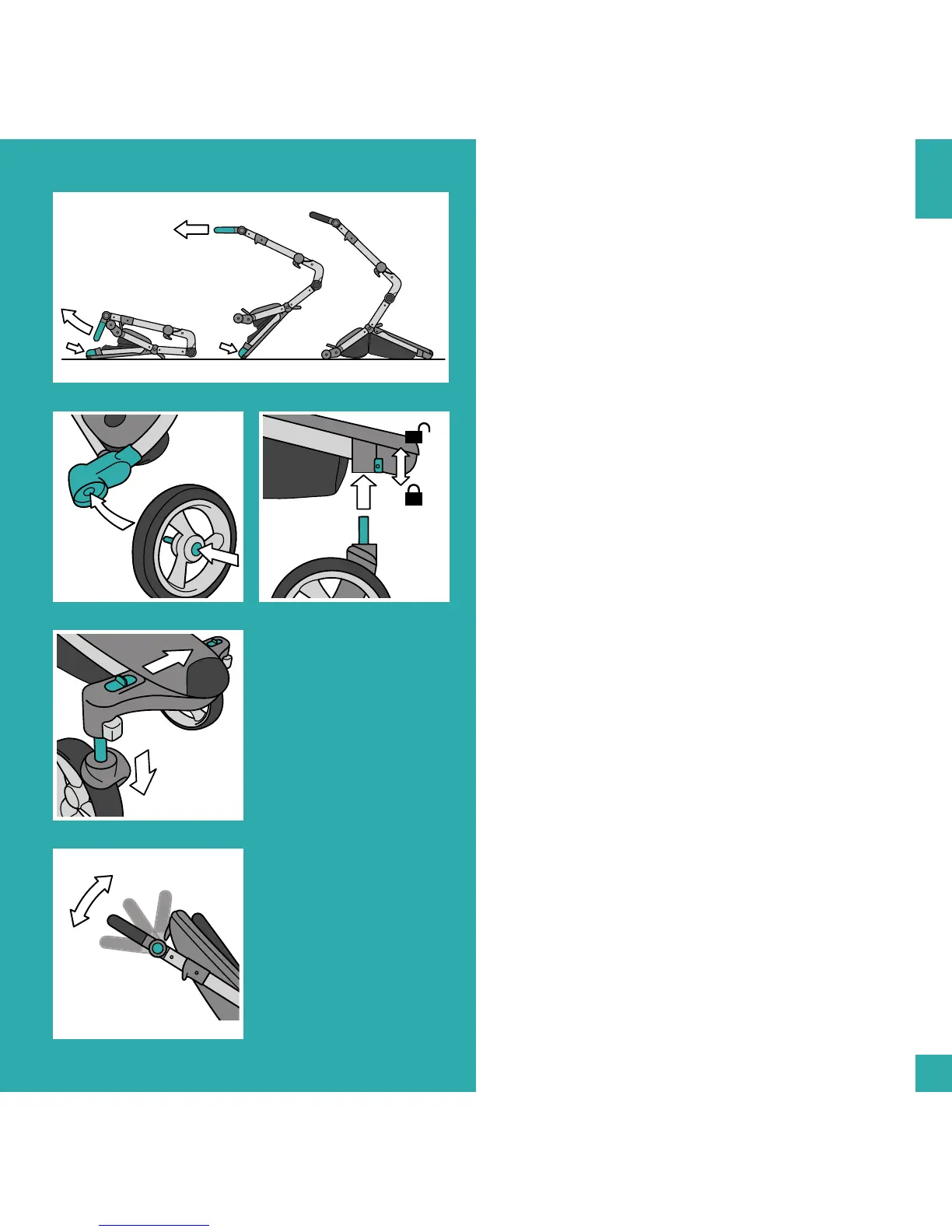
1. Unfold chassis
Pull up the handlebar while holding down the p of the
chassis with your foot. Connue to pull the handlebar
towards you unl the chassis completely unfolds and
stands by itself.
WHEELS
• Please note the L/R indicaon on the chassis and on
each wheel.
2. Aach rear wheels
Press in the wheel axle hub and insert the axle into the
wheel ng. Check if the wheels are properly aached by
aempng to pull them out again.
3. Remove rear wheels
Press in the wheel axle hub and pull the wheel o.
4. Aach front wheels
Insert the wheel rod into the wheel ng and push it in
unl it clicks.
5. Front wheel swivel lock
Use the front wheel swivel lock when you are using xari
on rough terrain.
Push the swivel lock buon down to acvate. Pull it up
again to deacvate it.
6. Remove front wheels
Slide the unlock buon sideways and pull out the front
wheel.
HANDLEBAR HEIGHT
7. Adjust handlebar height
Press and hold both buons located on the outside of
the handlebar and rotate the handlebar to the desired
posion.


 To Next Page