EasyManua.ls Logo

Minibar Systems SmartFridge 50 - User Manual

Minibar Systems SmartFridge 50
11 pages
Print Icon
To Next Page IconTo Next Page
Loading...
Minibar Systems
SmartFridge 50 Full Glass Door User’s Guide
100-127V~60Hz: 50-G-AC-ET
220V-240V~50/60Hz: 50-G-AC-ET
SmartFridge 50 Full Glass Door User's Guide_Rev-5.doc Page 1
SmartFridge 50
Full Glass Door
User’s Guide
Full Glass Door
Question and Answer IconNeed help?

Do you have a question about the Minibar Systems SmartFridge 50 and is the answer not in the manual?

Summary

Description of the SmartFridge

Adjustable Shelves

Shelves can be placed on guides inside the SmartFridge. Store perishable foods towards the back/rear.

Defrost Water Outlet

The interior is cooled by a plate under which is a channel and drain outlet for defrosting water. Keep free from blockages.

Door Liner

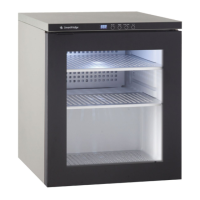
The standard door liner consists of a full glass door and comes standard with a door handle.

LED Control Panel Overview

The Control Panel has four buttons and a LED display. See 'Use of the LED Control Panel' for more information.

Dimensions

Provides height, width, and depth specifications for the SmartFridge - 50 Full Glass Door model.

Location and Ventilation Requirements

Choosing the Right Location

Place the SmartFridge in a dry and regularly ventilated room, away from heat sources and direct sunlight.

Ventilation - Basic Principles

Explains convection cooling and requirements for the exhaust vent, ensuring heat is not trapped.

Grounding Instructions

Installation and Initial Use

Before Putting in Use

Let the SmartFridge stand for 24 hours before connecting to power to prevent cooling system malfunctions.

Using the LED Control Panel

Display Information

Describes the LED display, characters, decimal points, and error indicators like 'EL' and 'EH'.

Control Buttons

Explains the function of ON/OFF, SNOOZE, QUICK COOL, and °F/°C buttons for operating the unit.

Operational Modes and Functions

Details operation modes (DOOR, ON, OFF, STOP, SNOOZE), Quick Cool, Defrost, and Failure indicators.

Special Features and Settings

Covers 3-minute delay, door open to ON, auto-off display, GONG test, and temperature setting.

Maintenance and Cleaning

Cleaning the SmartFridge

Instructions for cleaning the interior, exterior, and detachable accessories using neutral cleaning agents.

Reversing the Door Hinge

Step-by-step guide with diagrams on how to reverse the door hinge for optimal placement.

Automatic Defrosting

Explains the automatic defrosting process and how defrost water is managed.

Turning Off When Not in Use

Steps to take when not using the SmartFridge for extended periods, including disconnection and cleaning.

Miscellaneous Information

Instructions for Use Summary

General instructions for safe operation. Emphasizes saving these instructions and not for outdoor use.

Environmental Considerations

Information on environmentally friendly packaging and recycled/chlorine-free paper for instructions.

Important Safety and Operational Notes

Covers safety regarding old locks, power connection, repairs by qualified personnel, and using correct tools.

Disposal of SmartFridge

Guidance on safe disposal, removing locks, and legal disposal of refrigerant and insulating substances.

Troubleshooting Guide

Unit Fails to Operate

Checks for power cord connection, power supply, and confirms the unit is working.

Continuous Cooling System Operation

Identifies causes like frequent door opening, poor seal, or inadequate ventilation.

Ice Formation on Inner Rear Wall

Addresses ice buildup, manual defrosting, and causes like door seal issues or frequent door opening.

Water Leaking from Unit

Diagnoses leaks due to clogged discharge outlets or defrost water management issues.

Noise Issues

Explains normal operating noise and checks for installation issues causing rattling or vibration.

Contact Information and Support

Energy Saving Tips

Provides advice on reducing energy consumption, such as minimizing door openings and ensuring ventilation.

Minibar Systems Customer Support

Contact details, hours of operation, and services offered by customer support in the United States.

Proof of Purchase and Service

Warranty and Record Keeping

Instructions to keep proof of purchase and record model/serial numbers for warranty purposes.

Service Assistance

Steps for seeking further assistance if unsatisfied with service, including contact details.

Summary

Description of the SmartFridge

Adjustable Shelves

Shelves can be placed on guides inside the SmartFridge. Store perishable foods towards the back/rear.

Defrost Water Outlet

The interior is cooled by a plate under which is a channel and drain outlet for defrosting water. Keep free from blockages.

Door Liner

The standard door liner consists of a full glass door and comes standard with a door handle.

LED Control Panel Overview

The Control Panel has four buttons and a LED display. See 'Use of the LED Control Panel' for more information.

Dimensions

Provides height, width, and depth specifications for the SmartFridge - 50 Full Glass Door model.

Location and Ventilation Requirements

Choosing the Right Location

Place the SmartFridge in a dry and regularly ventilated room, away from heat sources and direct sunlight.

Ventilation - Basic Principles

Explains convection cooling and requirements for the exhaust vent, ensuring heat is not trapped.

Grounding Instructions

Installation and Initial Use

Before Putting in Use

Let the SmartFridge stand for 24 hours before connecting to power to prevent cooling system malfunctions.

Using the LED Control Panel

Display Information

Describes the LED display, characters, decimal points, and error indicators like 'EL' and 'EH'.

Control Buttons

Explains the function of ON/OFF, SNOOZE, QUICK COOL, and °F/°C buttons for operating the unit.

Operational Modes and Functions

Details operation modes (DOOR, ON, OFF, STOP, SNOOZE), Quick Cool, Defrost, and Failure indicators.

Special Features and Settings

Covers 3-minute delay, door open to ON, auto-off display, GONG test, and temperature setting.

Maintenance and Cleaning

Cleaning the SmartFridge

Instructions for cleaning the interior, exterior, and detachable accessories using neutral cleaning agents.

Reversing the Door Hinge

Step-by-step guide with diagrams on how to reverse the door hinge for optimal placement.

Automatic Defrosting

Explains the automatic defrosting process and how defrost water is managed.

Turning Off When Not in Use

Steps to take when not using the SmartFridge for extended periods, including disconnection and cleaning.

Miscellaneous Information

Instructions for Use Summary

General instructions for safe operation. Emphasizes saving these instructions and not for outdoor use.

Environmental Considerations

Information on environmentally friendly packaging and recycled/chlorine-free paper for instructions.

Important Safety and Operational Notes

Covers safety regarding old locks, power connection, repairs by qualified personnel, and using correct tools.

Disposal of SmartFridge

Guidance on safe disposal, removing locks, and legal disposal of refrigerant and insulating substances.

Troubleshooting Guide

Unit Fails to Operate

Checks for power cord connection, power supply, and confirms the unit is working.

Continuous Cooling System Operation

Identifies causes like frequent door opening, poor seal, or inadequate ventilation.

Ice Formation on Inner Rear Wall

Addresses ice buildup, manual defrosting, and causes like door seal issues or frequent door opening.

Water Leaking from Unit

Diagnoses leaks due to clogged discharge outlets or defrost water management issues.

Noise Issues

Explains normal operating noise and checks for installation issues causing rattling or vibration.

Contact Information and Support

Energy Saving Tips

Provides advice on reducing energy consumption, such as minimizing door openings and ensuring ventilation.

Minibar Systems Customer Support

Contact details, hours of operation, and services offered by customer support in the United States.

Proof of Purchase and Service

Warranty and Record Keeping

Instructions to keep proof of purchase and record model/serial numbers for warranty purposes.

Service Assistance

Steps for seeking further assistance if unsatisfied with service, including contact details.

Minibar Systems SmartFridge 50 Specifications

General IconGeneral
BrandMinibar Systems
ModelSmartFridge 50
CategoryRefrigerator
LanguageEnglish

Related product manuals