CHANGING THE RESERVOIR ONLY
MINIMED™ 780G SYSTEM | MEDTRONIC EXTENDED INFUSION SET
- 4 -
Follow the steps to reconnect your infusion set tubing to the cannula housing on your body.
RECONNECT THE INFUSION SET
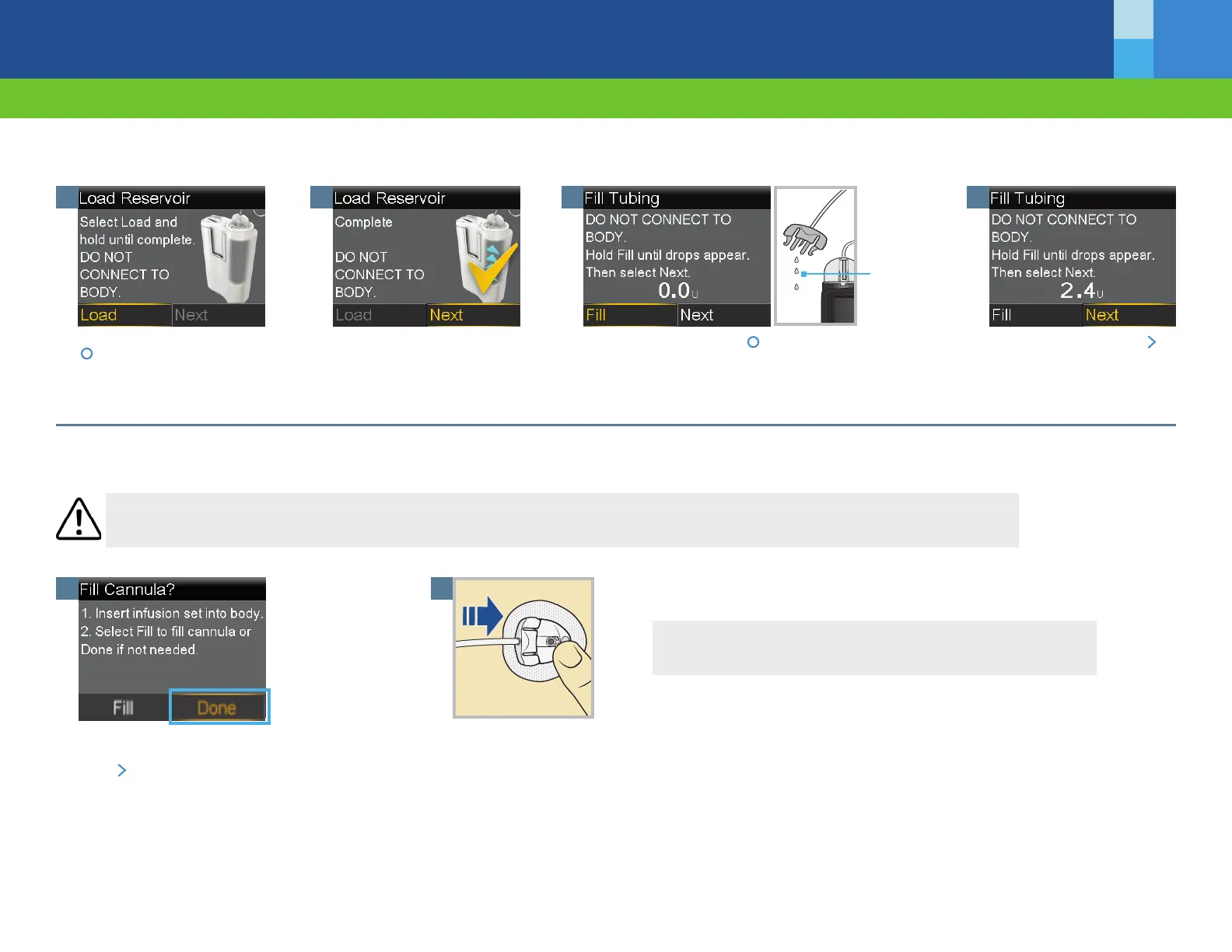
Gently hold the cannula housing steady with your nger.
Then push the site connector straight into the cannula
housing until you hear a click.
2
WARNING DO NOT ll the cannula. Select Done. When reconnecting the infusion set following a reservoir-only change, lling the cannula may result in
the delivery of too much insulin, which could cause hypoglycemia.
1
It is not necessary to ll the cannula because you
did not change your infusion set.
Press
and select Done.
Your reservoir change is now complete.
Remember to check blood glucose 1-3 hours after changing your reservoir.
M014957C001_1
©2021 Medtronic. All rights reserved. All other brands are trademarks of a Medtronic company.
LOAD THE RESERVOIR AND FILL THE TUBING
Select Load and keep holding
.
1
When you see this screen,
select Next.
2
Follow these steps to load the reservoir and ll the tubing.
Drops at
end of
tubing
3
Select Fill and keep holding until you see drops at the
end of tubing, then let go.
4
After you see drops, press
and select Next.
Speak to your healthcare professional for guidance to treat low
blood glucose as part of your insulin therapy.



 To Previous Page