
 Need help?
Do you have a question about the Minka Group MinkaAire Java and is the answer not in the manual?
Details various methods for securing the fan's outlet box to the ceiling structure.
Steps to diagnose and resolve when the fan fails to power on.
Solutions for addressing abnormal noises from the fan during operation.
Guidance on how to correct excessive fan movement or wobble.
Addresses issues with the fan or light switching on/off without user input.
Instructions for resolving interference issues between the remote and fan receiver.
This document serves as an instruction manual and warranty certificate for the Minka-Aire Java ceiling fan. It provides comprehensive guidance on installation, operation, and maintenance, along with important safety information and warranty details.
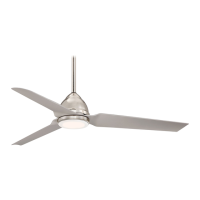
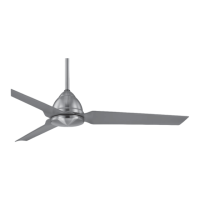
The Minka-Aire Java ceiling fan is designed to provide air circulation and comfort in various indoor and outdoor settings, as it is suitable for use in wet locations. It features a motor assembly with three fan blades, controlled by a remote or wall control system. The fan offers multiple speed settings and the ability to reverse blade rotation, allowing for both warm and cool weather operation. In warm weather, a downward airflow creates a cooling effect, enabling users to set their air conditioner to a warmer temperature without sacrificing comfort. Conversely, in cool weather, an upward airflow moves warmer air from the ceiling area, allowing for a cooler heating unit setting. The fan's control system is equipped with a learning frequency function to prevent interference from other remote units, offering 256 code combinations.
Installation of the Minka-Aire Java fan requires adherence to specific safety rules and electrical connection guidelines. Before beginning installation, power must be shut off at the circuit breaker. The fan must be mounted directly to a building joist or a U.L. Listed metal octagonal outlet box marked "Acceptable for Fan Support," which must be secured directly to the building structure and capable of supporting at least 50 pounds. A minimum clearance of 7 feet from the floor and 18 inches from the tip of the blades to the wall is required for proper operation. The manual provides detailed instructions for mounting options, including scenarios with and without existing mounting boxes or ceiling joists, and notes that longer downrods may be necessary for steep, sloped ceilings.
The hanging process involves securing the hanger bracket to the ceiling outlet box, feeding fan wires through the downrod, and attaching the downrod assembly to the motor assembly. The hanger ball is then placed into the hanger bracket, ensuring the check groove rests firmly over the registration tab to prevent rotation. Electrical connections involve connecting the fan's white and black wires to the receiver's corresponding "TO MOTOR N" and "TO MOTOR L" wires, respectively. The receiver's "AC in N" and "AC in L" wires are connected to the house supply's white (neutral) and black (hot) wires. Ground wires from the hanger ball and hanger bracket are connected to the house ground wire, if present, or to each other. All wire connections must be secured with plastic wire nuts and, as an additional precaution, electrical tape.
After the main assembly, the fan blades are attached to the motor housing using blade support plates and screws. The switch cup plate is then secured to the motor housing, followed by the switch cup, which is turned clockwise until snug.
The fan is operated using a remote control or wall control. The remote control requires a A23 12-volt battery. Buttons on the control unit allow for setting fan speeds (low, medium, high) and turning the fan off. For models with lights, dedicated buttons control the light's ON/OFF function and brightness settings. The light key features an automatic auto-resume feature, retaining the last brightness setting. A slide button on wall control fans turns the power to the fan and light(s) off and on. For full-function remote control units, a dedicated button changes the direction of blade rotation for seasonal comfort. If the remote or wall control lacks this button, a slide reverse switch on the motor housing can be used. It is important to wait for the fan to stop completely before changing the slide switch setting. The fan must be installed within a maximum distance of 40 feet from the transmitting unit for proper signal transmission.
To ensure the longevity and optimal performance of the Minka-Aire Java fan, regular maintenance is recommended. Due to natural movement, connections may loosen over time, so support connections, brackets, and blade attachments should be checked twice a year to ensure they are secure. It is not necessary to remove the fan from the ceiling for these checks.
Periodic cleaning helps maintain the fan's appearance. A soft, lint-free cloth and soapy water should be used for cleaning, as many common household cleaning products contain chemicals that can damage the fan's finish. For models with wood veneer blades, a light coat of furniture polish can be applied for protection and enhanced beauty, and small scratches can be covered with shoe polish. Dust can be removed from the blades using a lint-free, lightly damp cloth or duster. The fan's motor is permanently lubricated, so there is no need for oiling. If the fan includes glass shades, they should be cleaned with lukewarm soapy water and a soft cloth or sponge. It is crucial not to immerse glass shades in hot water or place them in an automatic dishwasher. Before attempting any repairs or maintenance, it is essential to ensure the power is off at the electrical panel box.
Troubleshooting tips are provided for common issues. If the fan does not start, users should check the wall switch, circuit fuses or breakers, and wire connections after turning off the power. If the fan sounds noisy, a 24-hour "break-in" period is suggested, and screws attaching the fan blade holder to the motor hub, the outlet box to the building structure, and the hanger bracket to the outlet box should be checked for tightness. For fan wobble, it's noted that variations in blade density can cause wobble even with matched blades. Users should ensure the outlet box and hanger bracket are secure, and a balancing kit, if provided, should be used to correct excessive wobble. If the fan or light turns on and off unexpectedly, this indicates frequency interference, and steps to change the frequency on the control system are outlined. This involves turning off power, using a small tool to change frequency settings, returning power, pressing and holding the transmitter's "Stop" button within 60 seconds of power-on, and observing the light blink twice (if applicable) to confirm the new frequency has been learned.
 General
| Category | Fan |
|---|---|
| Type | Ceiling Fan |
| Model | Java |
| Blade Span | 52 inches |
| Number of Blades | 5 |
| Motor | AC Motor |
| Control Type | Remote Control |
| Light Kit | Optional |
| Finish | Oil Rubbed Bronze / White |
| Blade Sweep | 52 inches |
| Motor Speeds | 3 |
| Blade Material | Wood |
| Light Included | No |
| Warranty | Limited Lifetime |
| Brand | Minka-Aire |
| Downrod Length | 6 inches |
| Mounting Type | Downrod Mount |

 To Next Page