7
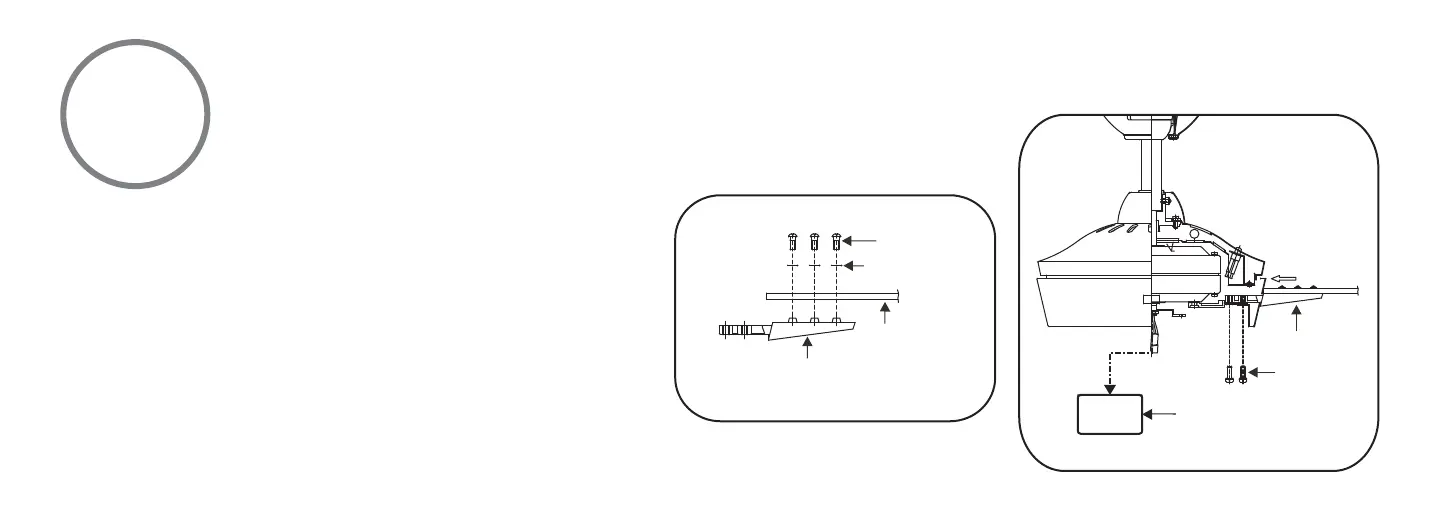
Fig 15
Fig 16
WARNING: The fan motor assembly is shipped with motor
support plate to prevent movement during transportation.
Remove the motor support plate from the fan motor
assembly and discard prior to attaching the blade arms.
(Fig. 16)
Step 1. Attach the fan blades to the blade holders using the
screws and fiber washers provided, tighten screws
securely. (Fig. 15)
Step 2. Insert one fan blade holder into the blade slot on
the motor housing and secure with the screws provided.
Securely tighten screws. Repeat process with other blades.
(Fig. 16)
BLADE INSTALLATION
BLADE HOLDER
SCREWS
FIBER WASHERS
BLADE
BLADE HOLDER
BLADE HOLDER
SCREWS
MOTOR SUPPORT PLATE




 To Next Page