EasyManua.ls Logo

Minolta 7000 - Page 19

Minolta 7000
343 pages
Print Icon
To Next Page IconTo Next Page
To Previous Page IconTo Previous Page
Loading...
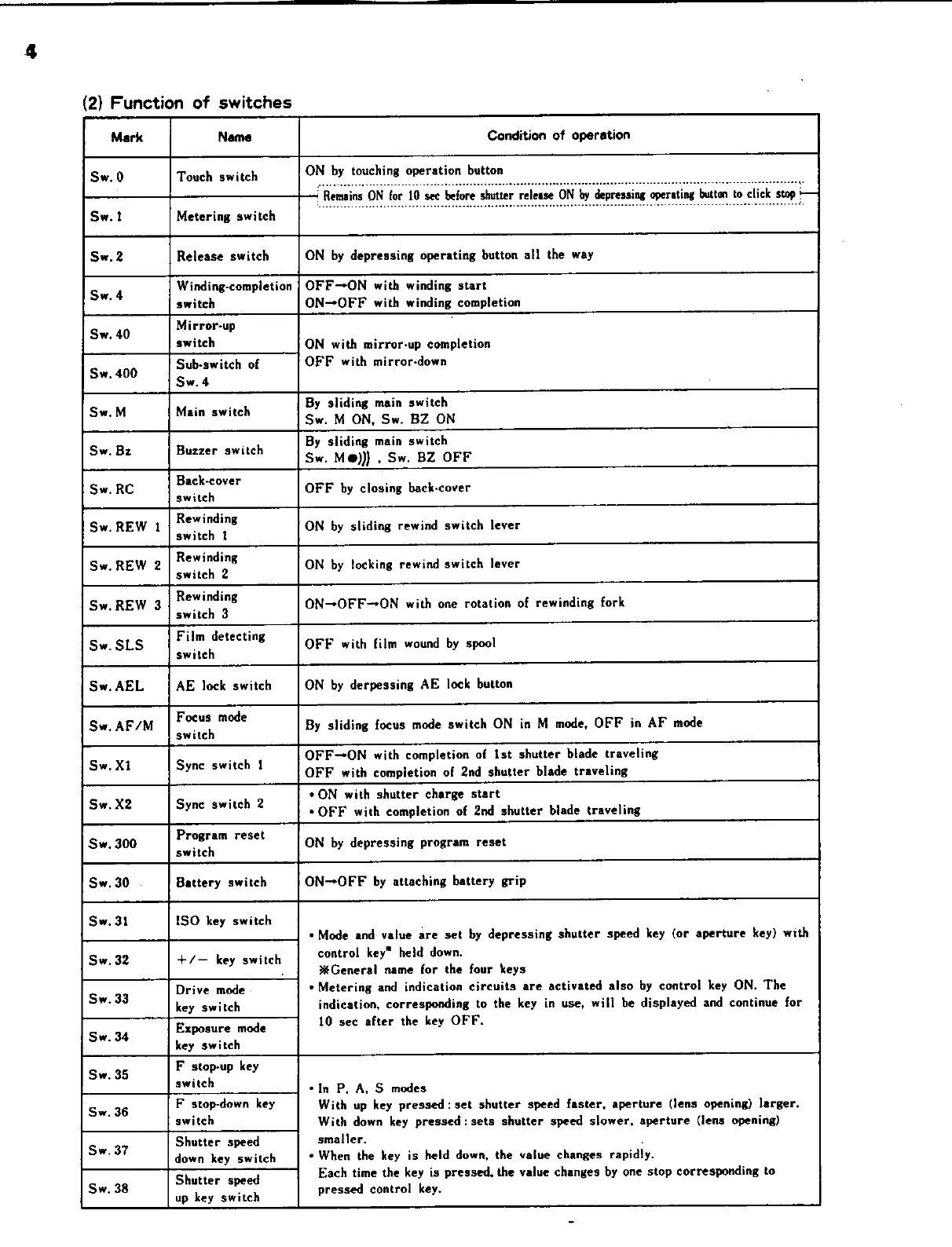
(2}
Function
of
switches
Mark Name
Condition
of
operation
Sw.0
Touch
switch
ON
by
touching
operation
button
‘Remains
ON
for
10
see
before
shutter
release
ON
by
depressing
operating
‘button
to
click
stop
Sw.t
Metering
switch
:
~~
Sw.2
Release
switch
ON
by
depressing
operating
button
all
the
way
Sw.
4
Winding-completion
|
OFF-ON
with
winding
start
.
switch
ON-OFF
with
winding
completion
Sw.
40
Mirror-up
switch
ON
with
mirror-up
completion
Sw.
400
Sub-switch
of
OFF
with
mirror-down
Sw.
4
.
.
By
sliding
main
switch
Sw.M
Main
switch
Sw.
M
ON,
Sw.
BZ
ON
.
By
sliding
main
switch
Sw.
Bz
Buzzer
switch
Sw.
M@)))
.
Sw.
BZ
OFF
Sw.
RC
Back-cover
OFF
by
closing
back-cover
switch
Sw.
REW
1
Rewinding
ON
by
sliding
rewind
switch
lever
switch
i
Sw,
REW
2
Rewinding
ON
by
flocking
rewind
switch
lever
switch
2
Sw.
REW
3
Rewinding
ON—-OFF-*ON
with
one
rotation
of
rewinding
fork
switch
3
Film
detecting
Log
Sw.
SLS
;
OFF
with
film
wound
by
spool
switch
Sw.
AEL
AE
lock
switch
ON
by
derpessing
AE
lock
button
Sw.
AF/M
|
Focus
mote
By
sliding
focus
mode
switch
ON
in
M
mode,
OFF
in
AF
mode
.
OFF—ON
with
completion
of
Ist
shutter
blade
traveling
Sw.
Xl
Sync
switch
1
OFF
with
completion
of
2nd
shutter
blade
traveling
.
¢ON
with
shutter
charge
start
Sw.
X2
Syne
switch
2
©
OFF
with
completion
of
2nd
shutter
blade
traveling
Program
reset
.
Sw.
300
switch
ON
by
depressing
program
reset
Sw.
30
Battery
switch
ON-OFF
by
attaching
battery
grip
Sw,
31
ISO
key
switch
«Mode
and
value
are
set
by
depressing
shutter
speed
key
(or
aperture
key}
with
Sw.
32
+/—
key
switch
control
key”
held
down.
.
General
name
for
the
four
keys
Sw.
33
Drive
mode
.
«Metering
and
indication
circuits
are
activated
also
by
control
key
ON.
The
“-
key
switch
indication,
corresponding
to
the
key
in
use,
will
be
displayed
and
continue
for
Sw.
34
Exposure
mode
10
sec
after
the
key
OFF.
key
switch
Sw.
35
F
stoprup
key
Swite
‘In
P,
A,
S
modes
Sw.
36
F
stop-down
key
With
up
key
pressed:
set
shutter
speed
faster,
aperture
(lens
opening)
larger.
switch
With
down
key
pressed:
sets
shutter
speed
slower,
aperture
(lens
opening}
Sw.
37
Shutter
speed
smaller.
al
down
key
switch
«
When
the
key
is
held
down,
the
value
changes
rapidly.
Shutter
speed
Each
time
the
key
is
pressed,
the
value
changes
by
one
stop
corresponding
to
Sw.
38
.
pressed
control
key.
up
key
switch

Related product manuals