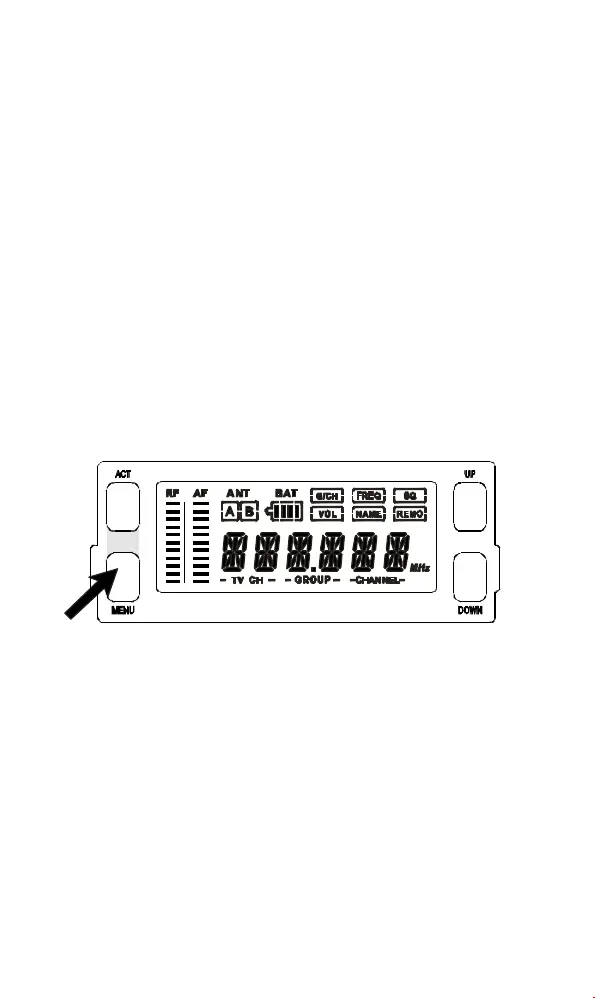
a.InthelowerrowofLCDdisplay,TVCHANNEL,
GROUP,andCHANNELareseparatelyshownin
dual-digitnumbers(fromlefttoright).
b.Push"UP"or"DOWN"buttononceandthenumber
above"GROUP"willstartblinking.Push"UP"or
"DOWN"buttonnowwillpermitusertochangeto
anotherpre-programmedgroup.Push"MENU"
buttontoconfirmthemodificationandgroupnumber
willstopblinking.
-1-
(1)G/CH:IndicatesorsetupsthereceiverGROUPand
CHANNEL.
-2-
G/CHFREQSQVOLNAMEREMO→ →→→→
EXIT
G/CH
MENU
GROUP
DOWN UP
MENU
CHANNEL
DOWN UP
MENU
Save
2.DesignationsofbuttonsandFunctions
A.OperatingProcedures.
B.HowtoOperate?
LCDDISPLAYWIRELESSRECEIVERMODULE LCDDISPLAYWIRELESSRECEIVERMODULE
InstructionManual1×
Thissystemincludesthefollowingaccessories:
ThankyouforchoosingMIPRO'sACT-707
MB/MC(LCDDisplayWirelessReceiverModule).
Tobringthemaximumperformanceoutofthe
systemandknowthesystembetter,pleasetake
user'stimeandreadthisinstructionthoroughly.
Thedisplaypanelisamodularizedmono-
coloredLCDdisplaythatcandisplayvarious
informationofoperationandperformACTfeature.
1.FullDisplayofLCDScreenand
Locationsofbuttons
MENU:Enableusertoselectfromonefunctiontotheother
"MENU"buttonallowsusertoselectamong6options(inthe
sequenceshowingbelow)thateachissurroundedinasquare
frameandshownontheupperhalfofLCDdisplay.
Detailfunctionsandoperationsareasfollows.



 To Next Page