How to Set Capture Card in PotPlayer(Windows)
Install "PotPlayer" application software on the computer;
2. Double click " PotPlayer" shortcut to open the application
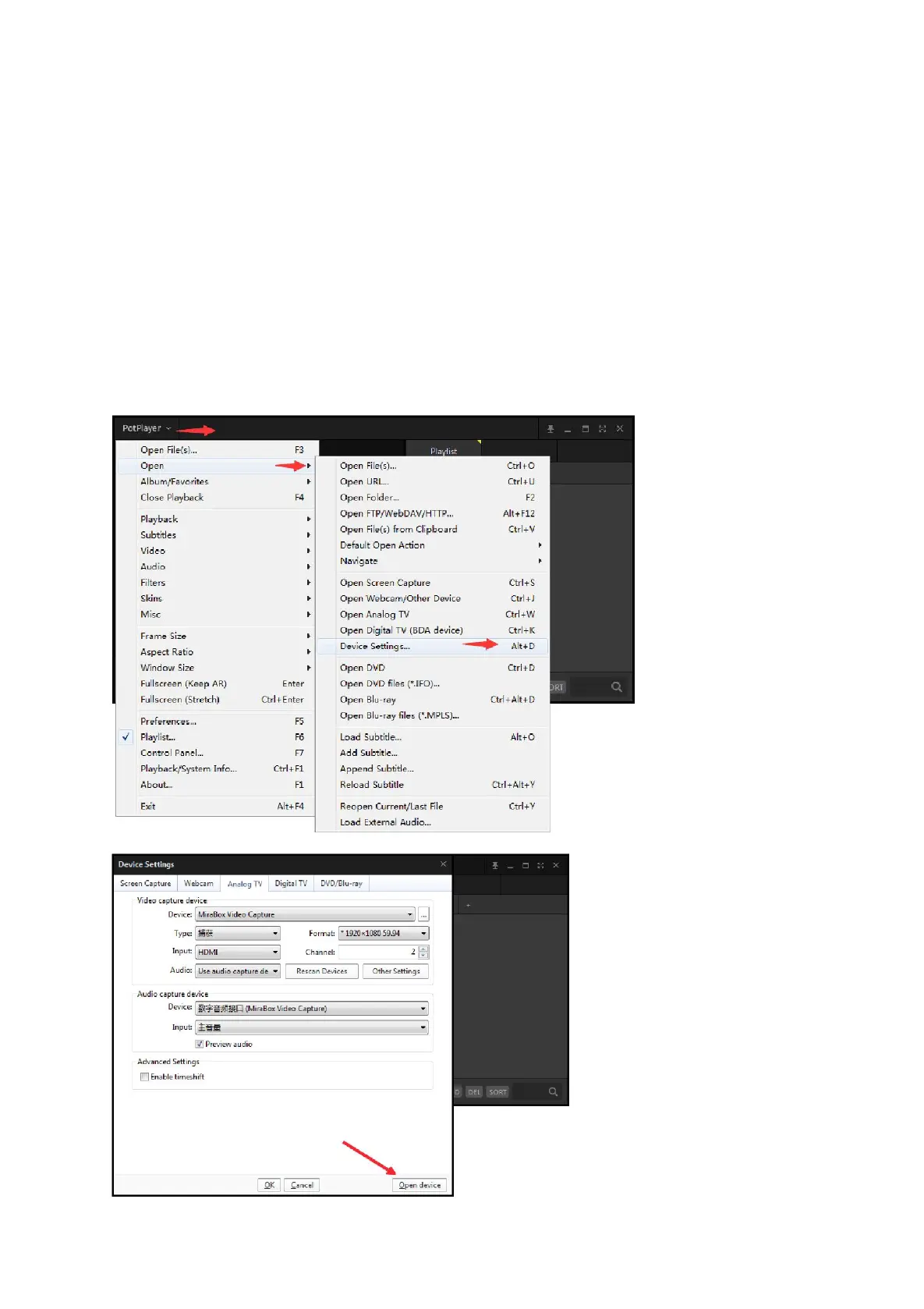
3. Clickupper left corner "PotPlayer” --- “Open” --- “Device setting” --- ”
Analog Tv”page
Select “MiraBox Video Capture” in Video Capture Device item.
Select “Capture” in Type item.
Select “HDMI” in input item.
Select suitable capture resolution in Format item.
Select "Digital Audio interface (MiraBox Video Capture) " in Audio
Capture Device item.
Click “Open device” to open the capture interface.
4. Click "Pot player”---
“Video”---“Video
recorder" or use shortcut
key"Alt+C"to open Video
recorder page.
Select storage position;
Set video and audio capture
setting;
Start to capture video and
audio;
5. Start video recording.



 To Next Page