7
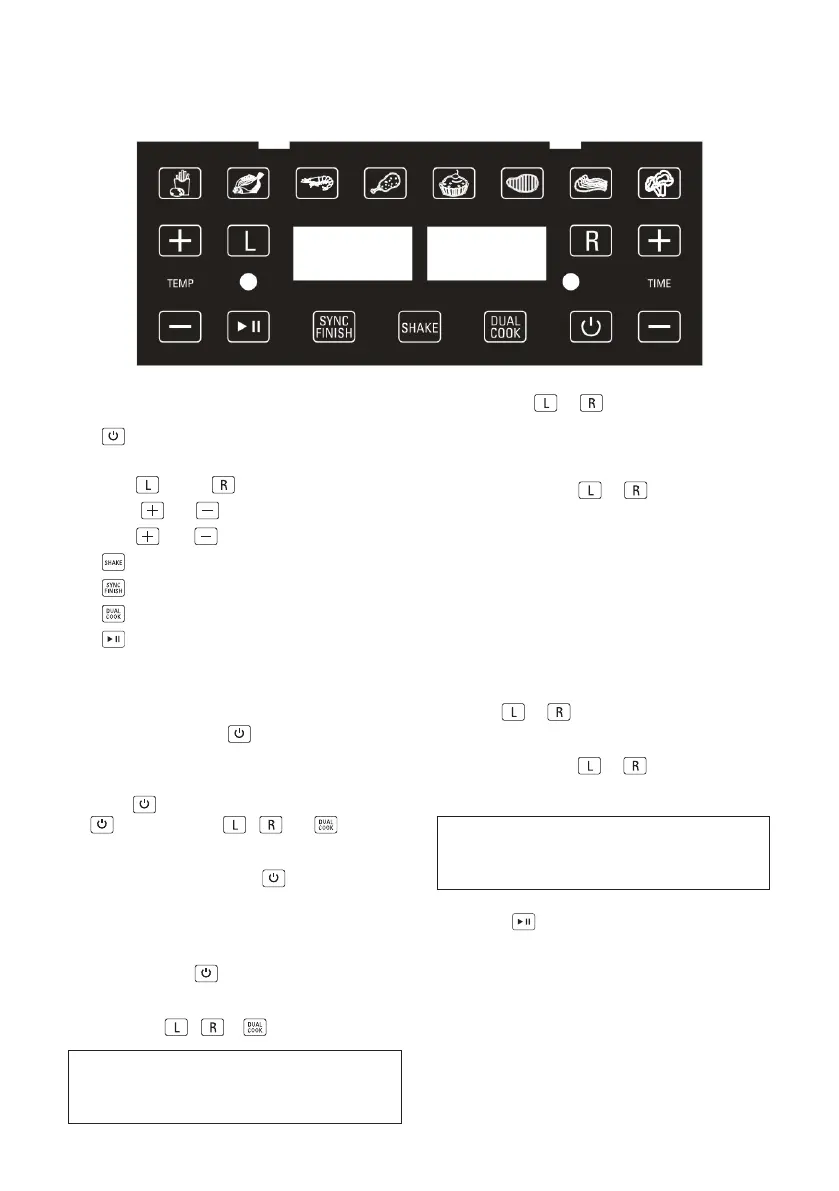
Using the Function Control Panel
Dual Touchscreen Control
1.
ON/OFF
2. Dual Digital TIME/TEMP Display
3. LEFT
/ RIGHT
Basket Control
4. TEMP
and
5. TIME
and
6. SHAKE FOOD
7. SYNC FINISH
8. DUAL COOK
9. START/PAUSE
ON/OFF
• When the Air Fryer is plugged in, the buzzer
will sound, and the control panel will light up
and then go o. The
buon will then light
up red, indicating that the unit is in Stand-By
mode and ready for use.
• When
is pressed, a beep will sound, the
will turn green,
,
and buons
will light up.
• When in operation, press
to turn both
LEFT and RIGHT basket controls OFF.
LEFT/RIGHT Basket Control
• When the red
is pressed, a beep will
sound. From here, you can choose to cook
in each basket together or separately by
pressing
/
or .
NOTE: DUAL COOK CAN BE USED TO
COOK THE SAME TYPE OF FOOD IN BOTH
BASKETS.
• Press the
or
buon to program the
LEFT or RIGHT basket. While Left or Right
flashes, press any PRESET MENU buon to
continue.
• Afer pressing
or
/ PRESET
MENU, the selected PRESET menu and
the temperature /time will start flashing
alternatively.
Default Cooking Preset: The default cooking
temperature of 180° C and a default cooking
time of 15 minutes. During the cooking
process, pressing the Power Buon will turn
the appliance o. The Control Panel’s lights
will turn o and the fan will continue running
for 20 seconds to cool down the appliance.
• The
or
buon will illuminate
steadily on the screen when active. To adjust
or add programming at any time, press
the appropriate
or
basket control
buon. When the buon begins to flash the
TEMP/TIME can be adjusted alternatively.
NOTE: LEFT OR RIGHT BASKETS MAY
BE PROGRAMMED INDEPENDENTLY, AT
ANYTIME BEFORE OR DURING OPERATION.
• Press the to start cooking.



 To Next Page