NOTICE
• If the remote control does not operate
normally, short circuit the RESET contacts, the
unit will then operate normally.
• The remote control will only operate within
a six metre range.
• Handle remote control carefully. Do not drop,
throw or allow any moisture to penetrate the
remote control.
• When a button is pressed, the indoor unit will
beep once or twice, indicating the signal has
been received. If no beep is heard, press again.
• Remove batteries if the remote control is not
to be used for a long time.
Remote Controller
Operation of Air Conditioner
Operating procedure using the
remote control
1. Start/Stop or On/Off
• Press I/O button to start operation,
the unit will stop when repressed.
2. Temperature adjustment
• Press TEMPERATURE ADJUSTMENT
button, decreases by 1˚C by pressing
"q" button once.
• The temperature change will display in the
remote controller's display.
3. Fan speed adjustment
• Pressing FAN SPEED button changes the
fan speed of indoor unit in the order of
(low) ¨ (medium) ¨ (high) ¨
(auto)
4. Sleep selection
• Press SLEEP button to set sleep operation,
this operation will cancel when the sleep
button is repressed.
5. Air ow direction adjustment
• Change up/down air ow direction
1 Press the MANUAL SWING button,
the deector will move to a specic
angle. Change the deector of
indoor unit following the order of
(1) (2) (3) (4) (5)(Fig.2)
(see page 6).
2 Press the SWING button, the deector will
start to operate.
• To change the air ow direction from left
to right.
You can manually adjust the swing deector,
Left/Right to change the air ow direction.
Complete adjustment before operation,
if adjusted during operation, the auto
swinging deector may pinch your ngers.
(Fig.1) (see page 6).
4 5
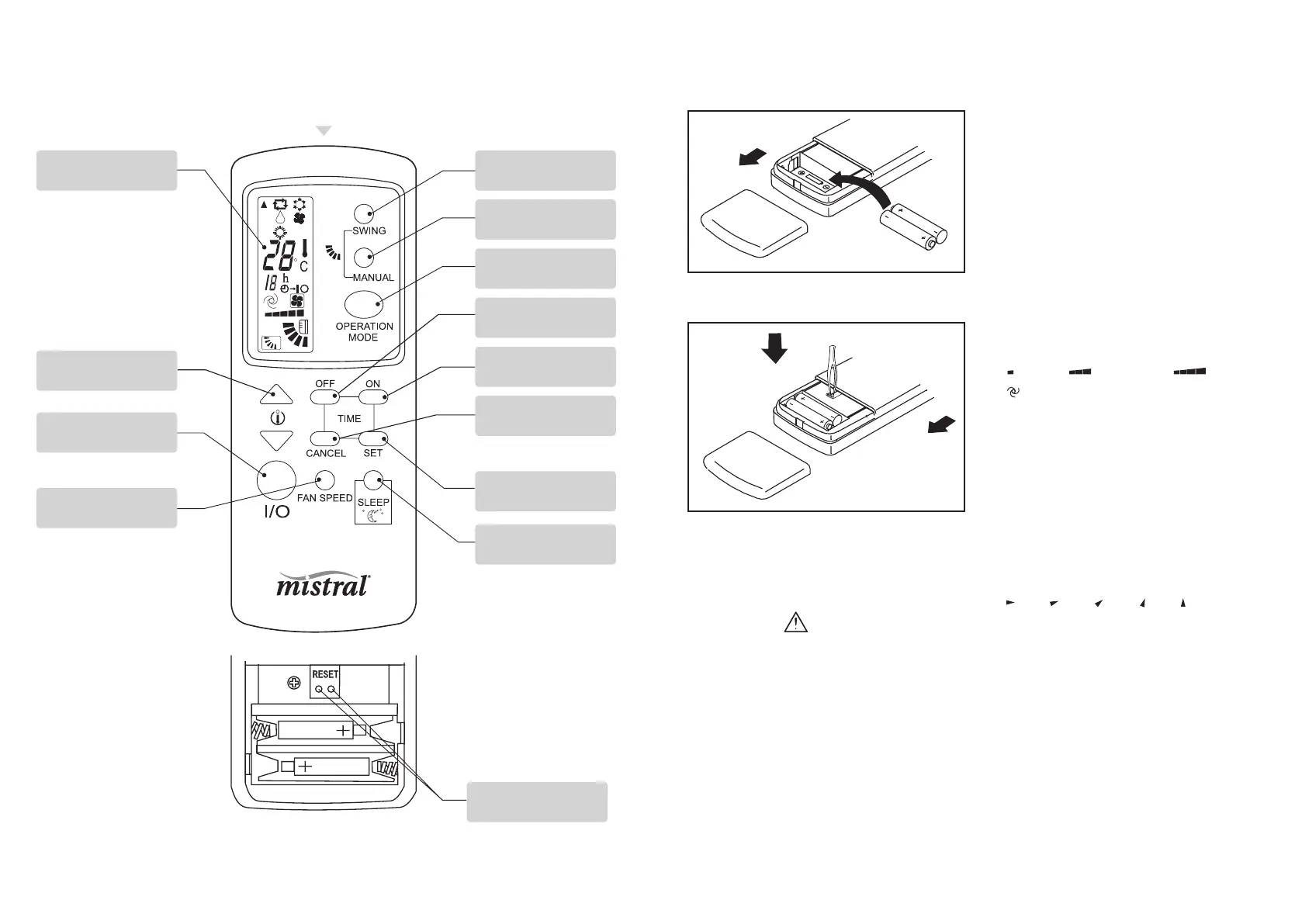
Signal ejecting window
OPERATION DISPLAY
TEMPERATURE
ADJUSTMENT BUTTON
ON/OFF BUTTON
FAN SPEED BUTTON
SWING BUTTON
MANUAL SWING
BUTTON
OPERATION MODE
BUTTON
TIME OFF BUTTON
TIME ON BUTTON
TIME CANCEL BUTTON
TIME SET BUTTON
SLEEP BUTTON
RESET BUTTON
1. Open back cover, put in batteries.
2. Short circuit reset contacts with forceps.
(Short two RESET buttons after changing
the batteries).
Remote Control
Preparation
Battery Compartment
• Ensure batteries are inserted
in the correct direction.
•
Do not mix battery types.
•
When replaceing,
ensure both batteries are
changed simultaniously.



 To Next Page
 Loading...