EasyManua.ls Logo

Mitsubishi Electric Ecodan FTC4 - User Manual

Mitsubishi Electric Ecodan FTC4
3 pages
Print Icon
To Next Page IconTo Next Page
Loading...
i
1
April 2014 12:30
20
ºC
S
D
21
º
C
21
º
C
21
Z1
Z2
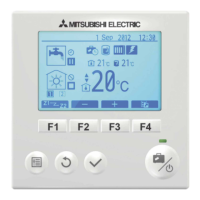
Button Function
User Guide
Heating
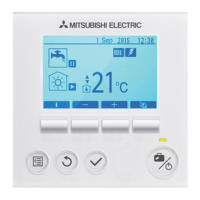
FTC4 Controller
F
TC4 Controller
A
ccess to system settings for initial
set up and modifications
Return to previous menu
Menu
Back
Used to select or save (Enter key)
Confirm
Used to scroll through menu and
adjust settings. Function is
determined by visible menu screen
Function keys
If system is switched off pressing
o
nce will turn system on. Pressing
again when system is switched on
will enable Holiday mode. Holding
the button down for 3 secs will turn
the system off
Power / Holiday
Mode
Main Screen Icons Description
When this icon is displayed Legionella prevention mode is active
Legionella Prevention
When this icon is displayed the ‘Electric Heaters’ (booster or immersion heater) are in use
Electric Heater
Summary S
cr
een
‘Heat Pump’ is running
Defrosting
Emergency heating
Heat Pump
Target flow temperature (Fixed flow temperature)
Target room temperature (Room compensation)
Compensation curve (Weather compensation)
Target Temperature
A
B
C P
K
L
I
H
G
F
E
M
D
J
O
N
Pressing the function button below this icon displays the summary screen
C
B
A
D
E
F
G
H
I
J
K
L
M
N
O
Normal or Eco mode domestic hot water
DHW Mode
Boiler
Increase desired temperature
When this icon is displayed ‘Holiday mode’ is activated
Holiday Mode
Decrease desired temperature
Timer
Prohibited
Stand-by
Stop
Operating
Pressing the function button below this icon switches between Zone 1 and Zone 2
Pressing the function button below this icon displays the information screen
Heating mode
Space Heating Mode
Zone 1 or Zone 2
Current room temperature
Current Temperature
The Menu button is locked
Current water temperature of DHW tank
SD memory card is inserted. Normal operation
SD memory card inserted. Abnormal operation
Information
P
When this icon is displayed, the boiler is in use

SD
SD
Z1
Z2

Questions and Answers

  • H
    Heather SawyerAug 18, 2025
    Why is the Mitsubishi Electric Temperature Controller main display blank?
    • C
      cmorrisonAug 18, 2025
      A blank display on your Mitsubishi Electric Temperature Controller can be due to a couple of reasons. First, there might be no power getting to the main controller. Check LED2 on the FTC4 (Master): if it's lit, there may be damage or a loose connection in the main controller wiring; if it's blinking, refer to point No. 5 in the manual; if it's off, refer to point No. 4 in the manual. Alternatively, power might be supplied, but the display isn't working. In this case, check for disconnections between the main controller cable and the FTC4 (Master) control board, or the main controller might be faulty if 'Please Wait' isn't showing. If 'Please Wait' is displayed, refer to point No. 2 in the manual.
  • B
    Belinda LiAug 26, 2025
    Why is my Mitsubishi Electric Temperature Controller water heating taking longer?
    • T
      Travis RossAug 26, 2025
      If water heating is taking longer than usual with your Mitsubishi Electric Temperature Controller, consider these possibilities: The heat pump may not be working. Check the heat pump – consult the outdoor unit service manual. The booster heater cut-out might have tripped. Check the booster heater thermostat and press the reset button if safe. The reset button is located on the side of the booster heater, covered with a white rubber cap. Also, the booster heater breaker could be tripped. Check the cause and reset if safe. Additionally, the immersion heater cut-out might have been triggered. Check the immersion heater thermostat and press the reset button located on the immersion heater boss, if safe. Finally, the immersion heater breaker could be tripped. Check the cause and reset if safe.
  • R
    Robert ThompsonAug 27, 2025
    What causes water to discharge from the pressure relief valve on a Mitsubishi Electric Temperature Controller?
    • J
      Jesse MarshallAug 27, 2025
      Water discharging from the pressure relief valve (primary circuit) on your Mitsubishi Electric Temperature Controller can indicate a few issues. If it's continual, the pressure relief valve itself might be damaged; turn the handle on the valve to check for foreign objects. If the problem persists, replace the valve. If the discharge is intermittent, the expansion vessel charge may have reduced or the bladder might be damaged; check the pressure in the expansion vessel and recharge to 1 bar if necessary. If the bladder is damaged, replace the expansion vessel.
  • C
    Courtney LopezAug 30, 2025
    Why is LED2 off on the FTC4 (Master) of my Mitsubishi Electric Temperature Controller?
    • J
      Jennifer BrownAug 30, 2025
      If LED2 on the FTC4 (Master) of your Mitsubishi Electric Temperature Controller is off, it could be due to several reasons. The outdoor unit might not be getting the correct voltage; check the voltage across the terminals L and N or L3 and N on the outdoor power board. If the voltage isn't between 220 to 240V AC, check the wiring of the outdoor unit and the breaker. Another cause could be that the FTC4 (Master) isn't getting 220 to 240V AC; check the voltage across the outdoor unit terminals S1 and S2. If the voltage isn't correct, check the fuse on the outdoor control board and look for faulty wiring. Also, faulty connector wiring could be the reason. Check the connector wiring and re-wire if necessary. Finally, the outdoor controller circuit board or FTC4 (Master) might be defective.
  • S
    Shane LambertSep 1, 2025
    What does it mean when LED4 is blinking on my Mitsubishi Electric Temperature Controller?
    • F
      francisco04Sep 1, 2025
      If LED4 on the FTC4 (Master) is blinking on your Mitsubishi Electric Temperature Controller, it indicates an issue with the SD memory card. The card might be full of data; try moving, deleting data, or replacing the card. It could be write-protected; release the write-protect switch. The card may not be formatted; refer to "4.9 Using SD memory card". Finally, the card might be formatted in the NTFS file system; FTC4 is not compatible with NTFS, so use a card formatted in FAT file system.
  • P
    Patricia SandersSep 6, 2025
    How to troubleshoot a noisy Mitsubishi Electric Temperature Controller water circulation pump?
    • S
      Sandra RamirezSep 6, 2025
      A noisy water circulation pump in your Mitsubishi Electric Temperature Controller system is often caused by air trapped inside the pump. To resolve this, use the manual and automatic air vents to remove air from the system. If necessary, top up the water to achieve 1 bar on the primary circuit.
  • R
    Richard VillaSep 8, 2025
    Why is the room temperature rising during DHW operation with my Mitsubishi Electric Temperature Controller?
    • W
      wrichardsonSep 8, 2025
      If the room temperature rises during DHW (Domestic Hot Water) operation with your Mitsubishi Electric Temperature Controller, it's likely due to a 3-way valve failure. Check the 3-way valve to ensure it's functioning correctly.
  • R
    Robert WoodsSep 12, 2025
    What does it mean when LED4 is off on the FTC4 (Master) of my Mitsubishi Electric Temperature Controller?
    • H
      hwrightSep 12, 2025
      If LED4 on the FTC4 (Master) of your Mitsubishi Electric Temperature Controller is off, it typically means that the SD memory card is either not inserted correctly or is not a compliant card. Ensure the SD memory card is inserted into the memory card slot with the correct orientation until you hear a click. If that doesn't solve the problem, make sure you are using an SD standards-compliant memory card.
  • B
    Bryce FarmerSep 13, 2025
    What does it mean when LED2 is blinking on the FTC4 (Master) of my Mitsubishi Electric Temperature Controller?
    • S
      Samantha MartinSep 13, 2025
      If LED2 on the FTC4 (Master) of your Mitsubishi Electric Temperature Controller is blinking, it suggests a wiring issue. Check for faulty wiring between the FTC4 (Master) and the outdoor unit, as well as faulty wiring in the main controller. Also, remove the main controller wires and check LED2 on FTC4 (Master). If LED2 is blinking, check for short circuits in the main controller wiring. If LED2 is lit, wire the main controller again, and if LED2 is blinking, the main controller is faulty; if LED2 is lit, faulty wiring of the main controller has been corrected. Keep in mind that only one indoor unit can be wired to a single outdoor unit; additional indoor units must be wired individually to a single outdoor unit.
  • K
    Kimberly Barker DDSSep 15, 2025
    Why does the heating mode on my Mitsubishi Electric Temperature Controller stay on standby for too long?
    • W
      William FrankSep 15, 2025
      If the heating mode on your Mitsubishi Electric Temperature Controller remains on standby for an extended period and doesn't start smoothly, the “Delay” time set in the “Economy settings for pump” might be too short. Try increasing the time of “Delay” in the “Economy settings for pump”.

Summary

FTC4 Controller Interface

Button Functions

Details the function of main controller buttons including Menu, Back, Confirm, Power/Holiday Mode, and Function keys.

Main Screen Icons Guide

Legionella Prevention Icon

Indicates when the Legionella prevention mode is active on the system.

Heat Pump Status Icons

Covers icons for Heat Pump running, Defrosting, and Emergency heating.

Electric Heater Icon

Signifies that the Electric Heaters (booster or immersion heater) are currently in use.

Target Temperature Indicators

Explains icons for Target flow temperature, Target room temperature, and Compensation curve.

Summary Screen Access

Describes how to display the summary screen by pressing a specific function button.

Temperature Adjustment

Details the function of '+' and '-' buttons for increasing and decreasing desired temperature.

Zone and Information Display

Explains how to switch between Zone 1 and Zone 2, and access information screens.

Heating and DHW Modes

Covers icons for Space Heating Mode (Heating mode, Zone 1/2) and DHW Mode (Normal/Eco).

Holiday Mode Icon

Indicates when the 'Holiday mode' feature is activated on the system.

System Status Icons

Explains icons for Timer, Prohibited, Stand-by, Stop, and Operating statuses.

Temperature Readings

Details icons for Current room temperature and Current water temperature of DHW tank.

SD Card Status

Describes icons related to the SD memory card insertion and operational status.

Boiler Indicator

Shows when the boiler is actively in use.

Related Documents

Ecodan FTC4 User Guide

Link to the main User Guide for the Ecodan FTC4 controller.

Ecodan Hybrid Applications

Brochure detailing hybrid applications for the Ecodan system.

Declaration of Conformity

Document stating conformity for Ecodan PAC-IF052B-E / PAC-SIF051B-E.

Installation Manual

Installation manual for Ecodan PAC-IF052B-E / PAC-SIF051B-E.

Instruction Book

Instruction book for Ecodan PAC-IF052B-E / PAC-SIF051B-E.

Parts Catalogue

Catalogue of parts for Ecodan PAC-IF052B-E / PAC-SIF051B-E.

PUHZ FTC4 Databook

Technical databook for PUHZ FTC4.

Mitsubishi Electric Ecodan FTC4 Specifications

General IconGeneral
BrandMitsubishi Electric
ModelEcodan FTC4
CategoryHeating System
LanguageEnglish

Related product manuals