This document describes the operation and features of the MSZ-GE06NA, MSZ-GE09NA, MSZ-GE12NA, MSZ-GE15NA, MSZ-GE18NA, MSY-GE09NA, MSY-GE12NA, MSY-GE15NA, and MSY-GE18NA series of air conditioners, focusing on their wireless remote controller and indoor unit display.
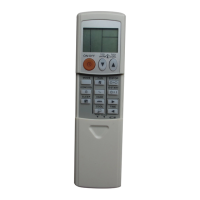
Wireless Remote Controller
The wireless remote controller serves as the primary interface for controlling the air conditioner. It features a signal transmitting section to send commands to the indoor unit and an operation display section that shows current settings.
Key Buttons and Functions:
- OPERATE/STOP (ON/OFF) button: This button turns the air conditioner on or off. When pressed, the indoor unit's OPERATION INDICATOR lamp turns on, accompanied by a beep.
- Temperature buttons: These buttons, labeled "TOO WARM" and "TOO COOL," allow users to adjust the desired temperature. The setting range for COOL and HEAT modes is typically 61~88°F (16~31°C). In "I FEEL CONTROL" mode, these buttons enable "Fuzzy control" to fine-tune the temperature based on room conditions and user preference.
- FAN SPEED CONTROL button: This button adjusts the fan speed. In FAN mode, when AUTO is selected, the fan speed defaults to Low.
- OPERATION SELECT button: This button cycles through different operation modes such as COOL, DRY, HEAT, FAN, and "I FEEL CONTROL."
- ECONO COOL button: When pressed in COOL mode, this button automatically sets the temperature 4°F (2°C) higher and adjusts the horizontal vane swing to create a cooler sensation, thereby saving energy. Pressing it again or changing the operation mode cancels ECONO COOL.
- VANE CONTROL button: This button controls the horizontal vane's angle and swing. Pressing and holding it for 2 seconds or more reverses the vane's movement to avoid direct airflow. Pressing it again returns the vane to its previously set position.
- SMART SET button: This button allows users to save and recall preferred settings for temperature, fan speed, and airflow direction. Two groups of settings can be saved for MSZ models (one for COOL/ECONO COOL, one for HEAT) and one group for MSY models. It cannot be selected during DRY or AUTO mode.
- RESET button: This button is used to reset settings or change temperature indication between °F and °C.
- OFF TIMER button: This button sets a timer for the unit to turn off.
- ON TIMER button: This button sets a timer for the unit to turn on.
- TIME SET buttons (FORWARD/BACKWARD): These buttons adjust the current time and timer settings. Pressing them briefly changes the time by 1 minute, while holding them down changes it by 10 minutes.
- CLOCK SET button: This button is used to set the current time.
Indoor Unit Display Section
The indoor unit features an OPERATION INDICATOR lamp that visually communicates the unit's operational status.
Operation Indicator Lamp Indications:
- Lighted: Indicates the unit is operating to reach the set temperature, typically when the room temperature is 4°F (2°C) or more away from the set temperature. It also indicates the room temperature is approaching the set temperature (within 2 to 4°F or 1 to 2°C).
- Blinking: Indicates standby mode, which occurs only during multi-system operation. It also blinks when other indoor units cannot operate in a multi-system setup due to conflicting modes.
- Not lighted: Indicates the unit is off or not in operation.
Function Descriptions
1. COOL Operation:
The unit cools the room to the desired temperature.
- Coil frost prevention: The compressor frequency is controlled to prevent the indoor heat exchanger coil from frosting. If the coil temperature drops too low, the compressor stops, and the indoor fan continues at the set speed until the temperature rises.
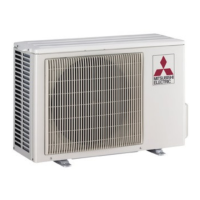
- Low outside temperature operation: If the outside temperature is low, the outdoor fan slows down or stops.
2. DRY Operation:
The unit dehumidifies the room.
- Coil frost prevention: Similar to COOL mode, this prevents coil frosting.
- Low outside temperature operation: Similar to COOL mode, the outdoor fan adjusts its speed based on outside temperature.
3. HEAT Operation (MSZ models):
The unit heats the room to the desired temperature.
- Cold air prevention control: The indoor fan stops or operates at a very low speed if the compressor is not running, starting, or if the indoor heat exchanger/room temperature is low, or during defrosting, to prevent cold air from blowing into the room.
- High pressure protection: The compressor frequency is controlled to prevent excessive condensing pressure. If the indoor heat exchanger temperature becomes too high, the indoor fan operates under cold air prevention control until the temperature falls.
- Defrosting: This function activates when the outdoor heat exchanger temperature is too low. The compressor and fans stop, the 4-way valve reverses, and the compressor restarts until the outdoor heat exchanger temperature rises or a fixed time passes.
4. FAN Operation (MSY models):
Only the indoor fan operates to circulate air. The outdoor unit does not operate.
5. "I FEEL CONTROL" Operation (MSY models):
The unit automatically determines the operation mode (COOL or HEAT) based on the room temperature at startup. Once the mode is fixed, it does not change based on subsequent room temperature fluctuations.
6. AUTO CHANGE OVER (AUTO MODE OPERATION) (MSZ models):
The unit automatically switches between COOL and HEAT modes to maintain the set temperature.
- If the room temperature is higher than the set temperature, it starts in COOL mode.
- If the room temperature is equal to or lower than the set temperature, it starts in HEAT mode.
- Mode changes occur after about 15 minutes if the room temperature is 2°F (1°C) below (for COOL to HEAT) or above (for HEAT to COOL) the set temperature.
- In multi-system operation, if one unit is in AUTO mode and cannot switch to the other operating mode (e.g., COOL to HEAT), it enters standby mode, indicated by a blinking lamp.
7. AUTO VANE OPERATION:
The horizontal vane is controlled by a stepping motor to optimize airflow.
- Positioning: The vane moves to a standard position at startup, shutdown, or during test runs.
- VANE AUTO mode: The microprocessor automatically determines the optimal vane angle for room temperature distribution. In COOL and DRY, the vane is fixed to the Horizontal position. In HEAT, it's fixed to Angle 5.
- STOP/ON TIMER standby: The horizontal vane returns to the closed position when the unit is turned off or on timer is active.
- Dew prevention: During COOL or DRY operation with the vane at Angle 4 or 5 for over an hour, it automatically changes to Angle 1 to prevent dew formation.
- SWING mode: The horizontal vane swings vertically.
- Cold air prevention in HEAT operation (MSZ): The horizontal vane is set to Upward to prevent cold air from blowing directly.
8. TIMER OPERATION:
Users can set ON and OFF timers. The current time must be set correctly for the timers to function. Program timers allow combining ON and OFF timers, with the first-reached timer operating first. If power is interrupted, timer settings are canceled, but the unit restarts with the auto-restart function.
9. SMART SET Operation:
This feature allows users to save and recall preferred settings for temperature, fan speed, and airflow direction. It can be canceled by pressing the SMART SET button again or by changing the operation mode.
10. EMERGENCY/TEST OPERATION:
In cases where the remote controller is unavailable or malfunctioning, the EMERGENCY OPERATION switch on the indoor unit can be used.
- The first 30 minutes are for test run operation, with the indoor fan at High speed and continuous system operation (thermostat inactive).
- After 30 minutes, it shifts to EMERGENCY COOL/HEAT (MSZ) mode with a set temperature of 75°F (24°C) and medium fan speed.
- The horizontal vane operates in VANE AUTO mode.
- Emergency operation continues until the switch is pressed again or a signal is received from the remote controller.
11. 3-MINUTE TIME DELAY OPERATION:
To protect the compressor from overload, it will not restart for 3 minutes after the system turns off.
12. Changing temperature indication (°F/°C):
The preset unit is °F. To change to °C, press the RESET button while holding the temperature buttons. To change back to °F, press the RESET button or remove the batteries.
Usage Features
- Remote Controller Model Indication: The model of the remote controller is indicated on its back.
- Last Setting Memory: The unit stores the last settings after being turned off with the remote controller.
- Beep Confirmation: The indoor unit confirms receipt of remote controller signals with beeps.
- Multi-System Operation Considerations: In multi-system setups, if multiple indoor units are operated simultaneously with conflicting modes (e.g., one for cooling, one for heating), the mode of the first operating unit is selected, and others cannot operate, indicated by a blinking lamp. All indoor units should be set to the same operation mode.
- Warm-up During Defrosting: When an indoor unit starts operation during outdoor unit defrosting, it may take a few minutes (up to 10 minutes) for warm air to blow out.
- Refrigerant Flow Sound: In heating operation, non-operating indoor units may get warm or produce the sound of refrigerant flow, which is normal.
Maintenance Features
- Resetting Settings: The RESET button can be used to reset certain settings.
- Battery Removal: Removing the batteries from the remote controller can also reset certain settings, such as the temperature indication unit.

 Need help?
 General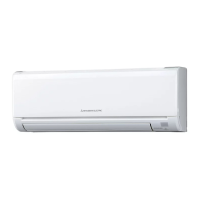



 To Next Page